
Smart CMS Content Assistant
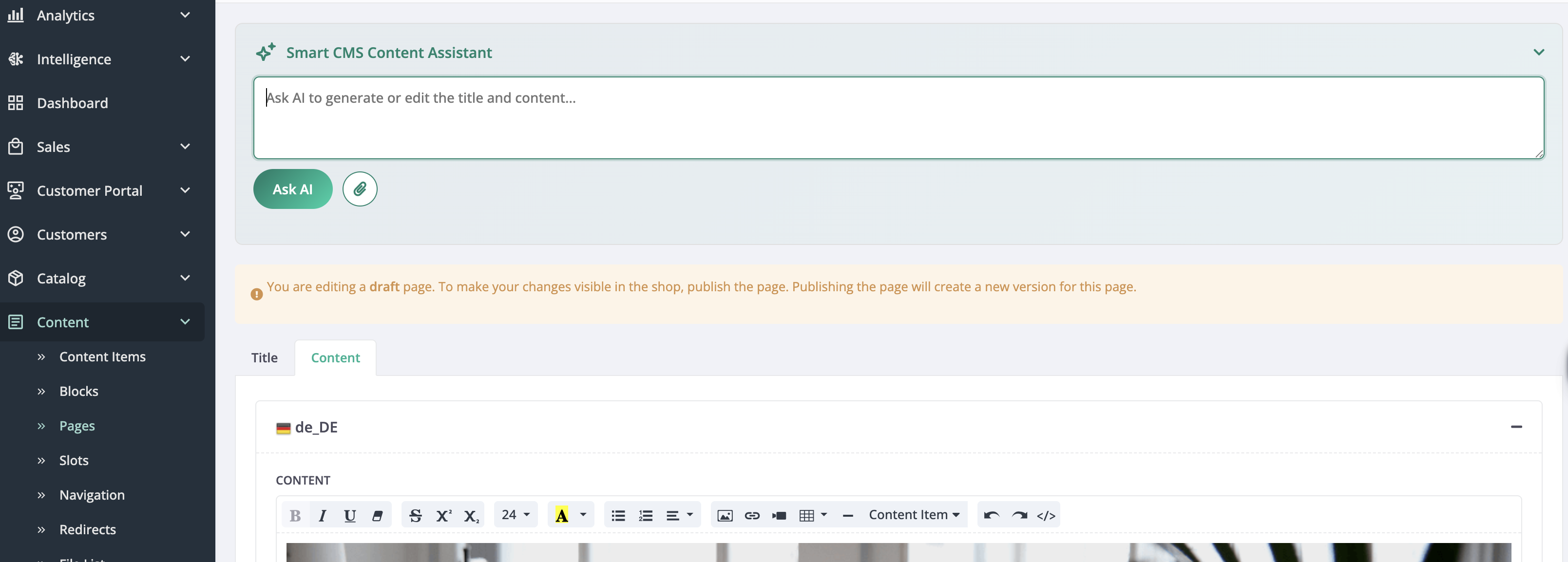
Edit on GitHubSmart CMS Content Assistant is an AI-powered panel embedded in the Back Office CMS Page and CMS Block glossary editors. Back Office users can ask the AI to generate or refine the title and body content for each placeholder and locale, using the full entity context — including the page name, template, URL slug, SEO metadata, and assigned stores.
Capabilities
| CAPABILITY | DESCRIPTION |
|---|---|
| Placeholder content generation | Generates title and body content for each placeholder and locale based on the entity context and a user prompt. |
| Content widget context | Provides the AI with the list of CMS content widgets available in the current editor, so it can reference them in generated content. |
| Content item reference | Allows the AI to look up existing content items (banners, product lists, navigation, and others) from the database and include them in the generated content. |
| File attachment | Allows attaching files to a prompt (for example, a brand guideline document or a product image) to inform the generated content. |
Use Smart CMS Content Assistant
- In the Back Office, open a CMS Page or CMS Block and go to the glossary editor.
- In the AI panel, select the placeholder and locale to generate content for.
- Type your prompt — for example, “Write a short promotional banner for our summer sale, targeting DE store customers.”
- Review the generated content and apply it to the editor or request further refinements.
Enable Smart CMS Content Assistant
To enable the feature, go to AI Commerce > Smart CMS > AI Vendor in the Back Office and select an AI configuration.
Developer resources
| RESOURCE | DESCRIPTION |
|---|---|
| Smart CMS Content Assistant | Technical overview: architecture, plugin wiring, AI configuration, and feature flag. |
| Install Smart CMS Content Assistant | Step-by-step installation guide. |
Thank you!
For submitting the form