
Customer Groups overview
Edit on GitHubCustomer Groups let you organize customers into groups to help you target users for discounts and promotions.
Members of a customer group
A customer group can hold the following members:
- Customers: discount conditions and other rules that target a customer group evaluate the customers of the group.
- Companies and business units: with the B2B Customer Groups feature, a customer group also records which B2B accounts belong to it. You manage these memberships in the Back Office, through the Backend API, and by data import. Discounts and other rules that target a customer group evaluate only its customers, so company and business unit memberships do not affect them.
To install company and business unit memberships, see Install the B2B Customer Groups feature.
Company and business unit memberships
A company membership and a business unit membership are independent of each other. Each records only the company or business unit that was assigned:
- Assigning a company does not assign its business units or its company users.
- Assigning a business unit does not assign its company, its parent or child business units, or its company users.
- Removing a company from a group keeps the business units of that company in the group.
- Removing the last business unit of a company keeps the company in the group.
A company or business unit can belong to any number of customer groups, and a customer group can hold business units of different companies.
Managing memberships never changes the companies, business units, company users, or customers themselves. Deleting a customer group removes its memberships, and deleting a company or business unit removes it from every customer group.
Manage memberships in the Back Office
In the Back Office, the pages that create and edit a customer group have a Companies tab and a Business Units tab next to the Customers tab. Each tab has the following tables:
- An available table that lists the companies or business units that are not assigned to the group. You select the ones to assign.
- An assigned table that lists the members of the group. You select the ones to remove.
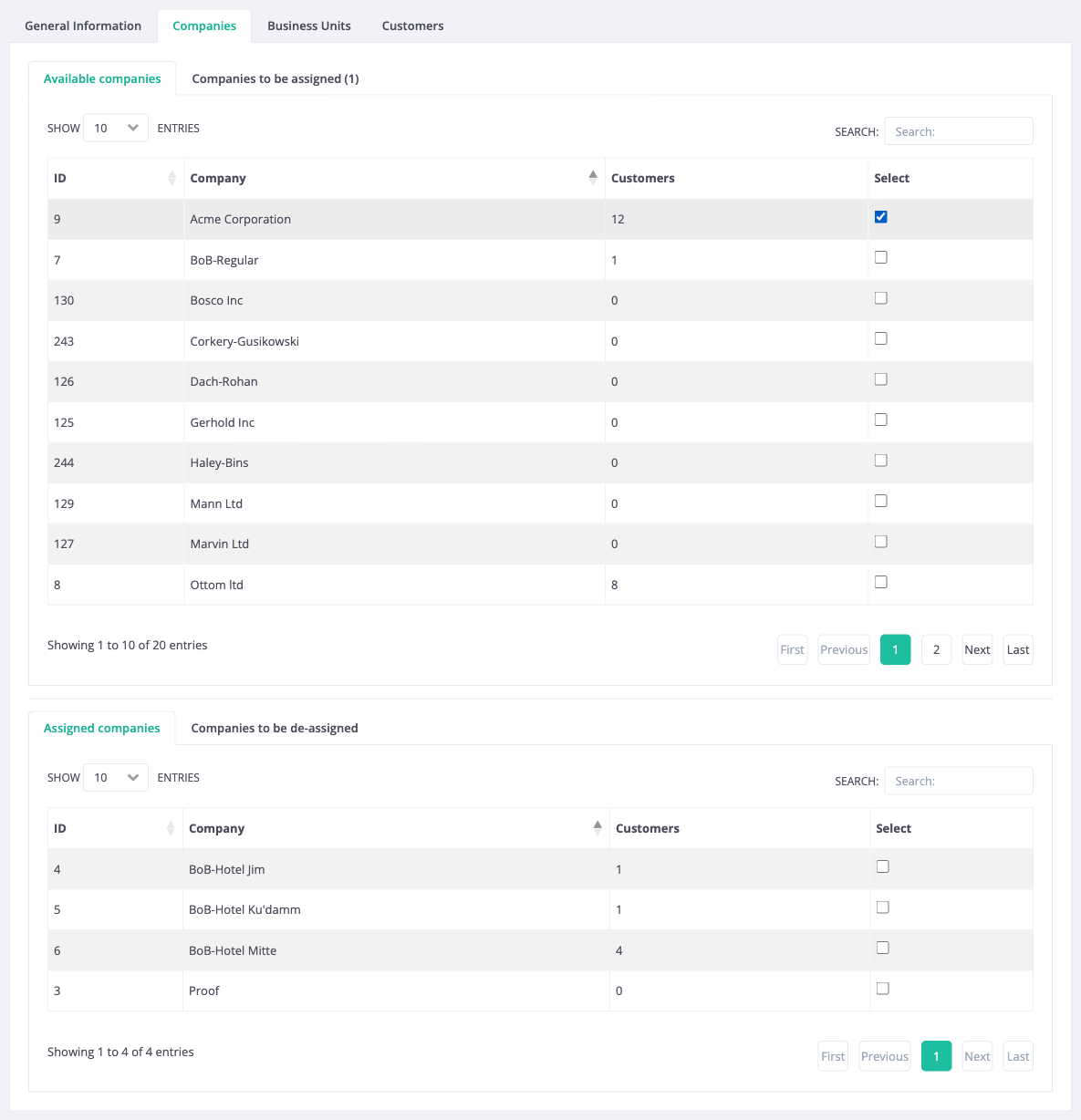
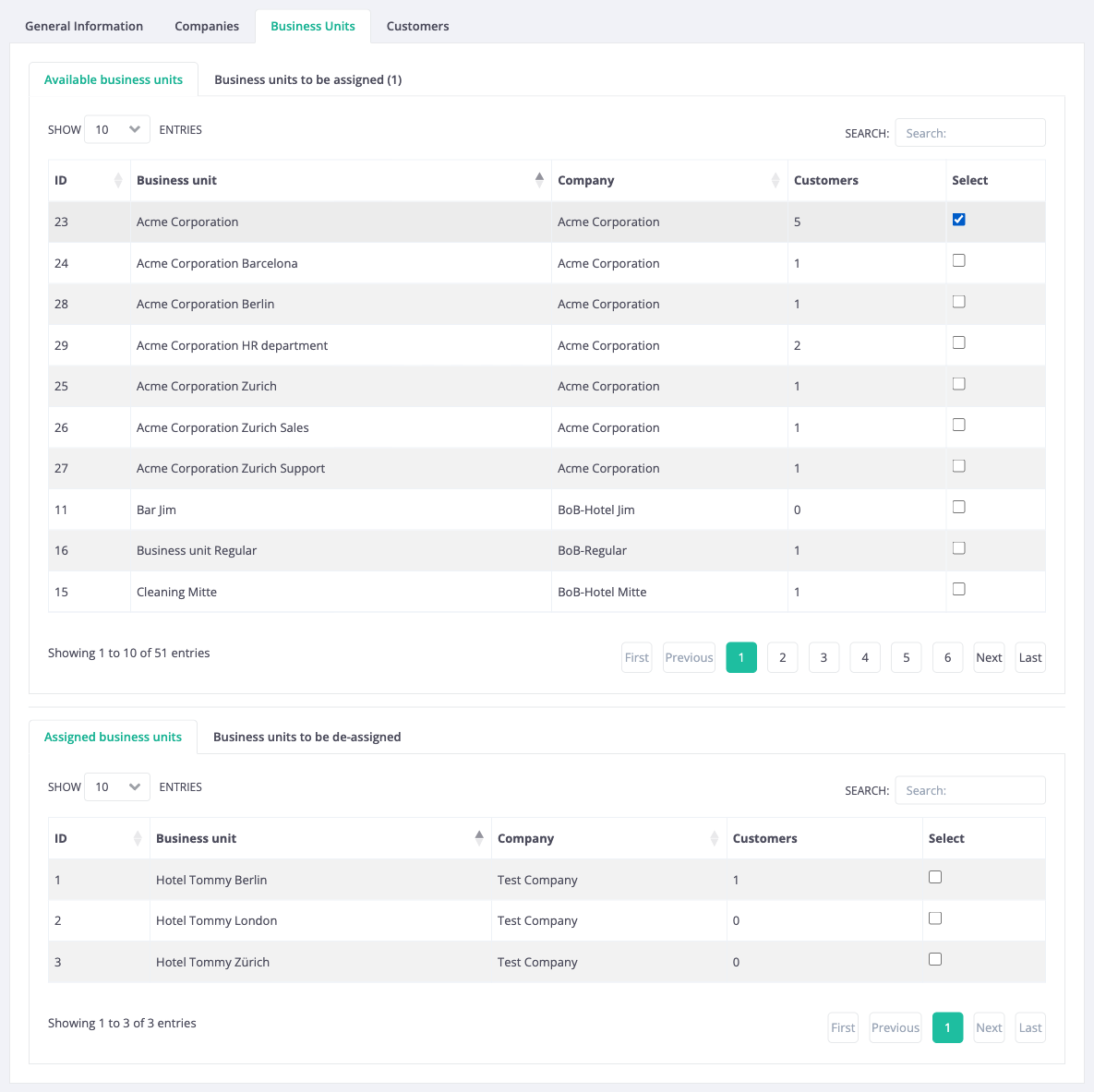
The selections are saved together with the customer group. The page that shows a customer group displays the Companies and Business Units panels, with an Edit button that opens the edit page of each company or business unit.
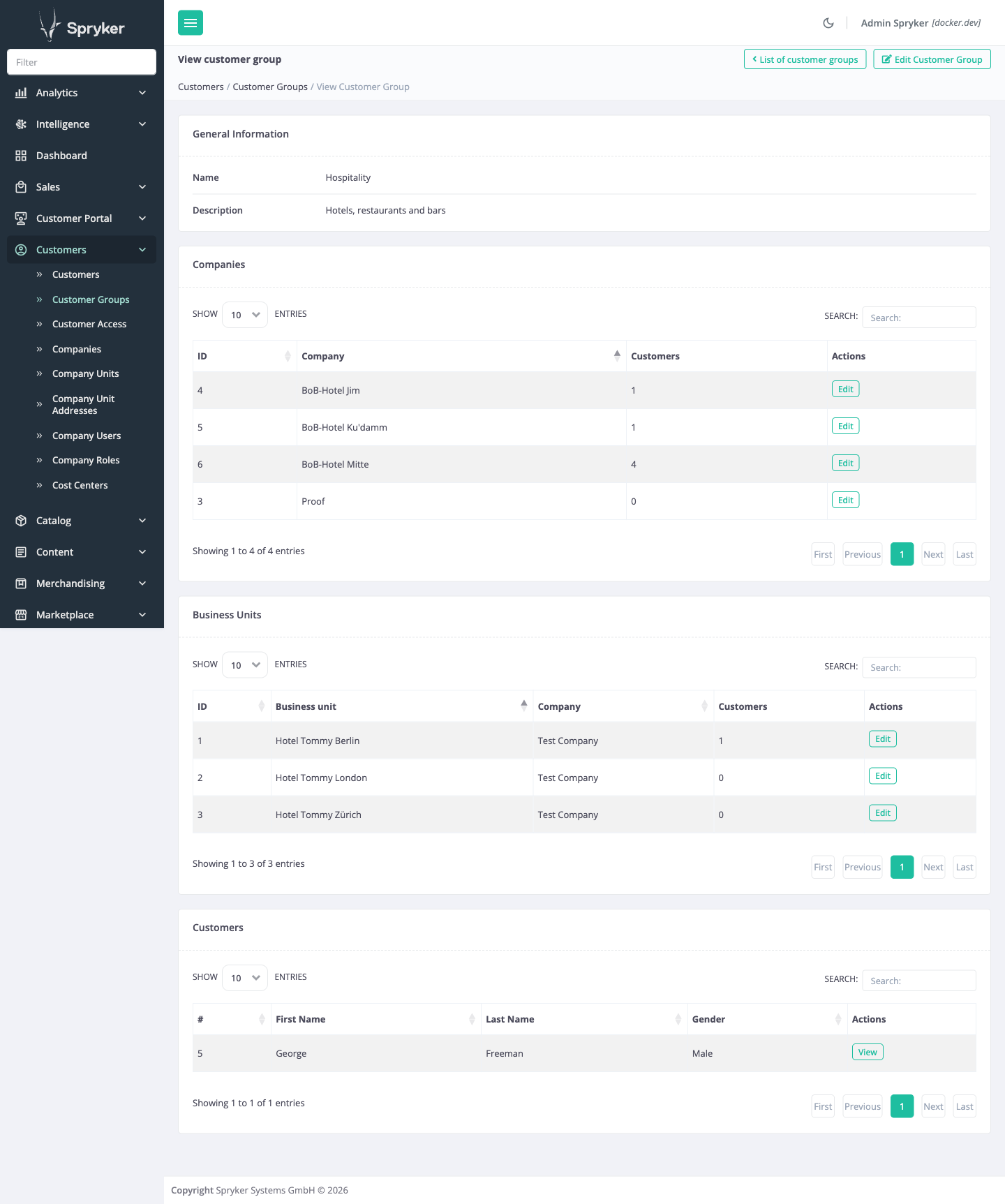
The Customers column of the tables counts company users:
- For a company, all of its company users, including inactive ones.
- For a business unit, only the company users directly in that business unit, not the users of its child business units, including inactive ones.
For instructions, see Manage customer groups.
Manage memberships using the Backend API
The Backend API lets integrations, such as an ERP, a CRM, or a partner administration tool, list, add, replace, and remove the companies and business units of a customer group. A write through the Backend API changes the same memberships as a save in the Back Office.
For the endpoints, see Backend API: Manage companies and business units of customer groups.
Import customer groups and their memberships
Four data importers load customer groups and their members in bulk, for example, from an ERP export:
| FILE | WHAT IT DOES |
|---|---|
| customer_group.csv | Creates customer groups and updates their descriptions. |
| customer_group_to_company.csv | Assigns companies to customer groups. |
| customer_group_to_company_business_unit.csv | Assigns business units to customer groups. |
| customer_group_to_customer.csv | Assigns customers to customer groups. |
An imported membership is the same membership that a Back Office save creates: it is listed in the Back Office, and you can remove it there. The membership files work as follows:
- They only add memberships. They never remove a membership, and they never create, change, or delete a customer group, company, business unit, company user, or customer.
- Each file assigns only what it names: importing a company does not assign its business units or customers.
- Importing the same file again changes nothing. A membership that already exists, from an earlier import or from the Back Office, is skipped.
- A row that refers to a customer group, key, or customer reference that does not exist is rejected. The other rows are still imported, the import report lists the reason for each rejected row, and the run is reported as failed.
The membership importers address companies and business units by their keys. Companies and business units created in the Back Office, through the Backend API, or by self-registration have no key, so the import cannot assign them.
As with other data importers, the import report lists only the first 50 rejected rows by default. A row whose number of columns differs from the header stops the import of the rest of that file.
Current constraints
The feature has the following functional constraints:
- Company and business unit memberships do not affect discounts, prices, or any other rule that targets a customer group.
- In the Back Office tables, you select companies and business units one at a time. There is no option to select all rows.
- A Backend API request that replaces the members of a customer group accepts up to 1,000 companies or business units. To change a larger set, add and remove members individually.
Related Business User documents
| BACK OFFICE USER GUIDES |
|---|
| Manage customer groups |
Related Developer documents
Thank you!
For submitting the form