
Federated Authentication via OAuth2/OIDC
Edit on GitHubIf your enterprise customers, back-office operators, or merchant users already authenticate through a corporate Identity Provider — Keycloak, Azure AD, Okta, or any other OAuth2/OIDC-compatible system — this feature lets them bring that identity to Spryker. Instead of maintaining a separate set of credentials for every application, your users log in through the same IdP they already trust, and Spryker handles the rest.
This is built on KnpU OAuth2 Client Bundle, which wraps league/oauth2-client and provides Symfony-integrated OAuth2 clients for a broad range of providers. Your project does not need to implement the OAuth protocol — you configure a provider, wire the plugins, and the flow is handled for you.
What You Get
Federated authentication works across all three Spryker applications out of the box:
| Application | User Type | Multiple Providers |
|---|---|---|
| Storefront (Yves) | Customer | Yes — one login button per provider |
| Back-office (Zed) | Back-office user | Single provider |
| Merchant Portal | Merchant user | Yes — one login button per provider |
On the Storefront and Merchant Portal, you can connect as many providers as you need — your users will see a separate login button for each one. The Back-office currently supports a single provider; support for multiple providers there is coming in a later version.
Authentication via the Platform API (Glue) is also coming in a later version.
How the OAuth2 Authorization Code Flow Works
Spryker uses the OAuth 2.0 Authorization Code flow as defined in RFC 6749. For OIDC-compatible providers like Keycloak, Azure AD, and Okta, the ID token is also issued alongside the access token per the OpenID Connect Core 1.0 specification.
The sequence below shows the full flow from the moment a user clicks a login button to the moment their session is created.
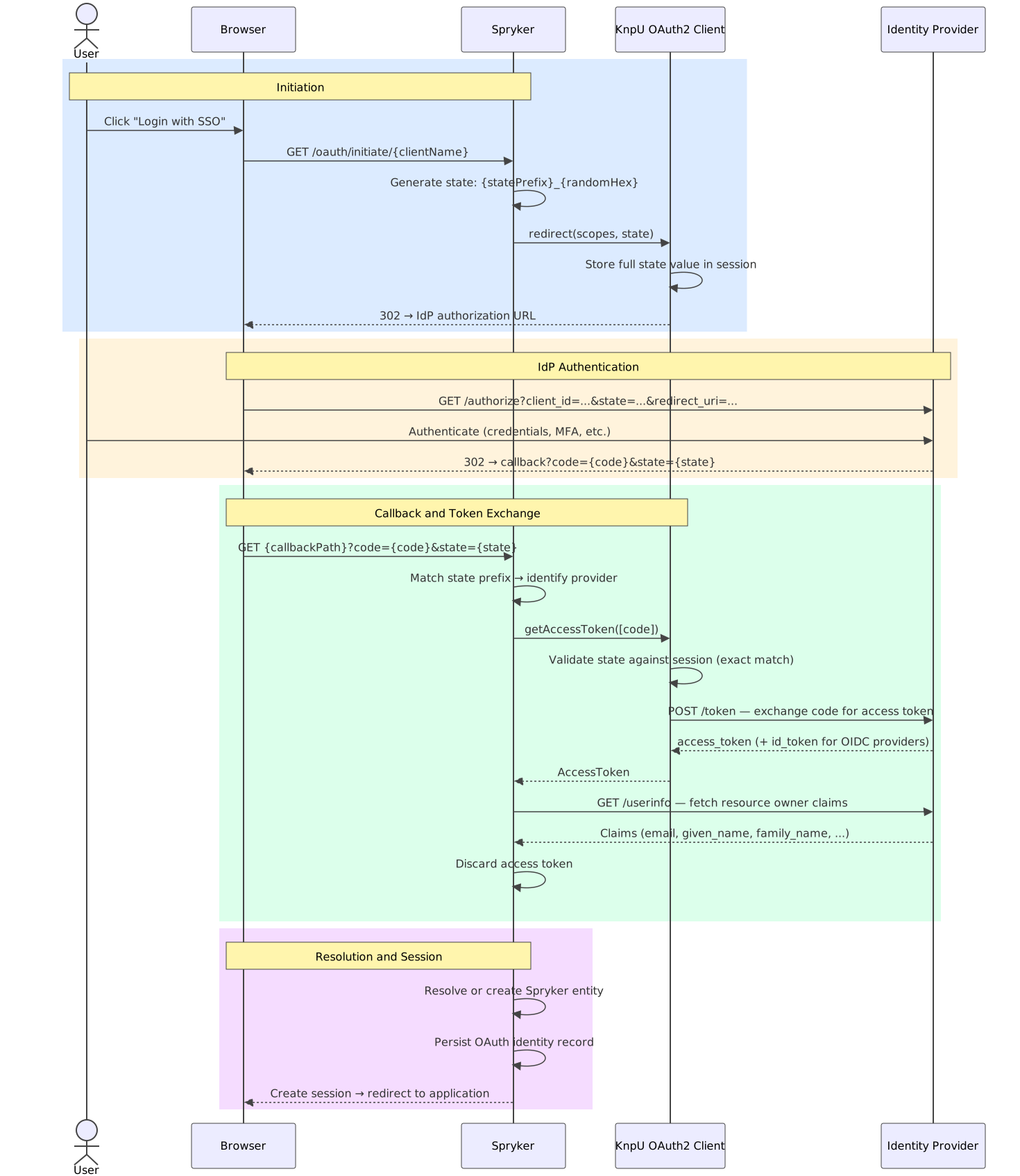
The only claim your IdP must return is email. If the IdP also returns given_name, family_name, name, or preferred_username, Spryker uses them to populate display fields where available. If you need additional claims for custom logic — roles, groups, department — you can request them by configuring the appropriate scopes on the provider.
How It Fits Into Spryker’s Architecture
Bridging Two Worlds
Spryker runs as a Symfony application but maintains its own dependency injection container alongside Symfony’s. KnpU registers its ClientRegistry in the Symfony container, but Spryker’s business and communication layers expect their dependencies in Spryker’s own container.
OauthKnpuApplicationPlugin resolves this on application boot. It pulls ClientRegistry out of the Symfony container and re-exposes it in Spryker’s DI, so that Spryker’s plugin chain can reach it. It also registers the OAuth callback routes into Symfony’s router — which is necessary because KnpU uses Symfony’s router to build redirect URIs, while Spryker’s own router is separate.

The Yves plugin handles the Storefront callback route. The Zed plugin handles both Back-office and Merchant Portal, since both run within the same Zed container.
Symfony Security Integration
Once the bridge is in place, SecurityOauthKnpu plugs into Symfony Security the same way in every application: a dedicated OAuth authenticator is added to the existing firewall, sitting alongside the standard form-login authenticator so that both login methods continue to work independently.

The Plugin Chain
Each application follows the same four-stage plugin chain. This is where you connect the OAuth flow to Spryker’s user resolution and persistence logic.
SecurityOauthKnpu ships with a concrete implementation of each plugin for every application. You register them in the respective dependency providers during integration — no custom plugin code required unless you want to override a step.
| Stage | Storefront | Back-office | Merchant Portal |
|---|---|---|---|
| AuthenticationLink Renders login buttons on the login page |
KnpuCustomerAuthenticationLinkPlugin |
KnpuOauthAuthenticationLinkPlugin |
KnpuOauthMerchantUserAuthenticationLinkPlugin |
| ClientStrategy Exchanges the OAuth code for a resource owner |
KnpuOauthCustomerClientStrategyPlugin |
KnpuOauthUserClientStrategyPlugin |
KnpuOauthMerchantUserClientStrategyPlugin |
| IdentityStrategy Resolves the Spryker entity from the resource owner |
KnpuOauthCustomerIdentityStrategyPlugin |
KnpuOauthUserIdentityStrategyPlugin |
KnpuOauthMerchantUserIdentityStrategyPlugin |
| IdentityPersistence Creates or updates the OAuth identity record |
KnpuOauthCustomerIdentityPersistencePlugin |
KnpuOauthUserIdentityPersistencePlugin |
KnpuOauthMerchantUserIdentityPersistencePlugin |
How Identities Are Stored
Spryker keeps a lightweight identity record for each user–provider pair. This is what makes the connection between a Spryker account and an external IdP identity persistent across sessions.

The anchor for each record is the combination of provider and external_id — the stable, IdP-assigned identifier for that user. This matters in practice: if your users change their email address in the IdP, their Spryker account remains correctly linked and login continues to work. The email column in the identity table is updated to the latest IdP value on every successful login, but the email stored on the Spryker entity itself (spy_customer.email, spy_user.email) is left untouched. Syncing that back is something you can implement at the project level if your use case requires it.
How Login Works
The resolution logic is the same across all three applications. Spryker first looks for an existing identity record; if it finds one, the user is logged in immediately. If not — because this is the first time they are logging in via this provider — Spryker falls back to email matching.

First Time a User Logs In via SSO
On the first OAuth login, there is no identity record yet. Spryker looks up the entity by the email address returned by the IdP:
- If an account with that email already exists in Spryker — perhaps the user registered through the regular form previously — it gets linked to the OAuth identity on the spot. From this point on, the user can log in via SSO or, if you keep it enabled, via password.
- If no account exists, just-in-time provisioning runs (see below).
Either way, the identity record is created at the end of this first login and used for every login after.
Every Login After That
Once the identity record exists, Spryker goes straight to it using the provider name and the external ID. Your users’ email addresses are no longer part of the lookup — so even if someone updates their email in the IdP, the connection to their Spryker account is unaffected.
Just-in-Time Provisioning
Storefront
When a customer logs in via SSO for the first time and no Spryker account with their email exists, one is created automatically. The account is confirmed immediately — no email verification is sent. Name fields are populated from IdP claims where available.
This default behaviour is intentionally minimal, and you are expected to extend it to fit your project.
Two common starting points:
- Accept-only mode: If you want only pre-existing customers to be able to log in via SSO — for example, because you import customers from a CRM — you can disable automatic creation by replacing
CreateCustomerOauthCustomerAuthenticationStrategyPluginwithAcceptOnlyOauthCustomerAuthenticationStrategyPluginin yourCustomerDependencyProvider. - B2B provisioning: In a B2B context, a new customer often needs to be assigned to a company and given a company user record before they can do anything meaningful. You can extend the creation strategy to handle this automatically based on claims from your IdP.
Back-office
Back-office users are provisioned automatically on first SSO login if no user with their email exists. This is built into the SecurityOauthUser module via CreateUserAuthenticationStrategy and works without any configuration on your part.
Merchant Portal
Merchant users are not provisioned automatically. The merchant user must already exist in Spryker before they can log in via SSO. This is intentional — without project-specific logic, Spryker has no way to know which merchant a newly arrived user should belong to. If your project needs JIT provisioning here, you can implement a custom authentication strategy that makes that merchant assignment decision and creates the user accordingly.
Security Considerations
How CSRF Is Prevented
When a user initiates an OAuth login, Spryker generates a state value made up of a provider-specific prefix and a cryptographically random hex string — something like sso_yves_a3f9b2c1.... The KnpU bundle stores this full value in the user’s session before redirecting to the IdP.
When the IdP redirects back, KnpU compares the returned state parameter against the stored session value. The match must be exact — any deviation causes the request to be rejected before the authorization code is exchanged. This protects against CSRF attacks on the callback endpoint.
The prefix part of the state is just a routing signal — Spryker uses it to identify which provider’s KnpU client should handle the callback. It does not need to be secret, but it must be unique per provider in a given application.
What Happens to the Access Token
The OAuth access token is used for one thing: fetching the user’s claims from the IdP’s userinfo endpoint. Once Spryker has those claims, the token is discarded. It is never written to the database, the session, or any log.
The practical implication is that your Spryker session is independent of the IdP token. If a user’s account is suspended in the IdP after they have already logged into Spryker, their active session continues until it expires according to Spryker’s standard session configuration. Continuous session validation against the IdP — and federated logout — are coming in a later version.
Multi-Factor Authentication
Once your users authenticate through an Identity Provider (IdP), you have to decide where Multi-Factor Authentication (MFA) lives — at the IdP, in Spryker’s own Multi-Factor Authentication feature, or both. Each option trades off security assurance against user experience, and setups that mix password and SSO login need extra care to avoid leaving password users without a second factor.
For the decision guide, see Multi-Factor Authentication with SSO.
Supported Providers
You can use any OAuth2/OIDC provider that knpuniversity/oauth2-client-bundle supports. The reference configuration in this codebase uses Keycloak, but the architecture is provider-agnostic. For the full list of supported provider types and their specific configuration fields, see the KnpU OAuth2 Client Bundle provider documentation.
The following table lists the most common B2B identity providers used with Spryker:
| Provider | Type | Notes |
|---|---|---|
| Microsoft Entra ID (formerly Azure Active Directory) | Cloud IdP | Widely used in enterprise environments; supports OIDC and SAML. Use the azure provider type in KnpU. |
| Okta | Cloud IdP | Common in B2B SaaS setups; full OIDC support. Use the okta provider type in KnpU. |
| Keycloak | Self-hosted IdP | Open-source; the reference implementation used in Spryker’s example configuration. Use the keycloak provider type in KnpU. |
| Google Workspace | Cloud IdP | Suitable for organizations using Google as their identity backbone. Use the google provider type in KnpU. |
| Auth0 | Cloud IdP | Flexible, developer-friendly IdP with strong B2B multi-tenant support. Use the auth0 provider type in KnpU. |
| IBM App ID | Cloud IdP | Used in IBM enterprise environments; supports OIDC. Use the appid provider type in KnpU. |
| Salesforce Identity | Cloud IdP | Acts as an IdP for Salesforce-heavy B2B orgs; supports OIDC. Use the salesforce provider type in KnpU. |
| Amazon Cognito | Cloud IdP | Common in AWS-native enterprise setups; supports OIDC. Install the dedicated league/oauth2-client Cognito package and use the generic provider type in KnpU. |
| Nextcloud | Self-hosted IdP | Open-source, self-hosted option used in European B2B environments; supports OIDC. Install the dedicated league/oauth2-client Nextcloud package and use the generic provider type in KnpU. |
Coming in Later Versions
| Capability | Description |
|---|---|
| Platform API (Glue) OAuth | SSO for API consumers via token exchange |
| Multi-provider Back-office | Multiple IdP options on the Back-office login page |
| Continuous sessions | Using IdP refresh tokens to extend Spryker sessions |
| Attribute sync | Keeping Spryker entity data in sync with IdP claims on each login |
| Claims-to-roles mapping | Assigning Spryker ACL roles automatically based on IdP group claims |
Thank you!
For submitting the form