
Stream AI responses with the AiFoundation module
Edit on GitHubAiFoundationClient::streamPrompt() sends a prompt to an AI model and returns the response chunk by chunk. The user sees the text while the model writes it, and does not wait for the full response.
streamPrompt() is a Client method, so you can stream responses in any application that uses the Client layer, for example, the Storefront (Yves) or Glue.
streamPrompt() ignores PromptRequestTransfer.structuredMessage. To get a structured response, use prompt(). For details, see Use structured responses with the AiFoundation module.
Prerequisites
-
Install and configure the AiFoundation module. For instructions, see AiFoundation module Overview.
-
Update the AiFoundation module to version 0.9.0 or later:
composer require spryker/ai-foundation:"^0.9.0" --update-with-dependencies
How streaming works
streamPrompt() runs in the Client layer, calls the AI provider directly, and calls Zed only to do the following:
- Load the AI configuration and the stored conversation.
- Save the conversation.
- Write the audit log, if you enable it.
The text chunks never go through Zed. They go from the AI provider to your stream event plugins, and these plugins write them to the browser.
In the following diagram, NeuronVendorAiAdapter is the part of AiFoundationClient that runs in your application, for example, Yves. The Zed gateway column shows the only calls that go to Zed.
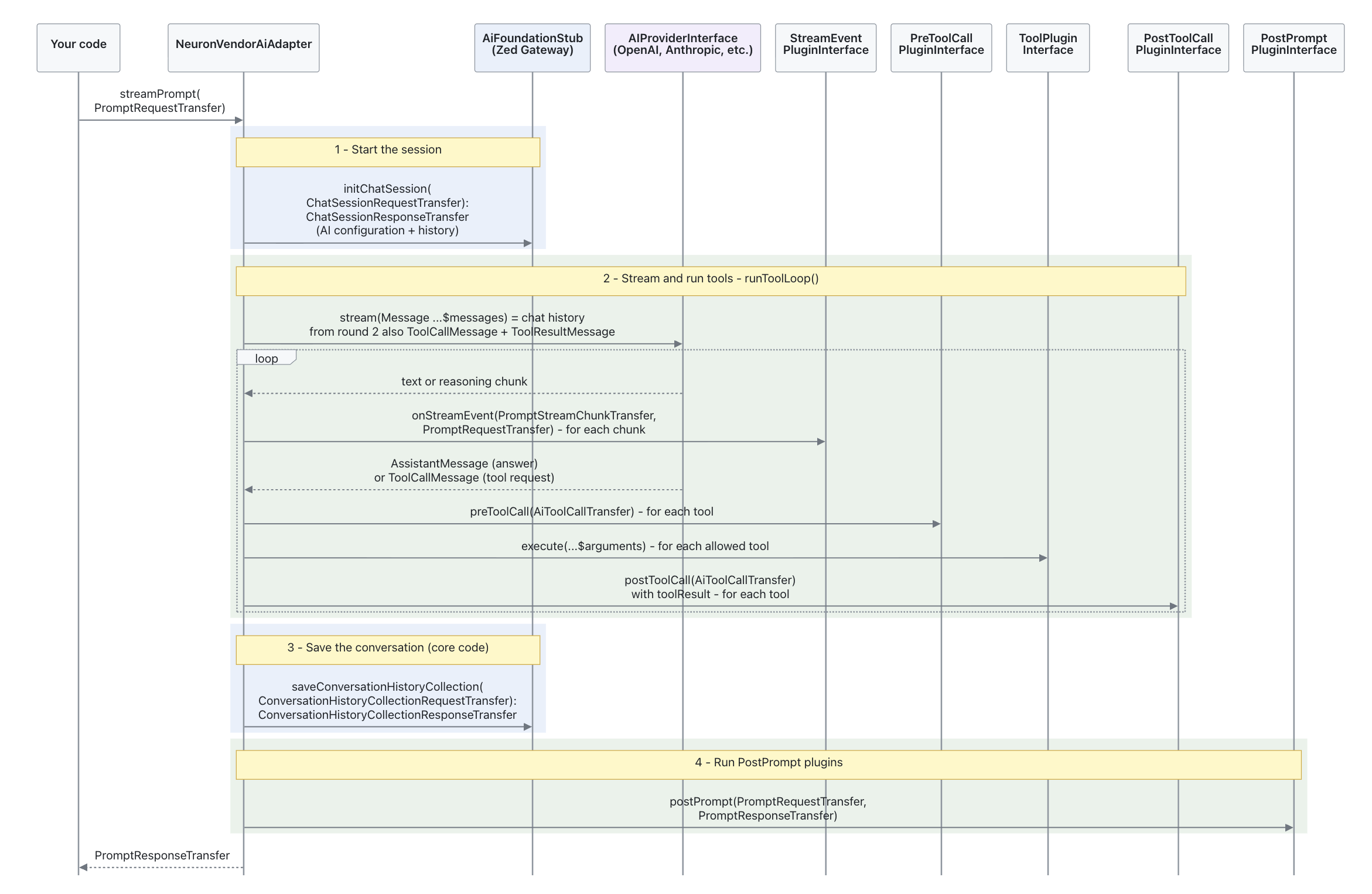
A turn is one user message and the full model response to it, including all tool calls. One call of streamPrompt() processes one turn. Each turn has four steps:
- Start the session. Zed returns the AI configuration and the conversation history. If this step fails, the turn stops and no plugin runs.
- Stream and run tools. Each chunk goes to the stream event plugins. When the model requests a tool,
AiFoundationClientruns the tool plugin in your application and sends the result back to the model. The model can request tools in a maximum of 5 rounds. This limit prevents endless tool loops and high token costs. To change it, extendNeuronVendorAiAdapter, override theMAX_TOOL_LOOP_ITERATIONSconstant, and return your adapter fromAiFoundationFactory::createVendorAiAdapter()in the Client layer. - Save the conversation. Zed saves the conversation history in the
spy_ai_conversation_historytable. This step runs only when you setPromptRequestTransfer.conversationReference. For details, see Conversation History. - Run post-prompt plugins. They run once at the end of the turn.
Stream a prompt
To stream a prompt, allow the AI configuration, register a stream event plugin, and call streamPrompt() from a controller.
1. Allow the AI configuration in the Client
By default, the Client cannot use any AI configuration. This prevents a Storefront or Glue request from using an AI configuration that is only for the Back Office. The examples on this page use a product assistant on the Storefront.
-
Define the AI configuration name as a shared constant, so that Zed and Yves use the same value:
src/Pyz/Shared/ProductAssistant/ProductAssistantConstants.php
<?php namespace Pyz\Shared\ProductAssistant; interface ProductAssistantConstants { /** * AI configuration name used by the product assistant on the Storefront. * * @api */ public const string AI_CONFIGURATION_PRODUCT_ASSISTANT = 'PRODUCT_ASSISTANT:AI_CONFIGURATION_PRODUCT_ASSISTANT'; } -
Add the AI configuration:
config/Shared/config_ai.php
use Pyz\Shared\ProductAssistant\ProductAssistantConstants; use Spryker\Shared\AiFoundation\AiFoundationConstants; $config[AiFoundationConstants::AI_CONFIGURATIONS] = [ // existing configurations... ProductAssistantConstants::AI_CONFIGURATION_PRODUCT_ASSISTANT => [ 'provider_name' => AiFoundationConstants::PROVIDER_OPENAI, 'provider_config' => [ 'key' => getenv('OPENAI_API_KEY'), 'model' => 'gpt-4o', ], 'system_prompt' => 'You are a product assistant of an online shop. Answer questions about products, prices, and availability. Answer only with data from the tools.', ], ]; -
Allow the Client to use the AI configuration:
src/Pyz/Zed/AiFoundation/AiFoundationConfig.php
<?php

namespace Pyz\Zed\AiFoundation;

use Pyz\Shared\ProductAssistant\ProductAssistantConstants;
use Spryker\Zed\AiFoundation\AiFoundationConfig as SprykerAiFoundationConfig;

class AiFoundationConfig extends SprykerAiFoundationConfig
{
    /**
     * @return array<string>
     */
    public function getClientResolvableAiConfigurationNames(): array
    {
        return [
            ProductAssistantConstants::AI_CONFIGURATION_PRODUCT_ASSISTANT,
        ];
    }
}
If the configuration name is not in this list, streamPrompt() returns isSuccessful=false.
2. Create a stream event plugin
A stream event plugin receives each chunk and writes it to the HTTP response.
Implement Spryker\Client\AiFoundation\Dependency\Plugin\StreamEventPluginInterface:
src/Pyz/Yves/ProductAssistant/Plugin/AiFoundation/ProductAssistantSseStreamEventPlugin.php
<?php

// Example only, not production-ready code. Add the namespace and use statements for your project.
class ProductAssistantSseStreamEventPlugin extends AbstractPlugin implements StreamEventPluginInterface
{
    public function onStreamEvent(
        PromptStreamChunkTransfer $promptStreamChunkTransfer,
        PromptRequestTransfer $promptRequestTransfer
    ): void {
        if ($promptRequestTransfer->getAiConfigurationName() !== ProductAssistantConstants::AI_CONFIGURATION_PRODUCT_ASSISTANT) {
            return;
        }

        // Example SSE event format. Use the format your frontend expects.
        $type = $promptStreamChunkTransfer->getType(); // text or reasoning
        $data = json_encode(['content' => $promptStreamChunkTransfer->getContent()]);

        echo "event: {$type}\ndata: {$data}\n\n";
        flush();
    }
}
Follow these rules when you implement the plugin:
- Check
aiConfigurationNamefirst. The plugin receives the chunks of every turn of every AI configuration. - Do not throw exceptions. The Client catches and logs them, but the user does not get the chunk.
contentcontains only the new text of the chunk, not the full text so far.
3. Register the stream event plugin
src/Pyz/Client/AiFoundation/AiFoundationDependencyProvider.php
<?php

namespace Pyz\Client\AiFoundation;

use Pyz\Yves\ProductAssistant\Plugin\AiFoundation\ProductAssistantSseStreamEventPlugin;
use Spryker\Client\AiFoundation\AiFoundationDependencyProvider as SprykerAiFoundationDependencyProvider;

class AiFoundationDependencyProvider extends SprykerAiFoundationDependencyProvider
{
    /**
     * @return array<\Spryker\Client\AiFoundation\Dependency\Plugin\StreamEventPluginInterface>
     */
    protected function getStreamEventPlugins(): array
    {
        return [
            new ProductAssistantSseStreamEventPlugin(),
        ];
    }
}
4. Call streamPrompt() in a controller
Call streamPrompt() inside a StreamedResponse with server-sent events (SSE) headers. The following controller is one example of a streaming setup, not the only way to call streamPrompt(). To save the conversation history, set PromptRequestTransfer.conversationReference. For details, see Conversation History:
src/Pyz/Yves/ProductAssistant/Controller/PromptController.php
<?php

namespace Pyz\Yves\ProductAssistant\Controller;

// Example only, not production-ready code. Add the use statements for your project.
class PromptController extends AbstractController
{
    public function indexAction(Request $request): StreamedResponse
    {
        // Build $promptRequestTransfer here, for example with aiConfigurationName and promptMessage.

        return new StreamedResponse(
            function () use ($promptRequestTransfer): void {
                $this->getFactory()->getAiFoundationClient()->streamPrompt($promptRequestTransfer);
            },
            200,
            ['Content-Type' => 'text/event-stream', 'Cache-Control' => 'no-cache', 'X-Accel-Buffering' => 'no'],
        );
    }
}
Use tools
Tools let the model get data or run actions during the turn. For streaming, register tools in the Client, not in Zed.
- Create a tool plugin that implements
Spryker\Client\AiFoundation\Dependency\Tools\ToolPluginInterface. For details about tool plugins, see Use AI tools with the AiFoundation module. - Register the tool plugin in
getAiToolPlugins()of the ClientAiFoundationDependencyProvider. - Add the tool names to
PromptRequestTransfer.toolNames. The tool name is the value thatToolPluginInterface::getName()returns.
Note the following behavior:
streamPrompt()usestoolNamesonly. It ignorestoolSetNames.- If a tool throws an exception, the turn continues. The model gets a message that the tool did not return a result.
Enable audit logs
The audit log stores each prompt and each tool call of the turn in the spy_ai_interaction_log table. The Client collects all entries of the turn and sends them to Zed in one call at the end of the turn.
-
Register both audit plugins in the Client
AiFoundationDependencyProvider:src/Pyz/Client/AiFoundation/AiFoundationDependencyProvider.php
use Spryker\Client\AiFoundation\Plugin\AuditLog\AiInteractionAuditLogPostPromptPlugin;
use Spryker\Client\AiFoundation\Plugin\AuditLog\AiInteractionAuditLogPostToolCallPlugin;

protected function getPostToolCallPlugins(): array
{
    return [
        new AiInteractionAuditLogPostToolCallPlugin(),
    ];
}

protected function getPostPromptPlugins(): array
{
    return [
        new AiInteractionAuditLogPostPromptPlugin(),
    ];
}
Register both pluginsAlways register both plugins. If you register only
AiInteractionAuditLogPostToolCallPlugin, no entries reach Zed. If you register onlyAiInteractionAuditLogPostPromptPlugin, the tool call entries are missing. -
In
config/Shared/config_default.php, add the Client audit logger config plugin for the application that callsstreamPrompt():config/Shared/config_default.php
use Spryker\Client\AiFoundation\Plugin\Log\AiInteractionAuditLoggerConfigPlugin as ClientAiInteractionAuditLoggerConfigPlugin;
use Spryker\Shared\Log\LogConstants;

$config[LogConstants::AUDIT_LOGGER_CONFIG_PLUGINS_YVES] = [
    // existing plugins...
    ClientAiInteractionAuditLoggerConfigPlugin::class,
];
For Glue, use LogConstants::AUDIT_LOGGER_CONFIG_PLUGINS_GLUE. Do not use the Zed plugin with the same class name: Spryker\Zed\AiFoundation\Communication\Plugin\Log\AiInteractionAuditLoggerConfigPlugin is for AiFoundationFacade::prompt().
To view the logs in the Back Office, see AI Interaction Audit Logs.
Plugin reference
All plugin stacks are in the Client AiFoundationDependencyProvider.
| Method | Plugin interface | When it runs | Exceptions |
|---|---|---|---|
getStreamEventPlugins() |
Spryker\Client\AiFoundation\Dependency\Plugin\StreamEventPluginInterface |
For each chunk of every turn | Caught and logged |
getAiToolPlugins() |
Spryker\Client\AiFoundation\Dependency\Tools\ToolPluginInterface |
When the model requests the tool, and the tool name is in toolNames |
Caught, the model gets a failure message |
getPreToolCallPlugins() |
Spryker\Client\AiFoundation\Dependency\Plugin\PreToolCallPluginInterface |
Before each tool | Not caught, the turn fails |
getPostToolCallPlugins() |
Spryker\Client\AiFoundation\Dependency\Plugin\PostToolCallPluginInterface |
After each tool | Not caught, the turn fails |
getPostPromptPlugins() |
Spryker\Client\AiFoundation\Dependency\Plugin\PostPromptPluginInterface |
Once, at the end of the turn | Caught and logged |
Thank you!
For submitting the form