
Performance guidelines: External HTTP requests
Edit on GitHubSpryker architecture principle: read from fast storage
The original Spryker Architecture was built with a fundamental high-level principle in mind: frontend applications (Yves/Glue/Merchant Portal) should read only from fast storage like Redis/ValKey and Elasticsearch/OpenSearch, not from databases or remote APIs.
How the architecture works
When an application needs data from a database or remote service, the data import or synchronization should be performed in the background through Spryker’s Publish & Sync mechanism to:
- Key-Value storage (Redis/ValKey) for structured data retrieval
- Search storage (Elasticsearch/OpenSearch) for searchable product catalog and content
Benefits of this approach
The main benefit is scalability - complete independence of web traffic from data sources’ capabilities:
- Both Key-Value and Search storages are easy and fast to scale with zero downtime
- Frontend application performance is predictable and not affected by database or external API performance
- The system can handle traffic spikes without overwhelming backend data sources
Real-world constraints
Real-life problems sometimes prevent engineers from implementing data flows according to this principle. When you must make external calls from frontend applications, it’s crucial to:
- Understand the downsides and trade-offs
- Ensure all connected systems can handle the same level of load as your frontend application
- Remember: a chain is only as strong as its weakest component
Recommendations for deviating from the principle
- Avoid unnecessary calls: Read from Key-Value or Search storages instead of calling backend-gateway or APIs from Yves/Glue/Merchant Portal.
- Combine multiple calls: If external requests are required, avoid multiple sequential calls. Instead, combine them into one batch request.
- Cache responses carefully: Caching can help, but be aware of what to cache, where to store it, and how long to keep it. Key-Value storages are fast but limited in capacity and can be expensive at scale. For detailed caching strategies, see Cache heavy logic appropriately.
- Ensure external system capability: If real-time data is a must-have requirement and background sync with a small delay is not viable, ensure that:
- Remote APIs or dependencies can handle the same level of requests and data volume as the main Spryker application
- Remote APIs or dependencies can scale at the same rate as the main Spryker application
Purpose of external HTTP calls
External calls occur to retrieve data from third-party systems (for example, SAP, ERP, PIM, pricing, stock, personalization) that are not yet replicated into internal Storage or Elasticsearch. These calls are sometimes unavoidable to maintain real-time accuracy (for example, live stock, dynamic pricing, real-time personalization).
Impact of external HTTP calls on performance
- In background jobs (such as Jenkins Queue workers), external calls are decoupled from the customer flow and have minimal direct impact.
- During Yves or Glue requests, they add latency, increase tail response times, and can cause session lock prolongation (for example, a long “add to cart” request can block other requests in the same customer session, creating a cascading slowdown).
- Slow external dependencies reduce horizontal scalability because threads must wait, which consumes connection pools.
Mitigation
Caching GET requests
Discuss with business stakeholders which data can tolerate minor staleness. Add a caching decorator around the HTTP client:
- Short-term cache (minutes): for prices or availability.
- Long-term cache (hours or days): for rarely changing reference data (for example, attributes or catalog metadata).
Replace N+1 with collection endpoints
A common performance issue is the N+1 Problem, where a collection of entities (for example, 20 products on a listing page) causes N external calls.
Scenario: expanding product widgets on a product listing page often leads to this, as each product individually calls an external service for a small piece of data (for example, a special price).
Solution: restructure the communication to make a single batch call for the entire collection. Send all entity IDs (Entity_1, Entity_2, Entity_N) in one request to the external service. The external service should be able to return an array of data, one entry for each entity. This reduces $N$ synchronous network round-trips to just 1, drastically improving latency.
Concurrent HTTP calls
When multiple independent external calls remain, execute them concurrently by using Guzzle concurrent requests to shorten total execution time. Set appropriate per-request timeouts and limit concurrency to prevent system overload.
use GuzzleHttp\Client;
use GuzzleHttp\Promise;

$client = new Client();

$promises = [
    'stocks'  => $client->getAsync('http://service-a/stocks'),
    'prices'  => $client->getAsync('http://service-b/prices'),
    'ratings' => $client->getAsync('http://service-c/ratings'),
];

$responses = Promise\Utils::unwrap($promises);
Asynchronous AJAX calls to avoid blocking page rendering
When frontend pages depend on data from backend-gateway or other remote resources, avoid blocking the initial page render. Synchronous calls to external services can significantly delay the Time to First Byte (TTFB) and degrade user experience.
The problem with blocking calls
If a page waits for external data before rendering, users see a blank screen or loading spinner for the entire request duration. This is particularly problematic when:
- External services are slow or temporarily unavailable
- Multiple external calls are required sequentially
- Network latency adds up across calls
Solution: Asynchronous loading with proper UI design
Instead of blocking page rendering, design your UI to load data asynchronously:
- Render the page skeleton first: Display the page structure, navigation, and static content immediately.
- Use AJAX for dynamic data: Fetch external data asynchronously after the page loads.
- Provide visual feedback: Show loading indicators, placeholders, or skeleton screens while data is being fetched.
- Handle errors gracefully: Display user-friendly error messages if external calls fail.
Implementation example
Bad approach - Blocking render:
// Controller waits for external data before rendering
$externalData = $this->externalClient->fetchData(); // Blocks for 2-3 seconds
return $this->view(['data' => $externalData]);
Good approach - Asynchronous loading:
// Controller renders immediately with placeholder
return $this->view(['dataEndpoint' => '/api/external-data']);
// Frontend fetches data asynchronously
// This could be the Spryker endpoint, which makes secure call to 3rd party or another public endpoint
fetch('/backend-gateway/request-external-data')
  .then(response => response.json())
  .then(data => {
    // Update UI with real data
    document.getElementById('content').innerHTML = renderData(data);
  })
  .catch(error => {
    // Show error message
    document.getElementById('content').innerHTML = '<p>Unable to load data</p>';
  });
UI patterns for asynchronous loading
- Loading indicators: Spinners or progress bars to show data is being fetched
- Skeleton screens: Gray placeholder boxes that match the content layout
- Placeholders: Text like “Loading…” or “Fetching latest data…”
- Progressive enhancement: Show cached or default data first, then update with fresh data
- Lazy loading: Load data only when users scroll to the relevant section
By implementing asynchronous AJAX calls with proper UI patterns, you ensure that:
- Pages render quickly, improving perceived performance
- Users can interact with the page while data loads
- External service failures don’t completely break the page
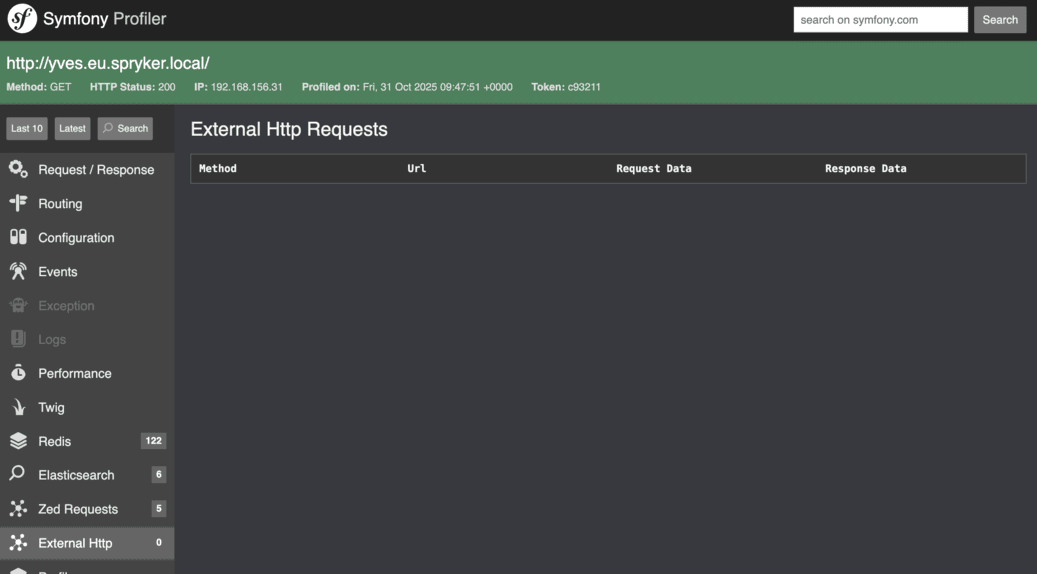
WebProfiler Widget monitoring of external HTTP calls
To effectively monitor external service integrations, use the WebProfiler.
Log external HTTP requests with Spryker\Shared\Http\Logger\ExternalHttpInMemoryLoggerTrait, so that you can easily see the request details in the WebProfiler Widget.
WebProfiler Widget is available for local development only.
<?php

use GuzzleHttp\Client;
use GuzzleHttp\Exception\RequestException;
use Spryker\Shared\Http\Logger\ExternalHttpInMemoryLoggerTrait;

class MyApiClient
{
    use ExternalHttpInMemoryLoggerTrait;

    public function __construct(
        private Client $httpClient,
    ){}

    public function sendSomeData(string $url, array $data): ?array
    {
        $method = 'POST';
        $requestData = $data;
        $responseData = null;

        try {
            $response = $this->httpClient->request($method, $url, [
                'json' => $requestData,
            ]);
            $responseData = json_decode($response->getBody()->getContents(), true);

        } catch (RequestException $e) {
            $responseData = ['error' => $e->getMessage()];
            if ($e->hasResponse()) {
                $responseData['response_body'] = $e->getResponse()?->getBody()->getContents();
            }
        } catch (\Throwable $e) {
            $responseData = ['error' => 'An unexpected error occurred: ' . $e->getMessage()];
        } finally {
            $this->getExternalHttpInMemoryLogger()->log(
                $method,
                $this->httpClient->getConfig('base_uri') . $url,
                $requestData,
                $responseData
            );
        }

        return $responseData;
    }
}
New Relic APM monitoring of external HTTP calls
Additionally, you can use New Relic APM transaction traces and external dependency data to identify bottlenecks and measure the impact of third-party latency.
Thank you!
For submitting the form