
Integrate Web Profiler for Glue
Edit on GitHubThe Web Profiler for Glue provides a tool for debugging and informational purposes for Glue API applications. The tool is accessible when making requests to Glue API endpoints and provides comprehensive profiling data for API requests.
Web Profiler is available for all Glue applications, including:
- Glue Storefront API - For storefront API endpoints
- Glue Backend API - For backend API endpoints
- General Glue Application - For custom Glue applications
The profiler is based on Symfony Profiler. For details, see Profiler documentation.
Prerequisites
Before integrating Web Profiler for Glue, ensure that the following modules are updated to the required versions:
| Module | Version | Required | Description |
|---|---|---|---|
spryker/glue-application |
^1.72.0 | Yes | Core Glue Application framework |
spryker/http |
^1.15.0 | Yes | HTTP handling for Glue applications |
spryker/redis |
^2.11.0 | Yes | Redis integration for data collection |
spryker/search-elasticsearch |
^1.21.0 | Yes | Elasticsearch integration for data collection |
spryker/web-profiler |
^1.7.0 | Yes | Core Web Profiler module |
spryker/zed-request |
^3.25.0 | Yes | Zed request handling and data collection |
spryker/profiler |
^0.1.3 | Yes | Spryker profiler |
spryker/propel |
^3.49.0 | No | Propel data collection |
Integration
Integrate Web Profiler into your Glue applications by updating the following dependency provider files:
1. EventDispatcher configuration
Add the Profiler Event Dispatcher Plugin to Pyz\Glue\EventDispatcher\EventDispatcherDependencyProvider:
src/Pyz/EventDispatcher/src/Pyz/Glue/EventDispatcher/EventDispatcherDependencyProvider.php
<?php

namespace Pyz\Glue\EventDispatcher;

use Spryker\Glue\EventDispatcher\EventDispatcherDependencyProvider as SprykerEventDispatcherDependencyProvider;
use Spryker\Glue\Profiler\Plugin\EventDispatcher\ProfilerRequestEventDispatcherPlugin;

class EventDispatcherDependencyProvider extends SprykerEventDispatcherDependencyProvider
{
    /**
     * @return array<\Spryker\Shared\EventDispatcherExtension\Dependency\Plugin\EventDispatcherPluginInterface>
     */
    protected function getEventDispatcherPlugins(): array
    {
        $plugins = [
            // Other plugins...
        ];

        if (class_exists(ProfilerRequestEventDispatcherPlugin::class)) {
            $plugins[] = new ProfilerRequestEventDispatcherPlugin();
        }

        return $plugins;
    }

    /**
     * @return array<\Spryker\Shared\EventDispatcherExtension\Dependency\Plugin\EventDispatcherPluginInterface>
     */
    protected function getBackendEventDispatcherPlugins(): array
    {
        $plugins = [
            // Other plugins...
        ];

        if (class_exists(ProfilerRequestEventDispatcherPlugin::class)) {
            $plugins[] = new ProfilerRequestEventDispatcherPlugin();
        }

        return $plugins;
    }

    /**
     * @return array<\Spryker\Shared\EventDispatcherExtension\Dependency\Plugin\EventDispatcherPluginInterface>
     */
    protected function getStorefrontEventDispatcherPlugins(): array
    {
        $plugins = [
            // Other plugins...
        ];

        if (class_exists(ProfilerRequestEventDispatcherPlugin::class)) {
            $plugins[] = new ProfilerRequestEventDispatcherPlugin();
        }

        return $plugins;
    }
}
2. General Glue Application configuration
Add the Web Profiler Application Plugin to Pyz\Glue\GlueApplication\GlueApplicationDependencyProvider:
src/Pyz/GlueApplication/src/Pyz/Glue/GlueApplication/GlueApplicationDependencyProvider.php
<?php

namespace Pyz\Glue\GlueApplication;

use Spryker\Glue\GlueApplication\GlueApplicationDependencyProvider as SprykerGlueApplicationDependencyProvider;
use Spryker\Glue\WebProfiler\Plugin\Application\WebProfilerApplicationPlugin;

class GlueApplicationDependencyProvider extends SprykerGlueApplicationDependencyProvider
{
    /**
     * @return array<\Spryker\Shared\ApplicationExtension\Dependency\Plugin\ApplicationPluginInterface>
     */
    protected function getApplicationPlugins(): array
    {
        $plugins = [
            // Other plugins...
        ];

        if (class_exists(WebProfilerApplicationPlugin::class)) {
            $plugins[] = new WebProfilerApplicationPlugin();
        }

        return $plugins;
    }
}
3. Glue Backend API Application configuration
Add the Web Profiler Application Plugin to Pyz\Glue\GlueBackendApiApplication\GlueBackendApiApplicationDependencyProvider:
src/Pyz/GlueBackendApiApplication/src/Pyz/Glue/GlueBackendApiApplication/GlueBackendApiApplicationDependencyProvider.php
<?php

namespace Pyz\Glue\GlueBackendApiApplication;

use Spryker\Glue\GlueBackendApiApplication\GlueBackendApiApplicationDependencyProvider as SprykerGlueBackendApiApplicationDependencyProvider;
use Spryker\Glue\WebProfiler\Plugin\Application\WebProfilerApplicationPlugin;

class GlueBackendApiApplicationDependencyProvider extends SprykerGlueBackendApiApplicationDependencyProvider
{
    /**
     * @return array<\Spryker\Shared\ApplicationExtension\Dependency\Plugin\ApplicationPluginInterface>
     */
    protected function getApplicationPlugins(): array
    {
        $plugins = [
            // Other plugins...
        ];

        if (class_exists(WebProfilerApplicationPlugin::class)) {
            $plugins[] = new WebProfilerApplicationPlugin();
        }

        return $plugins;
    }
}
4. Glue Storefront API Application configuration
Add the Web Profiler Application Plugin to Pyz\Glue\GlueStorefrontApiApplication\GlueStorefrontApiApplicationDependencyProvider:
src/Pyz/GlueStorefrontApiApplication/src/Pyz/Glue/GlueStorefrontApiApplication/GlueStorefrontApiApplicationDependencyProvider.php
<?php

namespace Pyz\Glue\GlueStorefrontApiApplication;

use Spryker\Glue\GlueStorefrontApiApplication\GlueStorefrontApiApplicationDependencyProvider as SprykerGlueStorefrontApiApplicationDependencyProvider;
use Spryker\Glue\WebProfiler\Plugin\Application\WebProfilerApplicationPlugin;

class GlueStorefrontApiApplicationDependencyProvider extends SprykerGlueStorefrontApiApplicationDependencyProvider
{
    /**
     * @return array<\Spryker\Shared\ApplicationExtension\Dependency\Plugin\ApplicationPluginInterface>
     */
    protected function getApplicationPlugins(): array
    {
        $plugins = [
            // Other plugins...
        ];

        if (class_exists(WebProfilerApplicationPlugin::class)) {
            $plugins[] = new WebProfilerApplicationPlugin();
        }

        return $plugins;
    }
}
5. Web Profiler data collectors configuration
Configure data collectors in Pyz\Glue\WebProfiler\WebProfilerDependencyProvider:
src/Pyz/WebProfiler/src/Pyz/Glue/WebProfiler/WebProfilerDependencyProvider.php
<?php

namespace Pyz\Glue\WebProfiler;

use Spryker\Glue\Http\Plugin\Twig\HttpKernelTwigPlugin;
use Spryker\Glue\Http\Plugin\Twig\RuntimeLoaderTwigPlugin;
use Spryker\Glue\Http\Plugin\WebProfiler\WebProfilerExternalHttpDataCollectorPlugin;
use Spryker\Glue\Profiler\Plugin\WebProfiler\WebProfilerProfilerDataCollectorPlugin;
use Spryker\Glue\Propel\Plugin\WebProfiler\WebProfilerPropelDataCollectorPlugin;
use Spryker\Glue\Redis\Plugin\WebProfiler\WebProfilerRedisDataCollectorPlugin;
use Spryker\Glue\SearchElasticsearch\Plugin\WebProfiler\WebProfilerElasticsearchDataCollectorPlugin;
use Spryker\Glue\WebProfiler\Plugin\WebProfiler\WebProfilerConfigDataCollectorPlugin;
use Spryker\Glue\WebProfiler\Plugin\WebProfiler\WebProfilerExceptionDataCollectorPlugin;
use Spryker\Glue\WebProfiler\Plugin\WebProfiler\WebProfilerLoggerDataCollectorPlugin;
use Spryker\Glue\WebProfiler\Plugin\WebProfiler\WebProfilerMemoryDataCollectorPlugin;
use Spryker\Glue\WebProfiler\Plugin\WebProfiler\WebProfilerRequestDataCollectorPlugin;
use Spryker\Glue\WebProfiler\Plugin\WebProfiler\WebProfilerTimeDataCollectorPlugin;
use Spryker\Glue\WebProfiler\WebProfilerDependencyProvider as SprykerWebProfilerDependencyProvider;
use Spryker\Glue\ZedRequest\Plugin\WebProfiler\WebProfilerZedRequestDataCollectorPlugin;
use Spryker\Shared\Twig\Plugin\RoutingTwigPlugin;

class WebProfilerDependencyProvider extends SprykerWebProfilerDependencyProvider
{
    /**
     * @return array<\Spryker\Shared\WebProfilerExtension\Dependency\Plugin\WebProfilerDataCollectorPluginInterface>
     */
    protected function getDataCollectorPlugins(): array
    {
        $plugins = [
            new WebProfilerRequestDataCollectorPlugin(),
            new WebProfilerMemoryDataCollectorPlugin(),
            new WebProfilerTimeDataCollectorPlugin(),
            new WebProfilerConfigDataCollectorPlugin(),
            new WebProfilerRedisDataCollectorPlugin(),
            new WebProfilerElasticsearchDataCollectorPlugin(),
            new WebProfilerZedRequestDataCollectorPlugin(),
            new WebProfilerExternalHttpDataCollectorPlugin(),
            new WebProfilerExceptionDataCollectorPlugin(),
            new WebProfilerLoggerDataCollectorPlugin(),
        ];

        if (class_exists(WebProfilerProfilerDataCollectorPlugin::class)) {
            $plugins[] = new WebProfilerProfilerDataCollectorPlugin();
        }

        if (class_exists(WebProfilerPropelDataCollectorPlugin::class)) {
            $plugins[] = new WebProfilerPropelDataCollectorPlugin();
        }

        return $plugins;
    }

    /**
     * @return array<\Spryker\Shared\TwigExtension\Dependency\Plugin\TwigPluginInterface>
     */
    protected function getTwigPlugins(): array
    {
        return [
            new HttpKernelTwigPlugin(),
            new RoutingTwigPlugin(),
            new RuntimeLoaderTwigPlugin(),
        ];
    }
}
Configure Propel Data Collector
To enable the Propel data collector, ensure that you have set the following in config/Shared/config_local.php:
$config[\Spryker\Shared\Propel\PropelConstants::PROPEL_DEBUG] = true;
Using Segmented SQL Collection
The Propel data collector includes a segmented SQL collection feature that allows you to isolate and analyze database queries from specific code paths. Use the static methods startSegment() and endSegment() to capture queries:
use Spryker\Shared\Propel\Logger\PropelInMemoryLogger;

PropelInMemoryLogger::startSegment('product-validation');
$this->validateRequest($glueRequestTransfer);
PropelInMemoryLogger::endSegment();

PropelInMemoryLogger::startSegment('product-fetch');
$productTransfers = $this->productRepository->findProducts($criteria);
PropelInMemoryLogger::endSegment();
Segmented queries appear in the Web Profiler under the Propel panel as collapsible sections showing segment key name, query counts, and full query tables.
Best Practices
- Use descriptive segment keys that identify the API operation (for example,
product-list-validation,cart-calculation,checkout-processing) - Always pair
startSegment()withendSegment()to prevent queries from being incorrectly categorized - Use try-finally blocks to ensure segments are properly closed:
PropelInMemoryLogger::startSegment('my-api-operation');
try {
    $result = $this->performDatabaseOperations();
} finally {
    PropelInMemoryLogger::endSegment();
}
Available data collectors
The Web Profiler for Glue includes the following data collectors:
| Data Collector | Description | Plugin Class |
|---|---|---|
| Request | Collects HTTP request and response information | WebProfilerRequestDataCollectorPlugin |
| Memory | Tracks memory usage during request execution | WebProfilerMemoryDataCollectorPlugin |
| Time | Measures request execution time and performance | WebProfilerTimeDataCollectorPlugin |
| Config | Displays configuration values | WebProfilerConfigDataCollectorPlugin |
| Redis | Tracks Redis calls and performance | WebProfilerRedisDataCollectorPlugin |
| Elasticsearch | Monitors Elasticsearch queries | WebProfilerElasticsearchDataCollectorPlugin |
| Zed Request | Collects information about Zed requests | WebProfilerZedRequestDataCollectorPlugin |
| External HTTP | Tracks external HTTP calls | WebProfilerExternalHttpDataCollectorPlugin |
| Exception | Captures exceptions and errors | WebProfilerExceptionDataCollectorPlugin |
| Logger | Displays log messages | WebProfilerLoggerDataCollectorPlugin |
| Propel | Monitors Propel database queries (available from spryker/propel:^3.49.0) |
WebProfilerPropelDataCollectorPlugin |
| Profiler | Provides XHProf profiling data (if xhprof extension is installed) |
WebProfilerProfilerDataCollectorPlugin |
Accessing Web Profiler
After integration, Web Profiler data is accessible through specific headers and URLs:
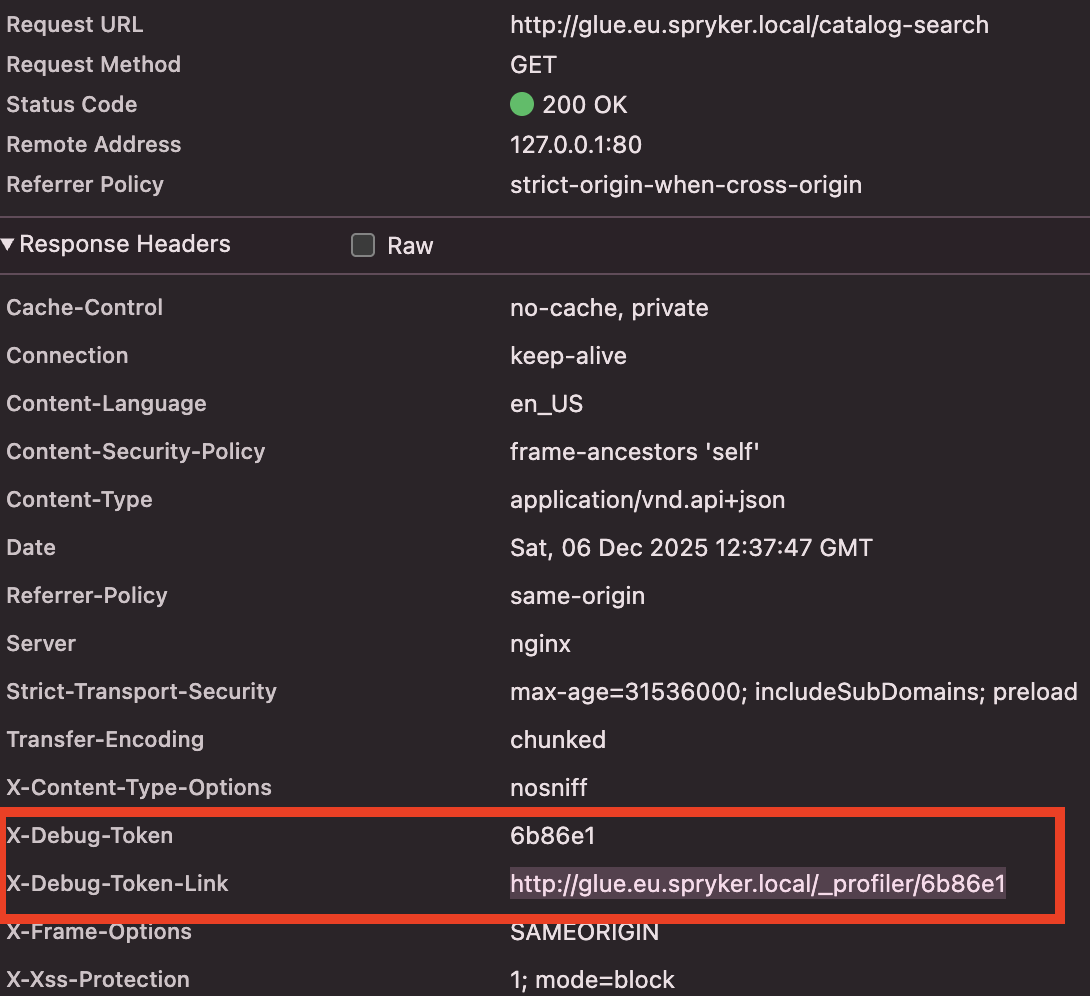
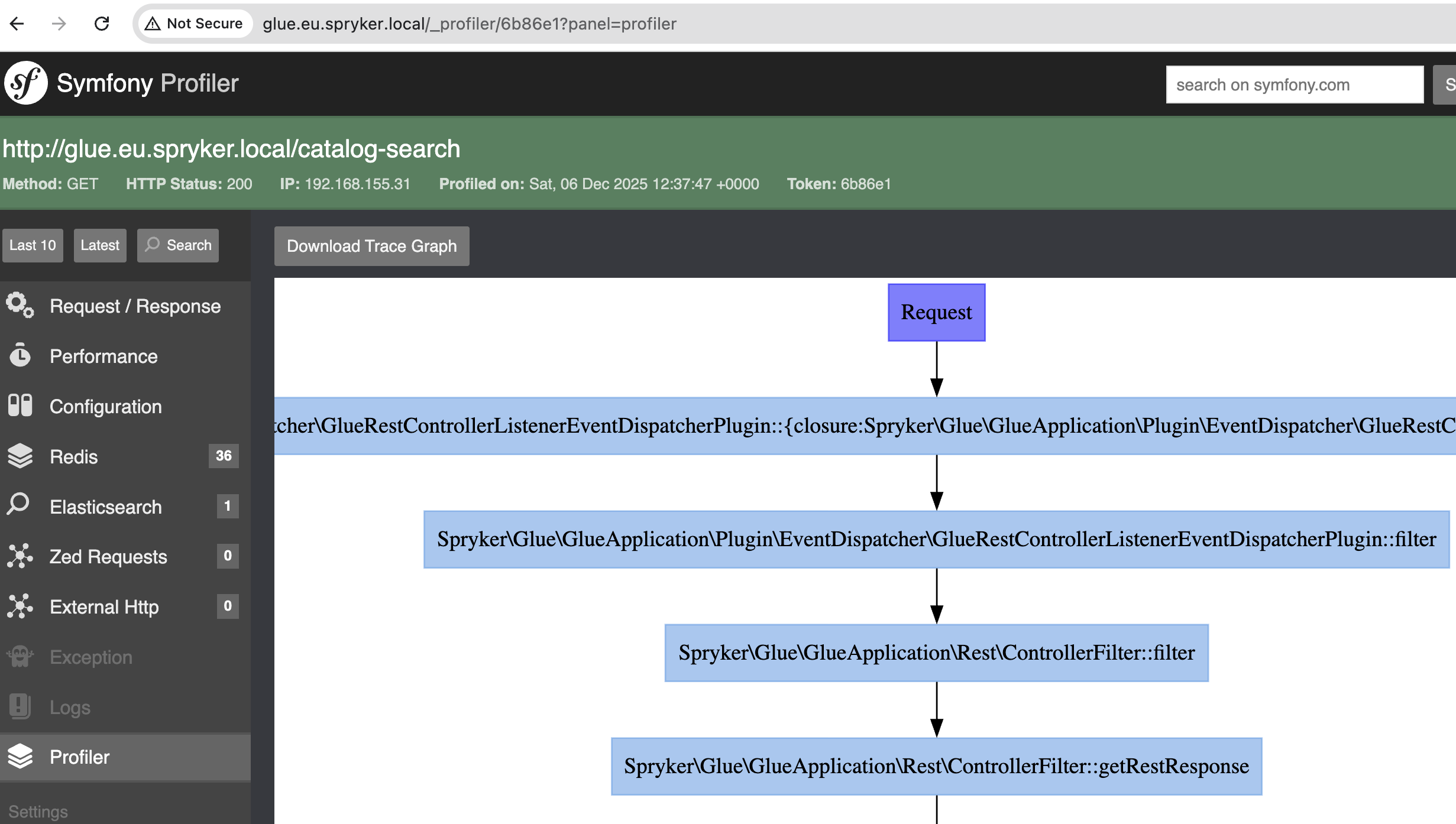
- Via response headers: Each API response includes an
X-Debug-Tokenheader containing the profile token. - Via profiler URL: Access the profiler interface at
/_profiler/{token}where{token}is the value from theX-Debug-Tokenheader.
Example workflow:
Additional profiling with XHProf
If the xhprof extension is installed and the Profiler module is integrated, the Web Profiler also includes detailed performance profiling data through XHProf. This provides function-level performance analysis and call graphs.
For information on integrating the Profiler module, see Integrate Profiler Module.
Thank you!
For submitting the form