
Install Back Office Assistant
Edit on GitHubBack Office Assistant is an AI-powered chat widget embedded in the Back Office. It lets admin users ask natural language questions, navigate the Back Office, manage orders, and create or update discounts through a conversational interface. This document describes how to install the Back Office Assistant feature.
Install the feature core
Follow the steps in the following sections to install the Back Office Assistant feature core.
Prerequisites
Install the required features:
| NAME | VERSION | INSTALLATION GUIDE |
|---|---|---|
| AI Commerce | 202608.0 | Install AI Commerce |
1) Install the required modules
composer require spryker-feature/ai-commerce
2) Generate transfers and run database migration
console transfer:generate
console propel:install
3) Configure AI models for Back Office Assistant
The Back Office Assistant uses a dedicated named AI configuration for the intent router and each agent. Each configuration is identified by a constant defined at the project level and registered in config/Shared/config_ai.php.
Using a dedicated AI model configuration per agent is recommended because each named configuration is tracked separately in the AiFoundation audit log. This lets you isolate and review all AI calls made by each agent independently from other AI features in your project.
First, define the configuration name constants and the Back Office setting keys at the project level:
src/Pyz/Shared/AiCommerce/AiCommerceConstants.php
<?php

declare(strict_types = 1);

namespace Pyz\Shared\AiCommerce;

use SprykerFeature\Shared\AiCommerce\AiCommerceConstants as SprykerFeatureAiCommerceConstants;

interface AiCommerceConstants extends SprykerFeatureAiCommerceConstants
{
    public const string CONFIGURATION_KEY_OPENAI_API_TOKEN = 'ai_vendor:openai:general:api_token';
    public const string CONFIGURATION_KEY_BACKOFFICE_ASSISTANT_OPENAI_MODEL = 'ai_commerce:backoffice_assistant:ai_vendor:openai_model';

    public const string AI_CONFIGURATION_INTENT_ROUTER_OPENAI = 'AI_COMMERCE:AI_CONFIGURATION_INTENT_ROUTER_OPENAI';
    public const string AI_CONFIGURATION_GENERAL_AGENT_OPENAI = 'AI_COMMERCE:AI_CONFIGURATION_GENERAL_AGENT_OPENAI';
    public const string AI_CONFIGURATION_ORDER_MANAGEMENT_OPENAI = 'AI_COMMERCE:AI_CONFIGURATION_ORDER_MANAGEMENT_OPENAI';
    public const string AI_CONFIGURATION_DISCOUNT_MANAGEMENT_OPENAI = 'AI_COMMERCE:AI_CONFIGURATION_DISCOUNT_MANAGEMENT_OPENAI';
    public const string AI_CONFIGURATION_FORM_FILL_OPENAI = 'AI_COMMERCE:AI_CONFIGURATION_FORM_FILL_OPENAI';
}
Then register the configuration entries in config/Shared/config_ai.php. The API token and model are resolved at runtime from the Back Office Configuration UI using the CONFIGURATION_REFERENCE_PREFIX:
config/Shared/config_ai.php
<?php

use Pyz\Shared\AiCommerce\AiCommerceConstants;
use Spryker\Shared\AiFoundation\AiFoundationConstants;

$config[AiFoundationConstants::AI_CONFIGURATIONS][AiCommerceConstants::AI_CONFIGURATION_INTENT_ROUTER_OPENAI] = [
    'provider_name' => AiFoundationConstants::PROVIDER_OPENAI_RESPONSES,
    'provider_config' => [
        'key' => AiFoundationConstants::CONFIGURATION_REFERENCE_PREFIX . AiCommerceConstants::CONFIGURATION_KEY_OPENAI_API_TOKEN,
        'model' => AiFoundationConstants::CONFIGURATION_REFERENCE_PREFIX . AiCommerceConstants::CONFIGURATION_KEY_BACKOFFICE_ASSISTANT_OPENAI_MODEL,
        'parameters' => [
            'reasoning' => [
                'effort' => 'none',
            ],
        ],
    ],
];

$config[AiFoundationConstants::AI_CONFIGURATIONS][AiCommerceConstants::AI_CONFIGURATION_GENERAL_AGENT_OPENAI] = [
    'provider_name' => AiFoundationConstants::PROVIDER_OPENAI_RESPONSES,
    'provider_config' => [
        'key' => AiFoundationConstants::CONFIGURATION_REFERENCE_PREFIX . AiCommerceConstants::CONFIGURATION_KEY_OPENAI_API_TOKEN,
        'model' => AiFoundationConstants::CONFIGURATION_REFERENCE_PREFIX . AiCommerceConstants::CONFIGURATION_KEY_BACKOFFICE_ASSISTANT_OPENAI_MODEL,
        'parameters' => [
            'reasoning' => [
                'effort' => 'none',
            ],
        ],
    ],
    'system_prompt' => AiFoundationConstants::CONFIGURATION_REFERENCE_PREFIX . AiCommerceConstants::CONFIGURATION_KEY_GENERAL_PURPOSE_SYSTEM_PROMPT,
];

$config[AiFoundationConstants::AI_CONFIGURATIONS][AiCommerceConstants::AI_CONFIGURATION_ORDER_MANAGEMENT_OPENAI] = [
    'provider_name' => AiFoundationConstants::PROVIDER_OPENAI_RESPONSES,
    'provider_config' => [
        'key' => AiFoundationConstants::CONFIGURATION_REFERENCE_PREFIX . AiCommerceConstants::CONFIGURATION_KEY_OPENAI_API_TOKEN,
        'model' => AiFoundationConstants::CONFIGURATION_REFERENCE_PREFIX . AiCommerceConstants::CONFIGURATION_KEY_BACKOFFICE_ASSISTANT_OPENAI_MODEL,
        'parameters' => [
            'reasoning' => [
                'effort' => 'none',
            ],
        ],
    ],
    'system_prompt' => AiFoundationConstants::CONFIGURATION_REFERENCE_PREFIX . AiCommerceConstants::CONFIGURATION_KEY_ORDER_MANAGEMENT_SYSTEM_PROMPT,
];

$config[AiFoundationConstants::AI_CONFIGURATIONS][AiCommerceConstants::AI_CONFIGURATION_DISCOUNT_MANAGEMENT_OPENAI] = [
    'provider_name' => AiFoundationConstants::PROVIDER_OPENAI_RESPONSES,
    'provider_config' => [
        'key' => AiFoundationConstants::CONFIGURATION_REFERENCE_PREFIX . AiCommerceConstants::CONFIGURATION_KEY_OPENAI_API_TOKEN,
        'model' => AiFoundationConstants::CONFIGURATION_REFERENCE_PREFIX . AiCommerceConstants::CONFIGURATION_KEY_BACKOFFICE_ASSISTANT_OPENAI_MODEL,
        'parameters' => [
            'reasoning' => [
                'effort' => 'none',
            ],
        ],
    ],
    'system_prompt' => AiFoundationConstants::CONFIGURATION_REFERENCE_PREFIX . AiCommerceConstants::CONFIGURATION_KEY_DISCOUNT_MANAGEMENT_SYSTEM_PROMPT,
];

$config[AiFoundationConstants::AI_CONFIGURATIONS][AiCommerceConstants::AI_CONFIGURATION_FORM_FILL_OPENAI] = [
    'provider_name' => AiFoundationConstants::PROVIDER_OPENAI_RESPONSES,
    'provider_config' => [
        'key' => AiFoundationConstants::CONFIGURATION_REFERENCE_PREFIX . AiCommerceConstants::CONFIGURATION_KEY_OPENAI_API_TOKEN,
        'model' => AiFoundationConstants::CONFIGURATION_REFERENCE_PREFIX . AiCommerceConstants::CONFIGURATION_KEY_BACKOFFICE_ASSISTANT_OPENAI_MODEL,
        'parameters' => [
            'reasoning' => [
                'effort' => 'none',
            ],
        ],
    ],
    'system_prompt' => AiFoundationConstants::CONFIGURATION_REFERENCE_PREFIX . AiCommerceConstants::CONFIGURATION_KEY_FORM_FILL_SYSTEM_PROMPT,
];
The example above registers OpenAI configurations. To offer AWS Bedrock and Anthropic as selectable providers for each agent, see Configure multiple AI providers.
Finally, point the intent router and each agent at its AI configuration by overriding the corresponding method in src/Pyz/Zed/AiCommerce/AiCommerceConfig.php. Each method reads the vendor selected in the Back Office and returns the matching configuration name, defaulting to the OpenAI configuration:
src/Pyz/Zed/AiCommerce/AiCommerceConfig.php
<?php

declare(strict_types = 1);

namespace Pyz\Zed\AiCommerce;

use Pyz\Shared\AiCommerce\AiCommerceConstants;
use SprykerFeature\Zed\AiCommerce\AiCommerceConfig as SprykerFeatureAiCommerceConfig;

class AiCommerceConfig extends SprykerFeatureAiCommerceConfig
{
    /**
     * @return string|null
     */
    public function getIntentRouterAiConfigurationName(): ?string
    {
        return AiCommerceConstants::AI_CONFIGURATION_INTENT_ROUTER_OPENAI;
    }

    /**
     * @return string|null
     */
    public function getGeneralAgentAiConfigurationName(): ?string
    {
        return AiCommerceConstants::AI_CONFIGURATION_GENERAL_AGENT_OPENAI;
    }

    /**
     * @return string|null
     */
    public function getOrderManagementAgentAiConfigurationName(): ?string
    {
        return AiCommerceConstants::AI_CONFIGURATION_ORDER_MANAGEMENT_OPENAI;
    }

    /**
     * @return string|null
     */
    public function getDiscountManagementAgentAiConfigurationName(): ?string
    {
        return AiCommerceConstants::AI_CONFIGURATION_DISCOUNT_MANAGEMENT_OPENAI;
    }

    /**
     * @return string|null
     */
    public function getFormFillAgentAiConfigurationName(): ?string
    {
        return AiCommerceConstants::AI_CONFIGURATION_FORM_FILL_OPENAI;
    }
}
4) Set up behavior
Register the following plugins to integrate the Back Office Assistant agents. To add a new agent instead of, or in addition to, the built-in ones, see Add a custom Back Office Assistant agent.
| PLUGIN | SPECIFICATION | PREREQUISITES | NAMESPACE |
|---|---|---|---|
GeneralAgentPlugin |
Registers the General Purpose agent that answers Back Office navigation and how-to questions. | SprykerFeature\Zed\AiCommerce\Communication\Plugin\Agent |
|
OrderManagementAgentPlugin |
Registers the Order Management agent that provides read-only access to order and OMS data. | SprykerFeature\Zed\AiCommerce\Communication\Plugin\Agent |
|
DiscountManagementAgentPlugin |
Registers the Discount Management agent that can create and update discounts. | SprykerFeature\Zed\AiCommerce\Communication\Plugin\Agent |
|
FormFillAgentPlugin |
Registers the Form Fill agent that fills Back Office forms using natural language instructions. | SprykerFeature\Zed\AiCommerce\Communication\Plugin\Agent |
src/Pyz/Zed/AiCommerce/AiCommerceDependencyProvider.php
<?php

namespace Pyz\Zed\AiCommerce;

use SprykerFeature\Zed\AiCommerce\AiCommerceDependencyProvider as SprykerFeatureAiCommerceDependencyProvider;
use SprykerFeature\Zed\AiCommerce\Communication\Plugin\Agent\DiscountManagementAgentPlugin;
use SprykerFeature\Zed\AiCommerce\Communication\Plugin\Agent\FormFillAgentPlugin;
use SprykerFeature\Zed\AiCommerce\Communication\Plugin\Agent\GeneralAgentPlugin;
use SprykerFeature\Zed\AiCommerce\Communication\Plugin\Agent\OrderManagementAgentPlugin;

class AiCommerceDependencyProvider extends SprykerFeatureAiCommerceDependencyProvider
{
    /**
     * @return array<\SprykerFeature\Zed\AiCommerce\Dependency\BackofficeAssistant\BackofficeAssistantAgentPluginInterface>
     */
    protected function getBackofficeAssistantAgentPlugins(): array
    {
        return [
            new GeneralAgentPlugin(),
            new OrderManagementAgentPlugin(),
            new DiscountManagementAgentPlugin(),
            new FormFillAgentPlugin(),
        ];
    }
}
Register the following plugins in AiFoundationDependencyProvider:
| PLUGIN | SPECIFICATION | PREREQUISITES | NAMESPACE |
|---|---|---|---|
BackofficeAssistantSsePreToolCallPlugin |
Streams a Server-Sent Event to the browser before each tool call. | SprykerFeature\Zed\AiCommerce\Communication\Plugin\AiFoundation |
|
BackofficeAssistantSsePostToolCallPlugin |
Streams a Server-Sent Event to the browser after each tool call. | SprykerFeature\Zed\AiCommerce\Communication\Plugin\AiFoundation |
|
AuditLogPostToolCallPlugin |
Records tool call results in the AI interaction audit log. | Spryker\Zed\AiFoundation\Communication\Plugin |
|
NavigationToolSetPlugin |
Registers tools for resolving Back Office navigation paths. | SprykerFeature\Zed\AiCommerce\Communication\Plugin\AiFoundation |
|
OrderManagementToolSetPlugin |
Registers tools for fetching order lists and OMS process information. | SprykerFeature\Zed\AiCommerce\Communication\Plugin\AiFoundation |
|
OrderDetailsToolSetPlugin |
Registers tools for fetching detailed order data by reference or ID. | SprykerFeature\Zed\AiCommerce\Communication\Plugin\AiFoundation |
|
DiscountManagementToolSetPlugin |
Registers tools for reading, creating, and updating discounts. | SprykerFeature\Zed\AiCommerce\Communication\Plugin\AiFoundation |
|
FormFillToolSetPlugin |
Registers tools for filling Back Office form fields. | SprykerFeature\Zed\AiCommerce\Communication\Plugin\AiFoundation |
src/Pyz/Zed/AiFoundation/AiFoundationDependencyProvider.php
<?php

namespace Pyz\Zed\AiFoundation;

use Spryker\Zed\AiFoundation\AiFoundationDependencyProvider as SprykerAiFoundationDependencyProvider;
use Spryker\Zed\AiFoundation\Communication\Plugin\AuditLogPostPromptPlugin;
use Spryker\Zed\AiFoundation\Communication\Plugin\AuditLogPostToolCallPlugin;
use Spryker\Zed\AiFoundation\Communication\Plugin\Log\AiInteractionHandlerPlugin;
use SprykerFeature\Zed\AiCommerce\Communication\Plugin\AiFoundation\BackofficeAssistantSsePostToolCallPlugin;
use SprykerFeature\Zed\AiCommerce\Communication\Plugin\AiFoundation\BackofficeAssistantSsePreToolCallPlugin;
use SprykerFeature\Zed\AiCommerce\Communication\Plugin\AiFoundation\DiscountManagementToolSetPlugin;
use SprykerFeature\Zed\AiCommerce\Communication\Plugin\AiFoundation\FormFillToolSetPlugin;
use SprykerFeature\Zed\AiCommerce\Communication\Plugin\AiFoundation\NavigationToolSetPlugin;
use SprykerFeature\Zed\AiCommerce\Communication\Plugin\AiFoundation\OrderDetailsToolSetPlugin;
use SprykerFeature\Zed\AiCommerce\Communication\Plugin\AiFoundation\OrderManagementToolSetPlugin;

class AiFoundationDependencyProvider extends SprykerAiFoundationDependencyProvider
{
    /**
     * @return array<\Spryker\Zed\AiFoundation\Dependency\Plugin\PostPromptPluginInterface>
     */
    protected function getPostPromptPlugins(): array
    {
        return [
            new AuditLogPostPromptPlugin(),
        ];
    }

    /**
     * @return array<\Spryker\Zed\AiFoundation\Dependency\Plugin\PreToolCallPluginInterface>
     */
    protected function getPreToolCallPlugins(): array
    {
        return [
            new BackofficeAssistantSsePreToolCallPlugin(),
        ];
    }

    /**
     * @return array<\Spryker\Zed\AiFoundation\Dependency\Plugin\PostToolCallPluginInterface>
     */
    protected function getPostToolCallPlugins(): array
    {
        return [
            new BackofficeAssistantSsePostToolCallPlugin(),
            new AuditLogPostToolCallPlugin(),
        ];
    }

    /**
     * @return array<\Spryker\Shared\Log\Dependency\Plugin\LogHandlerPluginInterface>
     */
    protected function getAiInteractionLogHandlerPlugins(): array
    {
        return [
            new AiInteractionHandlerPlugin(),
        ];
    }

    /**
     * @return array<\Spryker\Zed\AiFoundation\Dependency\Tools\ToolSetPluginInterface>
     */
    protected function getAiToolSetPlugins(): array
    {
        return [
            new NavigationToolSetPlugin(),
            new OrderManagementToolSetPlugin(),
            new OrderDetailsToolSetPlugin(),
            new DiscountManagementToolSetPlugin(),
            new FormFillToolSetPlugin(),
        ];
    }
}
Register the Twig plugin to inject the chat widget into the Back Office layout:
| PLUGIN | SPECIFICATION | PREREQUISITES | NAMESPACE |
|---|---|---|---|
AiCommerceTwigPlugin |
Registers Twig functions and variables required by the Back Office Assistant chat widget. | SprykerFeature\Zed\AiCommerce\Communication\Plugin\Twig |
src/Pyz/Zed/Twig/TwigDependencyProvider.php
<?php

namespace Pyz\Zed\Twig;

use SprykerFeature\Zed\AiCommerce\Communication\Plugin\Twig\AiCommerceTwigPlugin;
use Spryker\Zed\Twig\TwigDependencyProvider as SprykerTwigDependencyProvider;

class TwigDependencyProvider extends SprykerTwigDependencyProvider
{
    /**
     * @return array<\Spryker\Shared\TwigExtension\Dependency\Plugin\TwigPluginInterface>
     */
    protected function getTwigPlugins(): array
    {
        return [
            // ... other plugins
            new AiCommerceTwigPlugin(),
        ];
    }
}
In the Back Office, make sure the chat widget icon is visible in the Back Office layout after enabling the feature.
5) Sync configuration
Define the AI configuration and model settings for the Back Office Assistant in data/configuration/ai_commerce.configuration.yml. These settings back the configuration:: references registered in config/Shared/config_ai.php, so they must exist before syncing:
data/configuration/ai_commerce.configuration.yml
features:
    - key: ai_commerce
      tabs:
          - key: backoffice_assistant
            enabled: true
            groups:
                - key: ai_vendor
                  name: AI Vendor
                  description: AI configuration and vendor model used for the Backoffice Assistant. Only the model field matching the selected AI Configuration is shown.
                  enabled: true
                  order: 1
                  scopes:
                      - global
                  settings:
                      - key: ai_configuration
                        name: AI Configuration
                        description: AI configuration used for all Backoffice Assistant agents.
                        type: radio
                        default_value: 'AI_COMMERCE:AI_CONFIGURATION_BACKOFFICE_ASSISTANT_OPENAI'
                        enabled: true
                        secret: false
                        storefront: false
                        order: 1
                        scopes:
                            - global
                        options:
                            - value: 'AI_COMMERCE:AI_CONFIGURATION_BACKOFFICE_ASSISTANT_OPENAI'
                              label: OpenAI
                            - value: 'AI_COMMERCE:AI_CONFIGURATION_BACKOFFICE_ASSISTANT_AWS'
                              label: AWS Bedrock
                            - value: 'AI_COMMERCE:AI_CONFIGURATION_BACKOFFICE_ASSISTANT_ANTHROPIC'
                              label: Anthropic
                      - key: openai_model
                        name: OpenAI Model
                        description: The OpenAI model used for the Backoffice Assistant AI configuration. Model must support image input and structured output.
                        type: string
                        default_value: 'gpt-6-luna'
                        enabled: true
                        secret: false
                        storefront: false
                        order: 2
                        scopes:
                            - global
                        dependencies:
                            - when:
                                  any:
                                      - setting: ai_commerce:backoffice_assistant:ai_vendor:ai_configuration
                                        operator: equals
                                        value: 'AI_COMMERCE:AI_CONFIGURATION_BACKOFFICE_ASSISTANT_OPENAI'
                      - key: aws_model
                        name: AWS Bedrock Model
                        description: The AWS Bedrock model identifier used for the Backoffice Assistant AI configuration. Model must support image input and structured output.
                        type: string
                        default_value: 'eu.anthropic.claude-haiku-5-5'
                        enabled: true
                        secret: false
                        storefront: false
                        order: 3
                        scopes:
                            - global
                        dependencies:
                            - when:
                                  any:
                                      - setting: ai_commerce:backoffice_assistant:ai_vendor:ai_configuration
                                        operator: equals
                                        value: 'AI_COMMERCE:AI_CONFIGURATION_BACKOFFICE_ASSISTANT_AWS'
                      - key: anthropic_model
                        name: Anthropic Model
                        description: The Anthropic model used for the Backoffice Assistant AI configuration. Model must support image input and structured output.
                        type: string
                        default_value: 'claude-haiku-5-5'
                        enabled: true
                        secret: false
                        storefront: false
                        order: 4
                        scopes:
                            - global
                        dependencies:
                            - when:
                                  any:
                                      - setting: ai_commerce:backoffice_assistant:ai_vendor:ai_configuration
                                        operator: equals
                                        value: 'AI_COMMERCE:AI_CONFIGURATION_BACKOFFICE_ASSISTANT_ANTHROPIC'
Sync the Back Office Assistant configuration to the database:
console configuration:sync
6) Enable the feature
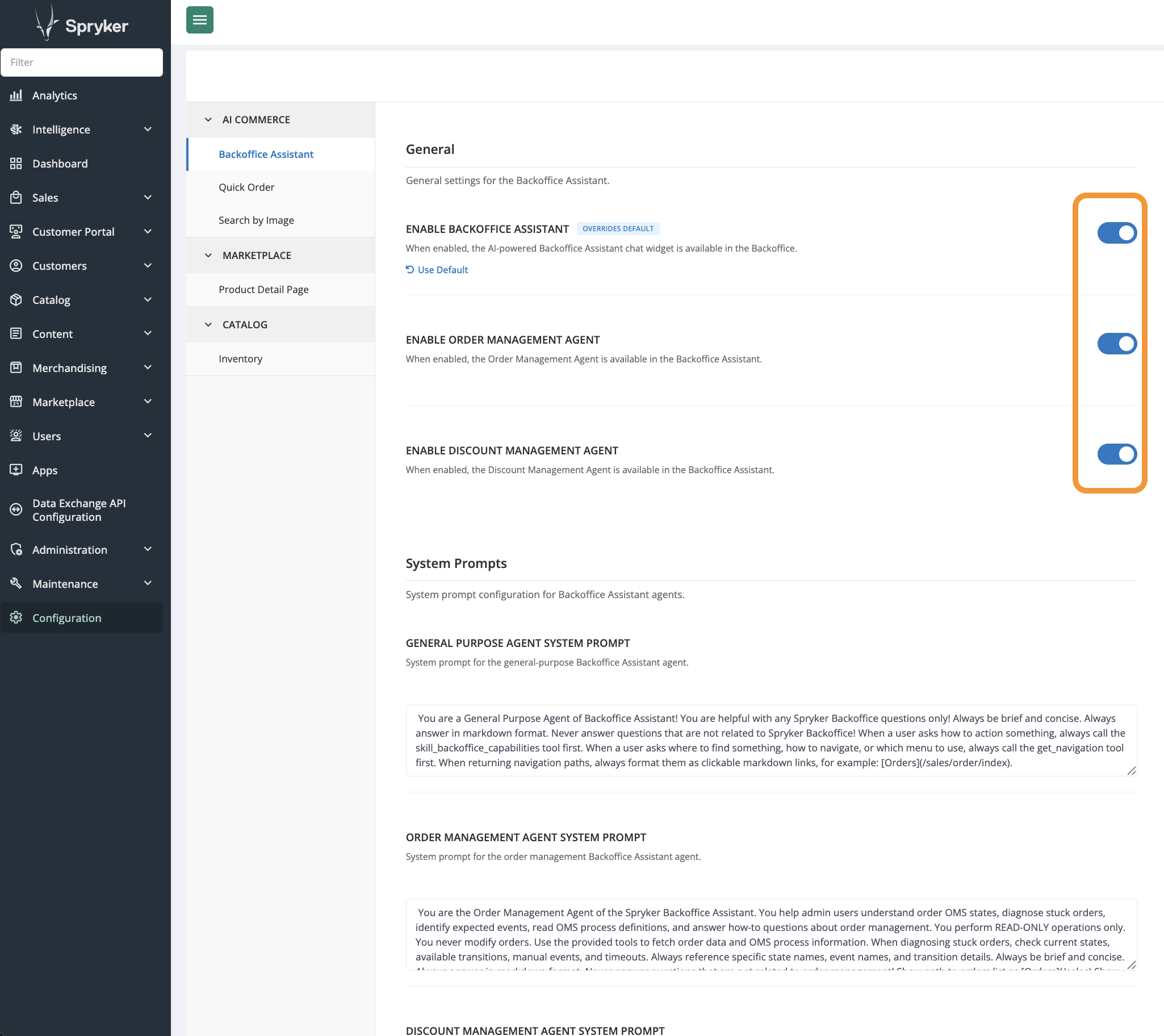
Enable the feature in the Back Office:
- In the Back Office, go to AI Commerce > Back Office Assistant > General.
- Enable Enable Back Office Assistant.
- Click Save.
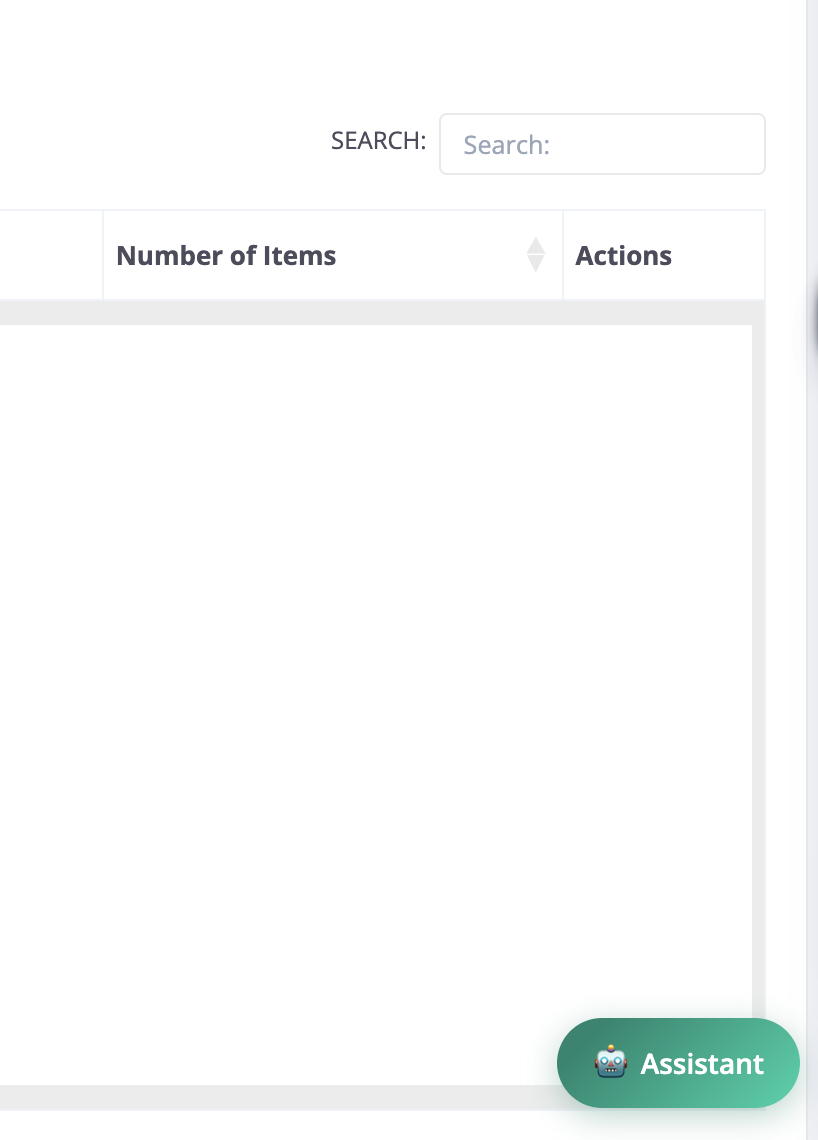
In the Back Office, make sure the Back Office Assistant chat icon is visible in the bottom-right corner of any Back Office page.
Integrate the feature frontend
1) Add the chat widget to the Back Office layout
Do this step only if you have overridden layout.twig in the Gui module at the project level. If you have not overridden this template, skip to 2) Install frontend dependencies.
In src/Pyz/Zed/Gui/Presentation/Layout/layout.twig, include the chat widget partial inside the footer_js block:
{% extends '@Spryker:Gui/Layout/layout.twig' %}

{% block footer_js %}
    {% if isBackofficeAssistantConnected is defined and isBackofficeAssistantConnected %}
        {% include '@AiCommerce/Partials/chat-widget.twig' %}
    {% endif %}
    {{ parent() }}
{% endblock %}
console cache:empty-all
console twig:cache:warmer
console router:cache:warm-up:backoffice
2) Install frontend dependencies
The chat widget requires the marked and dompurify npm packages for rendering and sanitizing Markdown responses.
Install the required npm packages:
npm install marked@^15.0.0 dompurify@^3.2.0
3) Apply the frontend changes
docker/sdk cli console frontend:project:install-dependencies
docker/sdk cli console frontend:zed:build
In the Back Office, open the Back Office Assistant chat widget and send a message. Make sure the response is rendered correctly and the widget is functional.

Thank you!
For submitting the form