
Customization Workflow
Edit on GitHubAvailability
The spryker-customization skill ships with the spryker-ai-dev-sdk Claude Code plugin. Version 0.6.4 of spryker-sdk/ai-dev, which ships plugin version 0.4.0, adds the conditional Cypress end-to-end phase described on this page.
To update the Claude Code plugin, run /plugin in Claude Code and update spryker-ai-dev-sdk from the spryker-plugins-official marketplace to the latest version. For installation instructions, see Claude Code.
What the skill does
spryker-customization is the AI Dev SDK’s orchestrator skill. It takes a feature idea and walks it to a working, committed branch in your Spryker project by delegating focused work to the SDK’s other skills and agents.
You describe what you want in one sentence. From there, spryker-customization invokes the right specialist at each step — for example, spryker-feature-expert to research which Spryker primitives apply, product-requirement-document to write the spec, spryker-refresher to run the post-change commands, spryker-verifier to check the feature against the running app. It stops at a commit gate where you approve the diff before it is saved to git.
You do not write code during the run. You make three decisions: what quality bar you want, whether the plan looks right, and whether the final diff goes in.
Workflow at a glance
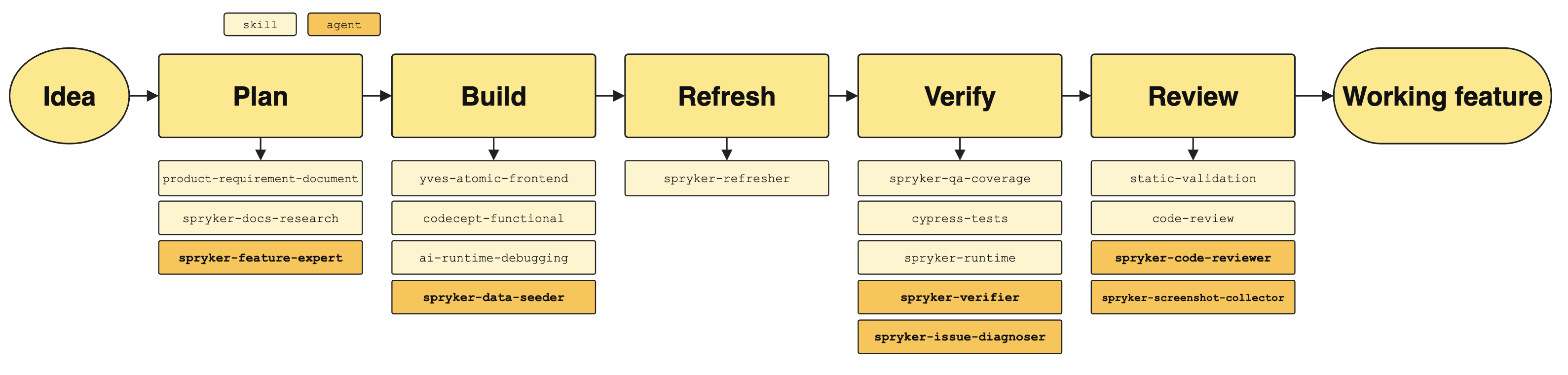
Each phase delegates to specific skills (pale yellow) and agents (deep amber) — for example, the spryker-feature-expert agent researches the relevant Spryker domain during planning, and the spryker-verifier agent drives the running storefront and back office to confirm the feature actually works.
What you get at the end
- A new branch (
ai-customize/<slug>) with the feature implemented - Code in your project layer only — your vendor directory is never edited
- A clean refresh — caches, transfers, and frontend builds are all up to date
- Per-criterion verification results with real evidence from the running app — what passed, what did not, why
- A code-review report against the staged diff
- Tests (when you pick the MVP bar)
- Cypress end-to-end coverage for the feature (when you pick the MVP bar)
- The commit waits for your approval; nothing is pushed
If you wanted a product requirement document too, the skill can produce one — by delegating to product-requirement-document — as a reusable document under resources/plan/PRD/ before the build starts.
Choose your output: PoC or production
You pick one of two bars at the start. The skill asks once and shapes the rest of the run accordingly.
PoC — the fastest path to a feature that works. The orchestrator collapses the implementation into the minimum number of classes, lets values be hardcoded where convenient, sticks to a single locale, and skips test generation. Pick this for demos, sales conversations, and quick experiments.
MVP — production-grade output. The orchestrator uses Spryker’s canonical extension chain (plugin stacks, factory expanders, dependency injection, project-layer transfer and schema XML), covers every configured locale, adds ACL where the feature touches the back office, and writes tests for non-trivial logic. Pick this for code you intend to ship.
Both bars produce a visually integrated feature — new UI elements reuse the project’s atomic design components, never raw HTML pasted onto a styled page.
Cypress end-to-end coverage
Once every acceptance criterion is verified green and any visual sign-offs are done, the workflow runs a Cypress phase. It delegates to the cypress-tests skill, which decides what the feature needs against your project’s existing suite:
- Fix a spec the feature broke
- Improve assertions that would have missed the change
- Add a new spec for the feature
The phase then runs the affected specs and the project’s quality gate rather than the whole suite.
The phase is on by default for the MVP bar and off for PoC, and you can switch it either way at the start. It runs only when the feature is visible on an end-to-end surface and your project has a Cypress suite. A skip is always reported with its reason, never silent.
The phase deliberately runs last, after the self-correction loop has converged, so no spec is written against an implementation still in flux. If a spec goes red because the feature is wrong rather than the test, that is treated as a missed acceptance criterion and feeds back into the self-correction loop.
Where you decide
The skill runs autonomously between three decision points where it pauses for you:
- Before planning — you pick PoC or MVP, and which optional phases run (tests, demo screenshots, etc.).
- Before any code is written — the orchestrator presents the acceptance criteria, the list of files it intends to edit, and one consolidated round of clarifying questions. Nothing touches the disk until you confirm.
- Before the commit — the final diff is staged for you to review. You approve, refuse, or adjust. Branches stay local; pushing is your call.
If verification fails on an acceptance criterion and the skill cannot fix it after a few tries, it surfaces what was attempted and asks you how to proceed rather than silently giving up.
Requirements
- A running Spryker project (Docker SDK up) with the AI Dev SDK installed
- An AI tool with the SDK’s skills loaded — either through the Claude Code plugin or via
ai-dev:setupfor another supported tool
Thank you!
For submitting the form