
Workflows, Skills, and Agents
Edit on GitHubOverview
The AI Dev SDK ships five ready-made workflows, more than 30 skills, and six agents that codify common Spryker practice — from turning a demoshop clone into a customer project, to building features, fixing bugs, and upgrading releases. Instead of teaching your AI assistant Spryker’s conventions prompt by prompt, you install workflows that already know them.
The skills and agents reach your project in two ways:
- Via the
ai-dev:setupconsole command — copies the skills and agents into your project’s AI-tool directories (.claude/skills/+.claude/agents/,.windsurf/skills/+.windsurf/agents/, and so on) - for every AI tool listed under Generated files per AI tool. Codex CLI has no agents directory, so agents are skipped for that tool.
- Via the Claude Code plugin — for Claude Code users, the Claude Code plugin installs the same skills and agents through the official marketplace, no console command required.
Both delivery paths read from the same source files — the plugin just packages them for marketplace installation.
What is the difference between a skill and an agent?
- Skills load into the active chat on demand. Use them when you want the assistant to follow a specific workflow (write a product requirement document, refresh caches, run QA).
- Agents are isolated sub-conversations the assistant delegates to. Use them when you want focused, single-purpose work done in its own context window (verify a behavior, diagnose a failure).
You do not need to remember the names — the assistant picks the right skill or agent from your prompt. The tables below explain what each one does so you know what to expect.
Available workflows and wizards
Five shipped workflows cover the work most projects need on day one, so you get value before you write anything of your own. Each has its own page, listed under this one in the sidebar:
| Workflow | Skill | What it does |
|---|---|---|
| Project Starter Wizard | project-starter-wizard |
Turns a fresh demoshop clone into your project |
| Customization Workflow | spryker-customization |
Builds a feature from a product requirement document to a committed branch |
| Bugfix Workflow | spryker-bugfix |
Drives a bug to a validated, QA-accepted fix |
| Upgrade Workflow | spryker-upgrade |
Upgrades a customized project to a newer Spryker release |
| Profiler Workflow | spryker-profiler |
Reads the Spryker WebProfiler as hard performance numbers |
The first four are orchestrators: they own a full workflow and delegate each stage to the specialist skills and agents listed below. Alongside them, product-requirement-document turns a feature idea into a research-grounded spec, so you can go from idea to specification to implementation without leaving your assistant.
Composable by design
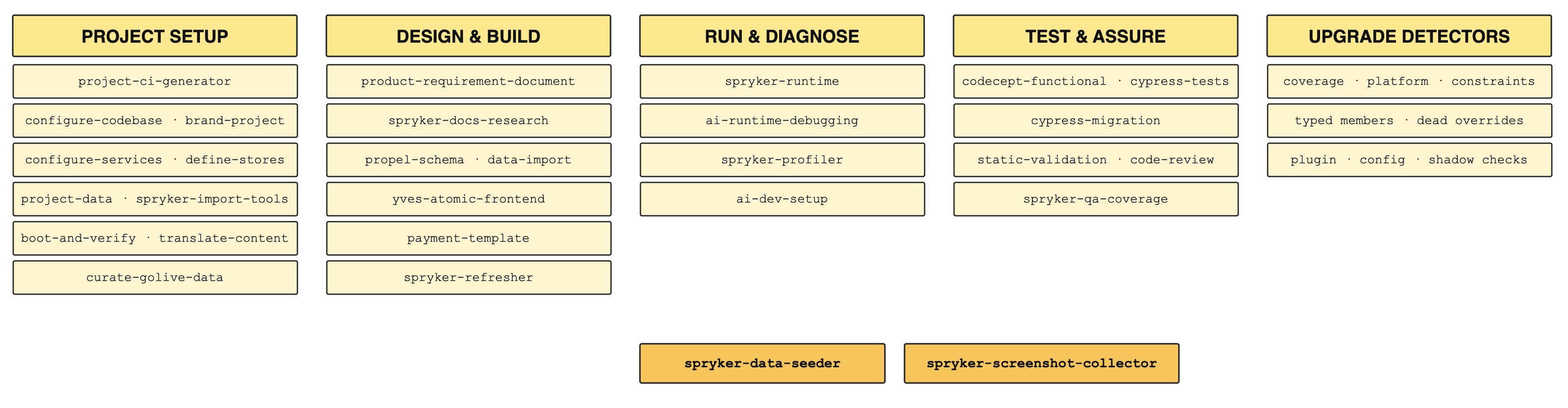
Each skill covers one stage of work and nothing more — research a feature, seed test data, run static validation, drive the running app, capture screenshots. Nothing is bundled into a single monolithic assistant, so you compose the stages into whatever long-running workflow your team actually runs.
This is how the orchestrator skills themselves are built. spryker-bugfix does not reimplement testing or validation — it calls codecept-functional, static-validation, code-review, and spryker-qa-coverage in sequence, and delegates isolated work to the agents. Your own workflows compose the same building blocks the same way.
Adapt the shipped workflows to your process. The four orchestrators are a baseline, not a prescription. Every team runs a different process — different review gates, different definition of done, different tracker. Because the stages are separate, you can reorder them, skip the ones you do not need, or drop your own stage in between. Ask for the workflow you want in your own words and the assistant assembles it from the installed skills.
Use the shipped skills as a template for your own. Every skill is plain Markdown with frontmatter, and every one ships a README documenting its flow, design decisions, and limits — linked in the Reference column of the tables below. Read the skill closest to what you need, then write your own the same way: your team’s release checklist, your onboarding walkthrough, your project-specific conventions. The result is AI-assisted development shaped by how your team works rather than by a fixed set of commands.
How to invoke
In most cases you do not need to call a skill or agent by name. Describe what you want — “build this feature”, “verify the new fee shows on the cart”, “write a product requirement document for…” — and the assistant matches your wording to the right skill or agent from the set installed in your project.
If you want to invoke one explicitly:
- Claude Code plugin — every skill is also available as a slash command, shown in the Command column below. Type the command (for example
/spryker-ai-dev-sdk:spryker-customization) and the skill loads into the current chat. - Other AI tools — invocation follows the tool’s own convention for skills and agents. In Cursor, Windsurf, Copilot, OpenCode, and Codex CLI, the skills and agents land in the tool-specific directories (
.cursor/,.windsurf/, etc.) and are picked up automatically by your assistant. Generated files per AI tool lists the output paths per tool. - Agents (subagents) are not invoked by the user directly — they are spawned by the assistant or by a parent skill when the work calls for an isolated context. You can suggest one by name in your prompt (“use the spryker-verifier to…”), but the assistant decides when to spawn.
Skills
Skills are delivered through ai-dev:setup (all supported AI tools) or the Claude Code plugin.
Every skill ships a README in its own directory in the plugin repository, covering its full flow, design decisions, and known limits. The Reference column links to it — use it when the summary here is not enough.
Orchestrator skills
These skills own a full workflow and delegate each stage to the specialist skills and agents below. Each has its own page.
| Skill | Command | Purpose | Benefits | Reference |
|---|---|---|---|---|
project-starter-wizard |
/spryker-ai-dev-sdk:project-starter-wizard |
Turn a fresh clone of a demoshop into the customer’s project | One developer interview up front, then nine orchestrated steps to a verified running shop; a resumable state file survives interruptions | README |
spryker-customization |
/spryker-ai-dev-sdk:spryker-customization |
Walk a product requirement document or set of acceptance criteria through to a committed branch | One workflow drives the full build; quality bar (PoC or MVP) chosen up-front; never auto-commits | README |
spryker-bugfix |
/spryker-ai-dev-sdk:spryker-bugfix |
Drive a bug from an optional tracker ticket or a plain description through to a committed, validated, QA-accepted fix | Orchestrates reproduce, root cause, minimal fix, functional test, static validation, review, QA, and final verification; a shared attempt budget loops back on any failed gate; Autonomous mode adds a pushed draft PR with a remote CI watch loop | README |
spryker-upgrade |
/spryker-ai-dev-sdk:spryker-upgrade |
Upgrade the project’s modules and features to a newer Spryker release | Checks first whether the customizations are covered by tests at all, resolves the constraint blockers that stop a release-group bump, then detects the silent damage a heavily customized project would otherwise ship | README |
Project setup skills
The project-starter-wizard runs these as its steps, and each also works standalone on an existing project.
| Skill | Command | Purpose | Benefits | Reference |
|---|---|---|---|---|
project-ci-generator |
/spryker-ai-dev-sdk:project-ci-generator |
Transform an inherited product-style CI setup into a single, lean project CI pipeline | Reads the CI that actually exists rather than applying a template; proposes a keep/drop plan for approval before deleting anything; ports the same jobs to GitLab or Bitbucket | README |
configure-codebase |
/spryker-ai-dev-sdk:configure-codebase |
Register a custom namespace instead of Pyz and wire autoload, frontend build, and Codeception to resolve it |
One pass covers every place the namespace must be declared, so the project builds, lints, and tests under its own name | README |
brand-project |
/spryker-ai-dev-sdk:brand-project |
Apply or change the project’s brand identity — name, development domain, Docker namespace, palette, and logo | Repeatable any time, not only at project start; works pre- or post-boot | README |
configure-services |
/spryker-ai-dev-sdk:configure-services |
Change what infrastructure the project runs on, or build a new environment deploy file | Surgical edits to the keys it owns; neighboring deploy-file blocks stay untouched | README |
define-stores |
/spryker-ai-dev-sdk:define-stores |
Create or redefine a DMS project’s stores and region before the first boot | Clears the hardcoded store and locale literals that otherwise abort the boot | README |
project-data |
/spryker-ai-dev-sdk:project-data |
Populate, reshape, reduce, clean up, or remove the project’s import data | One skill for every data/import change — adapt the demo shop to your stores, generate a catalog from images, or start with no demo data at all |
README |
spryker-import-tools |
/spryker-ai-dev-sdk:spryker-import-tools |
Read, filter, edit, and validate data import CSV files and manifests | Reliable where shell tools corrupt multi-line quoted fields; static validation catches boot-aborting data in seconds | README |
boot-and-verify |
/spryker-ai-dev-sdk:boot-and-verify |
Take a transformed project from “files written” to “verified running” | Per-store verification of storefront, Back Office, search, and queues; an independent verifier agent gives the verdict | README |
curate-golive-data |
/spryker-ai-dev-sdk:curate-golive-data |
Make the data the project keeps production-safe before go-live | Resolves the go-live warnings the data and boot steps surface — placeholder tax rates, Spryker CDN imagery, demo accounts | README |
translate-content |
/spryker-ai-dev-sdk:translate-content |
Translate storefront content into a project locale | Strictly per-locale and opt-in; covers glossary as well as catalog, CMS, navigation, and labels | README |
Development skills
| Skill | Command | Purpose | Benefits | Reference |
|---|---|---|---|---|
ai-dev-setup |
/spryker-ai-dev-sdk:ai-dev-setup |
Generate rules, an agents/context file, and skills for the project and the chosen AI tool | One command sets up consistent AI tooling for the whole team; also refreshes the rules and context file from the latest upstream content | README |
code-review |
/spryker-ai-dev-sdk:code-review |
Review staged or PR changes against Spryker coding standards | Catches Spryker-specific issues before they reach a pull request | README |
propel-schema |
/spryker-ai-dev-sdk:propel-schema |
Create and modify Propel ORM schema files | Follows Spryker schema conventions automatically | README |
data-import |
/spryker-ai-dev-sdk:data-import |
Create and modify data import CSV files and importers | Generates importers that fit Spryker’s data-import path | README |
static-validation |
/spryker-ai-dev-sdk:static-validation |
Run static analysis over only the code that changed against a base branch — PHP and frontend | Validates the diff rather than the whole project; groups PHP by changed file or by whole changed module | README |
payment-template |
/spryker-ai-dev-sdk:payment-template |
Scaffold payment method integration | Follows Spryker payment module patterns end-to-end | README |
yves-atomic-frontend |
/spryker-ai-dev-sdk:yves-atomic-frontend |
Create and override atomic design components for the Yves storefront — Twig, SCSS, and TypeScript | Components match the project’s atomic conventions; catches project-specific pitfalls such as an index.ts that replaces the core entry or a same-name component that silently shadows a core one |
README |
backoffice-frontend |
/spryker-ai-dev-sdk:backoffice-frontend |
Build or override Back Office pages — Zed Twig templates, navigation and ACL, and Back Office JavaScript and SCSS | Overrides extend core blocks instead of copying them; covers the cache warm-ups a new template, menu entry, or action needs before it shows up | README |
product-requirement-document |
/spryker-ai-dev-sdk:product-requirement-document |
Turn a feature idea into a research-grounded product requirement document before any code is written | Spec-before-code; assigns a real Spryker actor to every story; cuts ambiguity before implementation | README |
spryker-refresher |
/spryker-ai-dev-sdk:spryker-refresher |
Run the right post-change console and composer commands after edits | Owns the file-to-command mapping (codegen, caches, frontend builds, class-resolver); no missed cache rebuilds | README |
spryker-docs-research |
/spryker-ai-dev-sdk:spryker-docs-research |
Look up the right answer in official Spryker documentation | Grounds AI work in documented behavior rather than the model’s memory; falls back gracefully when MCP tools are unavailable | README |
spryker-runtime |
/spryker-ai-dev-sdk:spryker-runtime |
Drive the running Spryker application — Yves, Back Office, Merchant Portal, console, HTTP | Real authenticated sessions; read-only DB, Redis, and queue inspection; reusable building block for higher-level skills and agents | README |
ai-runtime-debugging |
/spryker-ai-dev-sdk:ai-runtime-debugging |
Inspect Spryker runtime state safely from an AI session | [AI-DEBUG] tagged-log pattern plus optional XDebug step-debug; built-in cleanup of debug instrumentation before commit |
README |
Testing and performance skills
| Skill | Command | Purpose | Benefits | Reference |
|---|---|---|---|---|
codecept-functional |
/spryker-ai-dev-sdk:codecept-functional |
Generate Codeception functional tests | Tests follow Spryker test patterns out of the box | README |
cypress-tests |
/spryker-ai-dev-sdk:cypress-tests |
Create, run, review, and validate Cypress end-to-end tests | Day-to-day E2E work against your project’s own suite — storefront, Back Office, Merchant Portal, and Glue API | README |
cypress-migration |
/spryker-ai-dev-sdk:cypress-migration |
Replace Spryker’s demoshop test suites with a project-owned Cypress baseline | One-time migration; vendors in a proven reference implementation, wires up CI, and generates the companion cypress-tests skill for the project |
README |
spryker-qa-coverage |
/spryker-ai-dev-sdk:spryker-qa-coverage |
Turn acceptance criteria into a four-bucket test plan executed against the live app | Coverage goes beyond literal acceptance criteria — happy, negative, authorization, and corner cases; reports pass/fail with real evidence | README |
spryker-profiler |
/spryker-ai-dev-sdk:spryker-profiler |
Read and configure the Spryker WebProfiler — every metric it recorded about a request | Real measurements instead of guesses; finds N+1 duplicates, Redis and search call counts, and the heaviest request; also fixes a profiler that shows no data | README |
Agents
Agents are delivered through ai-dev:setup (every supported AI tool with an agents directory) or the Claude Code plugin.
Each agent does one narrowly defined job in its own context and reports back — the “never” boundaries in the table are what make the results trustworthy.
| Agent | Purpose | Benefits |
|---|---|---|
spryker-code-reviewer |
Review code against Spryker’s coding standards and architectural rules | Deeper, Spryker-aware review than a generic linter; catches layer-architecture and module-convention issues |
spryker-feature-expert |
Answer “how does feature X work in this project / in Spryker” | Pushes back when the user’s framing reinvents an existing primitive; surfaces canonical patterns first; never edits code |
spryker-verifier |
Verify that a specific behavior holds in the running Spryker environment | Returns PASS / FAIL / BLOCKED per acceptance criterion with raw evidence; never lies green; never tries to fix |
spryker-issue-diagnoser |
Investigate why something failed and return a root cause | Reads logs, DB state, queue, search, browser console — returns a suggested direction; never attempts the fix itself |
spryker-data-seeder |
Create small additive test data through Spryker’s existing import path | Safe and incremental — CSV + data:import only; never edits code, never writes directly to the database |
spryker-screenshot-collector |
Capture screenshots and GIFs of pages and flows for demos and documentation | Pure capture — never asserts whether something works, never investigates failures, never edits |
Thank you!
For submitting the form