
Feature Install Workflow
Edit on GitHubAvailability
The spryker-feature-install, find-existing-capability, and yves-twig-integration skills are available from version 0.10.0 of the spryker-ai-dev-sdk plugin.
To update the plugin, run /plugin in Claude Code and update spryker-ai-dev-sdk from the spryker-plugins-official marketplace. In GitHub Copilot, run copilot plugin update spryker-ai-dev-sdk@spryker-plugins-official. For installation instructions, see Installation.
What the skill does
spryker-feature-install installs a Spryker feature into an existing project: from “not in the project” to “installed, wired, verified, covered by tests, and releasable”. It works on any project type — B2B or B2C, with or without marketplace.
Invoke it with “install the Recurring Orders feature”, “add spryker-feature/x”, “integrate feature X”, or “install the X Glue API”. The find-existing-capability skill and the Upgrade Workflow also hand features to it.
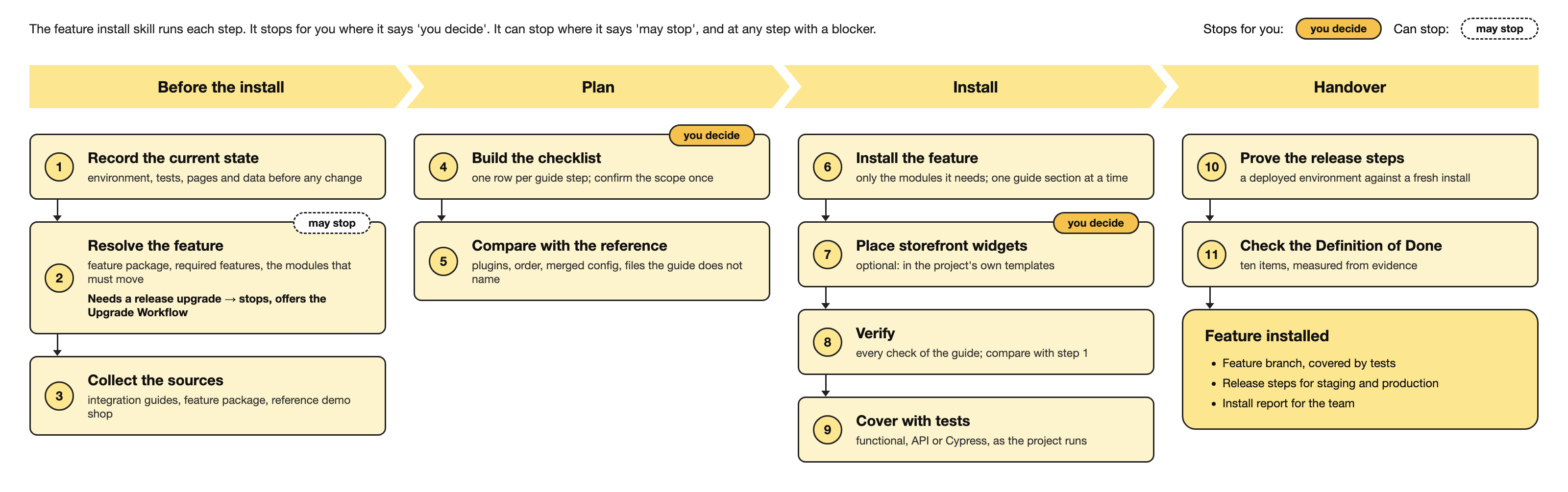
For the full flow, the design decisions, and the scripts, see the spryker-feature-install README in the plugin repository.
How the skill adapts the integration guide to your project
The integration guide is the source for every install. It describes the feature for a standard demo shop at the latest release, so that it applies to every project. Your project has its own product type, configuration, and customizations. The skill uses the guide as the basis and adapts each step to your project:
- It selects the plugins for your project. The guide covers every scenario. The skill keeps only the plugins for your product type and options.
- It merges values into your configuration. A guide snippet shows the complete value for a standard project. The skill adds the new entries to the value your project already has. For example, it adds a new secured URL pattern and keeps the login protection of your other customer pages.
- It finds the related files. The guide focuses on the feature’s own modules. The skill also finds the templates, other modules’ dependency providers, OMS processes, data files, and deploy files that the reference demo shop changed for the feature.
- It prepares the existing environments. The guide describes a local install, where you run the imports, installers, and republish commands by hand. The skill finds which of these commands your deploy recipe must run.
- It keeps module updates small. A
composer requirecan update more modules than the feature needs. The skill moves back every module the feature does not need, so your customizations keep working.
The skill turns the guide into a checklist, compares every step with the reference demo shop, and measures the result.
How the skills work together
| Skill | Role |
|---|---|
find-existing-capability |
The reuse gate before any new feature work. It searches the Spryker capability map, reads the install status from composer.lock, and gives one verdict per capability: extend it, install the missing part, install the feature and then extend it, build only the gap, or build new. It only reports. For an install, it hands over to spryker-feature-install. |
spryker-feature-install |
Installs the feature, with the phases below. |
yves-twig-integration |
The optional storefront step. Integration guides register widgets but do not place them in the project’s Twig templates. The skill suggests where each widget belongs, using the vendor templates for what goes where and the project’s design for how it looks, and applies only the placements the developer picks. |
spryker-feature-install also uses project-data for all data rows, spryker-refresher for the commands after each change, the spryker-verifier agent for the guide’s verification checks, codecept-functional and cypress-tests for tests, and the detector scripts of spryker-upgrade.
The phases
-
Preflight and baselines — checks the environment: the stack, the container’s view of the files,
vendor/againstcomposer.lock, and the frontend dependencies. Records baselines of PHPStan, the code sniffer, the tests, the Back Office pages, and the storage and search tables. A baseline that cannot run is a blocker. -
Resolve the feature and its release — finds the feature package and its required features from the capability map, and the release to install:
- The feature exists at the project’s release: it installs at that release.
- The feature exists only in a later release: the skill moves only the modules the feature needs. When another feature package or a third-party root pin must move, the skill stops and offers the Upgrade Workflow.
The skill always does a Composer dry run and shows every module move before the install.
-
Collect the sources — the integration guide and its prerequisite and linked guides, the feature package, and the reference demo shop at the install release, with its history.
-
Checklist and confirmation — turns the guide into a checklist with one row per step. A step the parser cannot classify becomes a row that is decided by hand, so no step is lost. Prerequisites that the guide marks as optional are asked about, not installed. Then the skill asks one confirmation question: the feature, the release, the update mode, the optional parts, demo data, the branch, the planned tests, and the commits.
-
Reconcile with the reference — compares each row with
b2b-demo-marketplaceat the same release. The reference decides which plugins and in which order; the project’s existing configuration is merged, never overwritten. The skill finds the reference’s change for the feature in its history and adds every file the guide does not name. -
Install — installs the feature package, moves back every module the feature does not need, and checks the project’s overrides against the modules that moved. Then it applies the guide one section at a time and runs the needed commands after each section.
-
Optional: storefront placement — the
yves-twig-integrationstep. -
Verify — the
spryker-verifieragent checks each verification step of the guide in the running shop. The baseline tools run again and are compared with the baselines. -
Tests — covers the feature with tests in the suites the project already runs: Codeception functional tests, Glue API tests, or Cypress. The skill ports the reference demo shop’s tests for the feature and adds one test per behavior the feature adds.
-
Release steps — finds and proves the steps that existing environments need. See Release steps.
-
Report — writes the install report. See The install report.
Definition of Done
A feature install is done only when all ten items hold. The check-dod.php script decides it from evidence — tool output, lock files, the checklist, and the project files — not from what the assistant writes down. While it says not done, the assistant does not call the feature installed, working, or ready, and offers nothing for review.
- The developer confirmed the scope: the feature, the release, the update mode, and the branch.
- Every baseline ran and holds a result.
- Only modules the feature needs moved; every other move has the developer’s reason.
- Every checklist row is decided, and done or skipped with a reason.
- The decided plugin wiring is in place.
- Nothing regressed against the baselines, and the frontend builds pass.
- Every verification step of the guide passed.
- Passing tests cover the feature, or the developer waived them with a reason.
- Every data file the install wrote is imported by a manifest that a deploy recipe runs, and every text the assistant wrote is listed for review.
- Every release step is proven, or the developer accepted shipping it unproven.
Blockers stop the run when they are found. A blocker is anything that stops an item from being met and that the install itself cannot fix: a failed login, a baseline that cannot run, missing frontend dependencies, or a decision only the developer can make. The assistant stops in the phase where it finds the blocker and asks: fix it, waive the item with a reason, or stop the run.
What the scripts check
Every script is a standalone CLI that runs on host PHP, with no Spryker bootstrap.
| Script | What it checks |
|---|---|
parse-integration-guide.php |
Turns a guide into checklist rows: composer lines, configuration, schema, transfers, glossary, plugins, navigation, data, console commands, verification steps, and optional scenarios. Reads both guide styles. |
check-feature-installed.php |
Which modules and plugin wiring the project already has; whether the decided wiring is in place; which plugins belong to modules the project does not install. |
find-feature-change.php |
The pull request that brought the feature into the reference demo shop, and every file of it that no checklist row names. |
check-checklist.php |
Whether every row is decided before the install, and done or skipped before the report. |
check-needed-moves.php |
For every moved package: whether the feature needs the new version, or whether its old version still satisfies every package that requires it. |
check-lock-diff.php |
Packages that moved outside the feature’s dependency tree, and dev constraints on the feature. |
glossary-key-check.php |
Translation keys that the feature uses or ships and that have no glossary row for a project locale, including mail subjects set in PHP. |
check-data-manifests.php |
Whether every data file the install wrote is imported by a manifest that a deploy recipe runs. |
compare-baselines.php |
Whether each baseline holds a result, and whether PHPStan, the code sniffer, the tests, the Back Office pages, the storage and search tables, or a frontend build regressed. |
diff-release-steps.php |
The commands, imports, republish steps, and environment variables that the deploy recipe does not cover. |
dump-state.php |
Dumps every database table and search index without IDs and timestamps, and compares two dumps. |
check-dod.php |
The Definition of Done: done or not done, item by item. |
Release steps
An integration guide runs its imports, installers, and republish commands by hand on a fresh local install. An existing environment gets only what its deploy recipe runs. The skill lists every command and data file that the recipe does not cover, then proves the list locally:
- Reset the project to the production branch.
- Deploy the feature branch with only the normal deployment commands, and dump the state.
- Reset to a fresh install of the feature branch, and dump the state.
- Compare the two dumps. Each difference that a command removes is a release step.
The skill asks before each reset, because a reset deletes the local data. The report recommends each proven step either as a recipe entry or as a one-time job.
The install report
When the Definition of Done is met, the skill writes a short report that the developer can share with the team. It contains:
- The versions: the project’s release, the installed feature release, and the latest available feature release.
- What was done, from the customer’s and the Back Office user’s point of view.
- The branch and the pull request.
- The steps after the deploy.
- A link to the exact version of the integration guide that was followed.
- The guide steps that were not installed, and why.
- What was validated and how, including the texts the assistant wrote that need a review.
- What upgrading the project to the latest release would add to the feature.
Problems found in the project that the install did not cause are not in the report. The skill lists them for the developer as ticket candidates.
Requirements
- A Spryker project with Composer installed, and host PHP to run the scripts
- A running Docker environment of the project (
docker/sdk) gitand the GitHub CLI (gh), to read the reference demo shop and the integration guides- An AI tool with the SDK’s skills loaded — either through the plugin in Claude Code or GitHub Copilot CLI, or via
ai-dev:setupfor another supported tool. See Installation.
Known limits
- The reference is
b2b-demo-marketplace. For another project type, the skill skips the plugins of capabilities the project does not have, and the reconcile decisions need more review. - When the reference demo shop never had the feature, the guide is the only source for the files to change.
- The docs site shows only the latest version of each integration guide. When the install release is older, guide steps for module versions the project does not have are skipped, and
check-feature-installed.phpnames them.
Thank you!
For submitting the form