
Bugfix Workflow
Edit on GitHubAvailability
The spryker-bugfix skill is available from spryker-sdk/ai-dev version 0.6.4, which ships version 0.4.0 of the spryker-ai-dev-sdk plugin. Version 0.6.4 also adds the conditional Cypress end-to-end phase described on this page.
To update the plugin, run /plugin in Claude Code and update spryker-ai-dev-sdk from the spryker-plugins-official marketplace to version 0.4.0 or later. In GitHub Copilot, run copilot plugin update spryker-ai-dev-sdk@spryker-plugins-official. For installation instructions, see Installation.
What the skill does
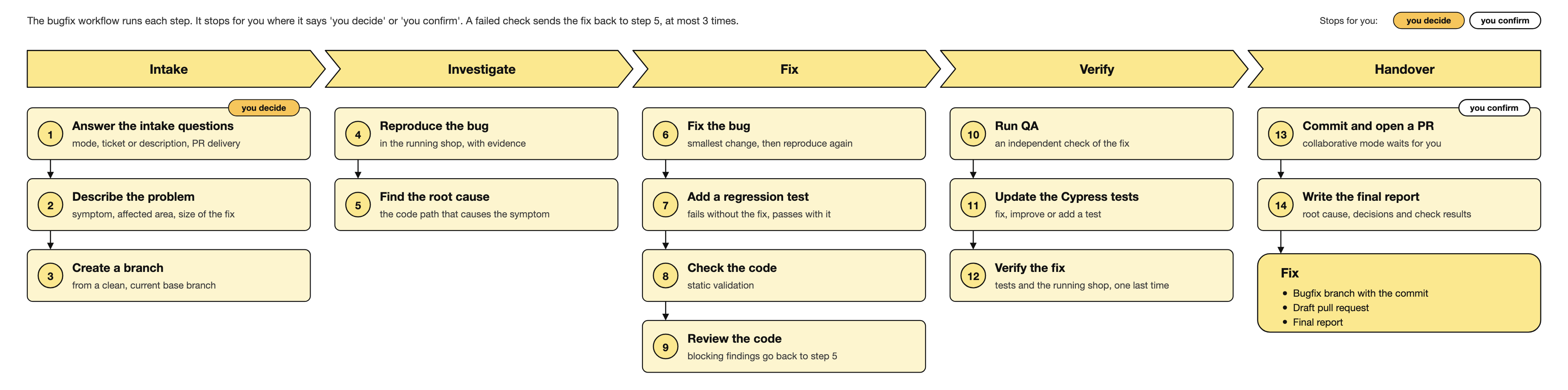
spryker-bugfix takes a bug and drives it to a committed, validated, QA-accepted fix on a bugfix/* branch. In Autonomous mode it goes all the way to a pushed draft pull request with a remote CI watch loop.
The skill is an orchestrator. It runs a fixed sequence of stages and delegates the work of each stage to another SDK skill or agent — it writes no product code itself.
Invoke it whenever you have a bug symptom and expect a delivered fix: “fix this bug”, “fix ticket XY-1122”, “this is broken, reproduce and fix it”. It is not the right skill for a single isolated step, a new feature, a refactor without a symptom, or an investigation-only request.
For the full flow, the design decisions, and the known limits, see the spryker-bugfix README in the plugin repository.
Two ways in — the ticket is optional
Bug context can come from either or both of:
- A ticket from any tracker — a Jira key, a GitHub issue URL or number, or any other service
- A free-text description of the symptom with technical hints
A ticket is never required. When a ticket exists and its integration is reachable, the skill pulls it for extra context; otherwise it works entirely from your description, and the branch name, commit message, and pull request title fall back to no-ticket.
The stages
| Stage | What happens | Delegates to |
|---|---|---|
| Intake | Mode, context, and pull request preference; sets up the run directory | — |
| Branch | Safety gate — refuses to continue on a dirty tree or a stale base | — |
| Reproduce | Confirms the symptom in the running application | spryker-runtime, spryker-docs-research |
| Root cause | Finds why it happens. Loop re-entry point | ai-runtime-debugging, spryker-runtime |
| Fix | Applies the minimal fix and re-runs the reproduction | — |
| Functional tests | Adds or updates Codeception tests | codecept-functional |
| Static validation | Runs static analysis over the changed code | static-validation |
| Code review | Gate — blocks on a blocker or major finding | code-review |
| QA | Gate — four-bucket coverage against the running application | spryker-qa-coverage |
| Cypress E2E | Conditional — fixes, improves, or adds an end-to-end spec for the bug | cypress-tests |
| Final verification | Confirms the symptom is gone in the running application | spryker-verifier, spryker-runtime |
| Commit | Always commits; push and pull request depend on your mode and channel | — |
| Report | Outcome, root cause, decisions, gate results, and log paths | — |
The verification loop
Code review, QA, final verification, and remote CI are gates. A failure in any of them draws from one shared attempt counter and loops back to the root cause stage to re-investigate, then forward through the full chain again.
The hard stop is three attempts. Beyond that the run stops and reports — nothing is pushed, and no pull request is marked ready with a known-broken state.
A Cypress failure that indicts the fix rather than the test joins the same loop.
Modes
- Collaborative — the skill stops at the important decision points and before any push, so you can review.
- Autonomous — after the single intake step the skill runs unattended to a pushed draft pull request. Every fork is a logged decision rather than a question. The only hard stops are a dirty or stale base branch and the attempt budget.
Pull request delivery
At intake the skill asks whether to open a pull request and through which channel, then probes what is actually available:
gh— the GitHub CLImcp— a connected forge MCP server for GitHub, GitLab, Bitbucket, or another hostgit-only— pushes a branch without opening a pull requestnone— local only
The GitHub CLI is never assumed. If the chosen channel cannot open a pull request, the skill degrades to a clean terminal state — it commits, pushes where possible, and hands over the command to create the pull request yourself.
Run artifacts
Every file the run produces lives in one folder per bug under .ai-dev/spryker-bugfix/<bugfix-id>/, which survives loopbacks and scheduled wake-ups:
| File | Role |
|---|---|
run.log |
The timeline — one line per stage boundary, every loopback, and every gate verdict |
decisions.md |
The rationale — critical decisions, open questions, and risks |
repro-notes.md |
The reproduction scenario in full |
<stage>-attempt<N>.log |
Bulk output per gate — tests, static analysis, review, verification, and CI logs |
watch-state.md |
The handoff the remote CI watch loop re-reads on each wake-up |
Requirements
- A running Spryker project (Docker SDK up) with the AI Dev SDK installed
- An AI tool with the SDK’s skills loaded — either through the plugin in Claude Code or GitHub Copilot CLI, or via
ai-dev:setupfor another supported tool. See Installation.
Thank you!
For submitting the form