
Install the Storefront MCP server
Edit on GitHubThis document describes how to enable the Storefront MCP server in a project. The server lets AI agents and MCP clients call tools of the Storefront API at /mcp.
This is an early-access preview for evaluation and prototyping. The interface, the configuration, and the package versions can change before the general release.
Prerequisites
- The project uses Glue Storefront based on API Platform.
spryker/api-platform1.53.0 or later andspryker/glue-storefront-api-application1.8.0 or later are installed. These releases contain the MCP tool generator, the discovery documents, andMcpHandshakeEraRefusalSubscriber.spryker-sdk/ai-dev0.9.0 or later is installed.spryker-sdk/ai-dev0.8.0 requiresmcp/sdk^0.9, which does not match themcp/sdk^0.8 thatapi-platform/mcprequires.
Install the server
The server needs the official MCP packages and a set of project configuration files. To enable the server, do the following:
-
Require the packages:
composer require api-platform/mcp:^4.4.6 mcp/sdk:^0.8.1 symfony/mcp-bundle:^0.14.1 symfony/object-mapper:^7.4 -
In
config/GlueStorefront/packages/api_platform.php, enable MCP with$apiPlatform->mcp()->enabled(true). Inconfig/GlueBackend/packages/api_platform.php, disable MCP with$apiPlatform->mcp()->enabled(false). -
Register
Symfony\AI\McpBundle\McpBundleinconfig/GlueStorefront/bundles.php. -
Add
config/GlueStorefront/packages/mcp.phpwith the following content. It defines the$mcpServersconfiguration forsymfony/mcp-bundle, the middleware factory,McpHandshakeEraRefusalSubscriber, and the discovery services:<?php declare(strict_types = 1); use Mcp\Schema\Enum\ProtocolVersion; use Spryker\Glue\GlueStorefrontApiApplication\Discovery\ApiCatalogBuilder; use Spryker\Glue\GlueStorefrontApiApplication\Discovery\ApiCatalogBuilderInterface; use Spryker\Glue\GlueStorefrontApiApplication\Discovery\McpServerCardBuilder; use Spryker\Glue\GlueStorefrontApiApplication\Discovery\McpServerCardBuilderInterface; use Spryker\Glue\GlueStorefrontApiApplication\GlueStorefrontApiApplicationConfig; use Spryker\Glue\GlueStorefrontApiApplication\Mcp\EventSubscriber\McpHandshakeEraRefusalSubscriber; use Symfony\AI\McpBundle\Http\MiddlewareFactory; use Symfony\Component\DependencyInjection\Loader\Configurator\ContainerConfigurator; use function Symfony\Component\DependencyInjection\Loader\Configurator\expr; use function Symfony\Component\DependencyInjection\Loader\Configurator\param; use function Symfony\Component\DependencyInjection\Loader\Configurator\service; return static function (ContainerConfigurator $container): void { $cacheTtlMilliseconds = 3600000; $protocolVersions = [ProtocolVersion::V2026_07_28->value]; $mcpServers = [ 'storefront' => [ 'name' => 'com.spryker/storefront', 'version' => '0.1.0', 'description' => 'MCP server of the Spryker Storefront API.', 'instructions' => 'MCP server of the Spryker Storefront API.', 'protocol_versions' => $protocolVersions, 'transports' => ['http' => true, 'stdio' => false], 'http' => [ 'path' => '/mcp', ], 'registry' => ['tools' => ['*']], 'session' => ['store' => 'memory'], 'cache' => [ 'methods' => [ 'server/discover' => ['ttl_ms' => $cacheTtlMilliseconds, 'scope' => 'public'], 'tools/list' => ['ttl_ms' => $cacheTtlMilliseconds, 'scope' => 'private'], ], ], ], ]; $configServiceExpression = sprintf("service('%s')", addslashes(GlueStorefrontApiApplicationConfig::class)); $apiBaseUrl = expr(sprintf('%s.getStorefrontApiBaseUrl()', $configServiceExpression)); $container->extension('mcp', ['servers' => $mcpServers]); $services = $container->services(); $services->set('mcp.storefront.middleware_factory', MiddlewareFactory::class) ->decorate('mcp.server.storefront.middleware_factory') ->args([expr(sprintf('%s.getMcpAllowedHosts()', $configServiceExpression))]); $services->set(McpHandshakeEraRefusalSubscriber::class) ->args([array_column(array_column($mcpServers, 'http'), 'path'), $protocolVersions]) ->tag('kernel.event_subscriber'); $services->set(McpServerCardBuilderInterface::class, McpServerCardBuilder::class) ->args([$mcpServers, $apiBaseUrl]); $services->set(ApiCatalogBuilderInterface::class, ApiCatalogBuilder::class) ->args([service(McpServerCardBuilderInterface::class), $apiBaseUrl, param('api_platform.enable_docs')]); }; -
Add
config/GlueStorefront/routes/mcp.phpwith only the following line. The discovery routes come from the resource schemas:$routingConfigurator->import('.', 'mcp'); -
In
config/Shared/config_default.php, setGlueStorefrontApiApplicationConstants::GLUE_STOREFRONT_API_BASE_URLto the public URL of the Storefront API host. For details, see Runtime configuration. -
Add
if-none-matchto the CORS allowed headers. Glue Storefront answers theOPTIONSpreflight request with theGlueApplicationConfigheaders. Without this header, browser clients cannot send conditional requests for the discovery documents. OverridegetCorsAllowedHeaders()in both project-level configuration classes:src/Pyz/Glue/GlueApplication/GlueApplicationConfig.php:<?php namespace Pyz\Glue\GlueApplication; use Spryker\Glue\GlueApplication\GlueApplicationConfig as SprykerGlueApplicationConfig; class GlueApplicationConfig extends SprykerGlueApplicationConfig { protected const string HEADER_IF_NONE_MATCH = 'if-none-match'; /** * @return array<string> */ public function getCorsAllowedHeaders(): array { return array_merge( parent::getCorsAllowedHeaders(), [static::HEADER_IF_NONE_MATCH], ); } }src/Pyz/Glue/GlueStorefrontApiApplication/GlueStorefrontApiApplicationConfig.php:<?php namespace Pyz\Glue\GlueStorefrontApiApplication; use Spryker\Glue\GlueStorefrontApiApplication\GlueStorefrontApiApplicationConfig as SprykerGlueStorefrontApiApplicationConfig; class GlueStorefrontApiApplicationConfig extends SprykerGlueStorefrontApiApplicationConfig { protected const string HEADER_IF_NONE_MATCH = 'if-none-match'; /** * @return array<string> */ public function getCorsAllowedHeaders(): array { return array_merge( parent::getCorsAllowedHeaders(), [static::HEADER_IF_NONE_MATCH], ); } }If a class already overrides
getCorsAllowedHeaders(), addif-none-matchto the array that it returns. -
Generate the resources and clear the cache:
vendor/bin/glue api:generate storefront
GLUE_APPLICATION=GLUE_STOREFRONT vendor/bin/glue cache:clear
Verify the installation
To make sure the server works, do the following:
-
Send a
tools/listrequest to the MCP server:curl -s https://glue-storefront.example.com/mcp \ -H 'Content-Type: application/json' -H 'Accept: application/json, text/event-stream' \ -H 'MCP-Protocol-Version: 2026-07-28' -H 'Mcp-Method: tools/list' \ -d '{"jsonrpc":"2.0","id":1,"method":"tools/list","params":{"_meta":{"io.modelcontextprotocol/protocolVersion":"2026-07-28","io.modelcontextprotocol/clientInfo":{"name":"curl","version":"1"},"io.modelcontextprotocol/clientCapabilities":{}}}}'Make sure the response is a valid JSON-RPC result. The
toolslist contains the tools that the installed feature modules declare. -
Request the API catalog:
curl -s https://glue-storefront.example.com/.well-known/api-catalogMake sure the response is similar to the following shortened example. It contains the URLs of the MCP server and of the server card:
{ "linkset": [ { "anchor": "https://glue-storefront.example.com/mcp", "service-meta": [ { "href": "https://glue-storefront.example.com/.well-known/mcp/server-card.json", "type": "application/mcp-server-card+json" } ] }, { "anchor": "https://glue-storefront.example.com/", "service-desc": [ { "href": "https://glue-storefront.example.com/docs.jsonopenapi", "type": "application/vnd.openapi+json" } ], "service-doc": [ { "href": "https://glue-storefront.example.com/docs", "type": "text/html" } ] } ] } -
Request the server card. The server card describes the server to MCP clients, so a client reads it before it connects:
curl -s https://glue-storefront.example.com/.well-known/mcp/server-card.jsonMake sure the response is similar to the following example. The
urlfield contains the URL of the MCP server, andsupportedProtocolVersionscontains2026-07-28:{ "$schema": "https://static.modelcontextprotocol.io/schemas/v1/server-card.schema.json", "name": "com.spryker/storefront", "version": "0.1.0", "description": "MCP server of the Spryker Storefront API.", "remotes": [ { "type": "streamable-http", "url": "https://glue-storefront.example.com/mcp", "supportedProtocolVersions": ["2026-07-28"] } ] }
Connect Claude Code to the server
To call the tools of the server from an AI agent, add the server to an MCP client. Claude Code supports the 2026-07-28 protocol version that the server requires.
To connect Claude Code, do the following:
-
Add the server:
claude mcp add --transport http spryker-storefront https://glue-storefront.example.com/mcp -
Start Claude Code and run the
/mcpcommand. -
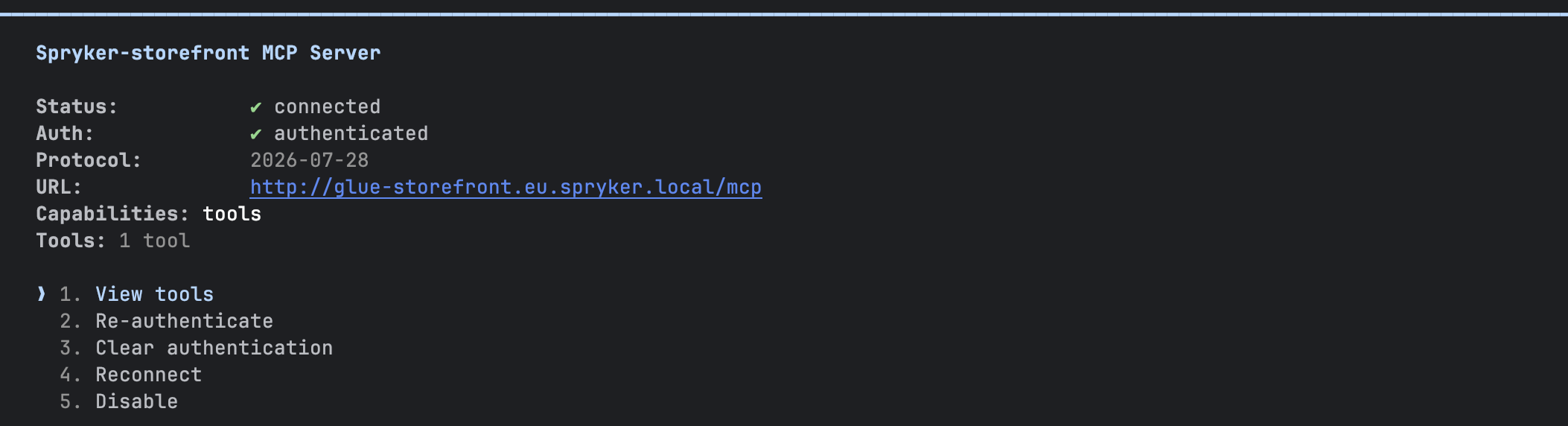
Select
spryker-storefront. Make sure the status isconnectedand the protocol is2026-07-28.
The following example shows the status of a connected server:
Thank you!
For submitting the form