
Storefront Assistant
Edit on GitHubStorefront Assistant is an AI chat for logged-in Storefront customers. It answers shopping questions only from the shop catalog and streams each answer to the browser as Server-Sent Events (SSE).
For the business overview, see Storefront Assistant.
Architecture
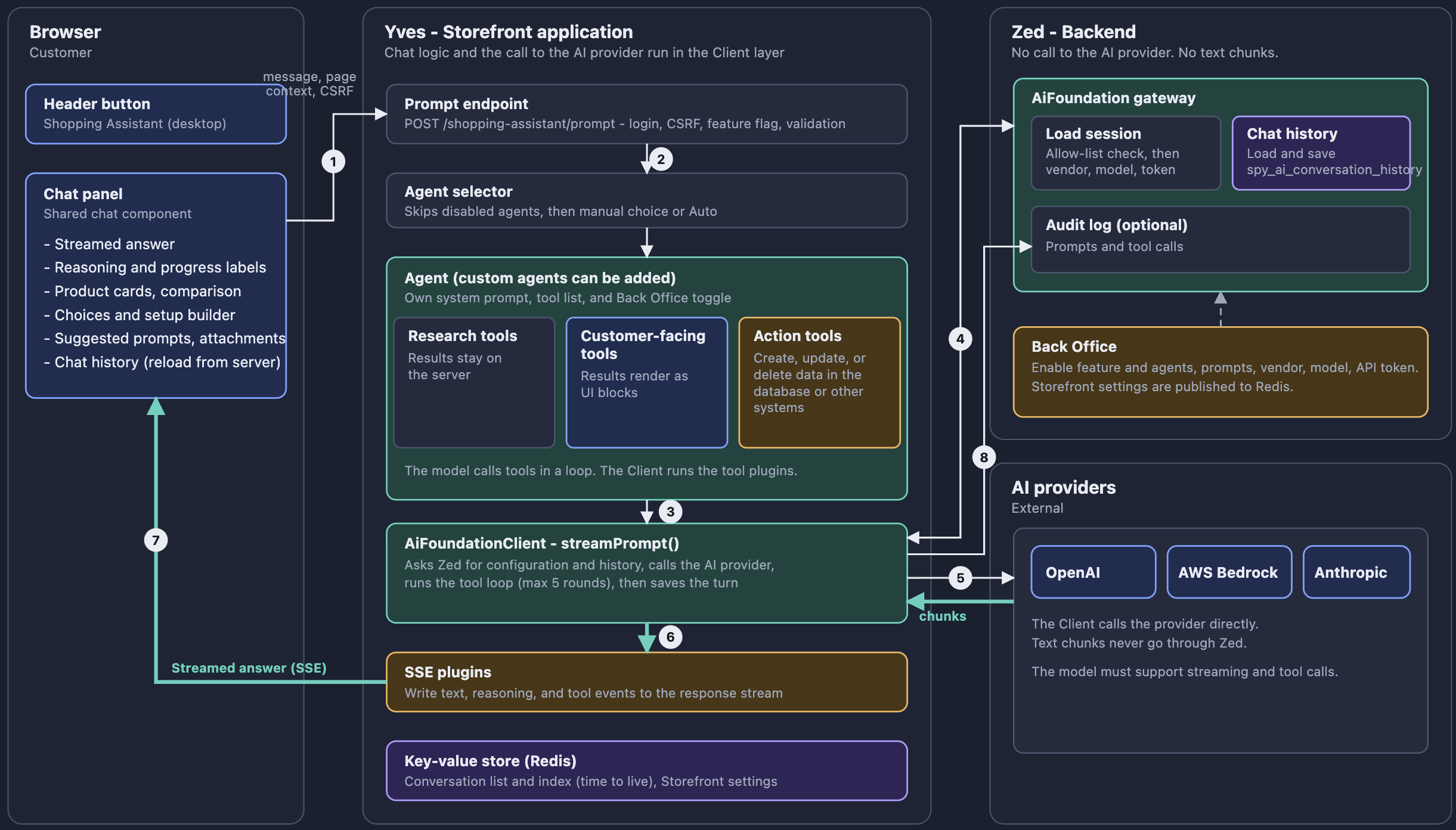
Storefront Assistant runs in the Yves application. The chat logic, the agents, the tools, and the call to the AI provider run in the Client layer, inside the Yves process. Zed does not call the AI provider. Zed only loads the AI configuration and the conversation history, saves the conversation, and writes the audit log.
| PART | IMPLEMENTATION | LAYER |
|---|---|---|
| Chat widget | StorefrontAssistantWidget, which renders the storefront-assistant organism. The organism embeds the shared chat of the module. |
Yves |
| Header button | The storefront-assistant-trigger molecule, included by the project header organism |
Yves |
| Endpoints | StorefrontAssistantController, registered by StorefrontAssistantRouteProviderPlugin |
Yves |
| Agents, tools, and SSE plugins | SprykerFeature\Client\AiCommerce\Plugin\... |
Client |
| Streaming, tool loop, and call to the AI provider | AiFoundationClientInterface::streamPrompt() |
Client |
| AI configuration, chat history storage, and audit log | The Zed gateway of the AiFoundation module and its spy_ai_conversation_history table |
Zed |
| Conversation list and index | Key-value storage (Redis) with a time to live (TTL) | Client |
For each chat turn, the following happens:
- The browser sends
POST /shopping-assistant/promptwith the message, the conversation reference, and the page context. - The controller validates the request and opens an SSE stream.
- The agent selector picks one agent for the turn. For details, see Agent selection.
- The agent calls
AiFoundationClientInterface::streamPrompt()with its system prompt and tool names. streamPrompt()asks Zed for the AI configuration and the conversation history.- The Client calls the AI provider directly and runs the tools of the model in the Yves process.
- While the model answers, the SSE plugins write the text, the reasoning, and the tool events to the stream.
- The Client saves the turn in the chat history through Zed.
For details on how streamPrompt() sends the model output, the tool calls, and the conversation history, see Stream AI responses with the AiFoundation module.
The browser keeps only a small state in localStorage under the storefront_assistant_state key: isOpen, isExpanded, conversationReference, userSelectedAgent, and activeAgent. The browser does not keep the messages. It loads them from the server on each page load.
Agents
An agent is a plugin that has its own system prompt, tool list, and Back Office toggle. For the shipped agents, their tools, the registration, and the agent selection rules, see Storefront Assistant agents.
SSE plugins
The following Client plugins write the stream events. They are registered in the Client AiFoundationDependencyProvider:
| PLUGIN | STACK | DESCRIPTION |
|---|---|---|
StorefrontAssistantSsePreToolCallPlugin |
getPreToolCallPlugins() |
Sends tool-input-start and tool-input-available before each tool call. |
StorefrontAssistantSsePostToolCallPlugin |
getPostToolCallPlugins() |
Sends tool-output-available or tool-output-denied after each customer-facing tool call. |
StorefrontAssistantSseStreamEventPlugin |
getStreamEventPlugins() |
Sends the text and reasoning deltas of the model. |
These plugins implement the AiFoundation streaming plugin interfaces. For the plugin contract, see Stream AI responses with the AiFoundation module.
The SSE plugins send events only for the AI configurations that AiCommerceConfig::getStorefrontAssistantSseAiConfigurationNames() returns. A turn on any other AI configuration streams only start, data-agent, finish, and [DONE].
Endpoints
StorefrontAssistantRouteProviderPlugin adds the following routes:
| METHOD | PATH | ROUTE NAME | CSRF HEADER | RESPONSE |
|---|---|---|---|---|
POST |
/shopping-assistant/prompt |
shopping-assistant/prompt |
Yes | SSE stream |
GET |
/shopping-assistant/conversations |
shopping-assistant/conversations |
No | JSON |
GET |
/shopping-assistant/conversations/messages |
shopping-assistant/conversations/messages |
No | JSON |
DELETE |
/shopping-assistant/conversations |
shopping-assistant/conversations/delete |
Yes | JSON |
Requests with a CSRF header must send the X-CSRF-Token header with a token for the storefront_assistant token ID. The widget reads the token from the page.
All endpoints require a logged-in customer. When the Enable Storefront Assistant setting is off, all endpoints return 404.
Prompt request
The body of POST /shopping-assistant/prompt is a JSON object:
{
  "message": "Show me cameras under 500 euros",
  "conversationReference": "c_7f3a9b",
  "selectedAgent": "product_discovery",
  "pageContext": { "pageType": "category", "categoryName": "Cameras", "filters": ["Canon"] },
  "attachments": [{ "mediaType": "image/png", "content": "<base64>", "name": "photo.png" }]
}
| FIELD | REQUIRED | RULE |
|---|---|---|
message |
Yes | Must not be empty. The maximum length comes from getStorefrontAssistantMaxMessageLengthCharacters(), which is calculated from the conversation history context window of AiFoundation. |
conversationReference |
Yes | Generated by the browser. Must match /\A[A-Za-z0-9_-]+\z/ and have a maximum of 64 characters. |
selectedAgent |
No | The agent name. An empty or missing value means Auto. |
pageContext |
No | pageType is product, category, or search. The server removes the context for other values. |
attachments |
No | A maximum of five files of 5 MiB each. Allowed types: JPEG, PNG, WebP, GIF, and PDF. The server checks the binary signature of each file. |
Stream protocol
The prompt endpoint follows the AI SDK UI Message Stream Protocol. This lets you replace the shipped widget with any client that understands this protocol.
| ELEMENT | VALUE |
|---|---|
| Transport | SSE over the HTTP response body of the POST request |
| Frame | data: <JSON object>\n\n, one JSON part for each frame, without event: or id: lines |
| Part type | The type field of the JSON object |
| End of stream | data: [DONE]\n\n |
| Writer | SprykerFeature\Shared\AiCommerce\Stream\StreamEventEmitter, which flushes the output after each frame |
A successful stream has the following response headers:
| HEADER | VALUE | PURPOSE |
|---|---|---|
Content-Type |
text/event-stream |
Marks the response as SSE. |
Cache-Control |
no-cache |
Prevents caching of the stream. |
X-Accel-Buffering |
no |
Disables nginx buffering, so each frame reaches the browser immediately. |
The protocol recommends the x-vercel-ai-ui-message-stream: v1 response header for custom backends. Storefront Assistant does not send this header, and the shipped widget does not need it. If you connect a client that checks this header, such as the AI SDK useChat hook, add the header in a project-level controller.
Part types
| PART TYPE | FIELDS | WHEN |
|---|---|---|
start |
messageId |
Always, as the first part. |
data-agent |
data.name |
After the agent selection, before the model call. |
reasoning-start |
id |
At the first reasoning chunk of a block. Sent only when isStorefrontAssistantReasoningStreamed() returns true. |
reasoning-delta |
id, delta |
For each reasoning chunk of the model. |
reasoning-end |
id |
When a text block, a tool call, an error, or the end of the turn follows. |
text-start |
id |
At the first text chunk of a block. |
text-delta |
id, delta |
For each answer text chunk. |
text-end |
id |
When a reasoning block, a tool call, an error, or the end of the turn follows. |
tool-input-start |
toolCallId, toolName |
Before each tool call, both research and customer-facing. |
tool-input-available |
toolCallId, toolName, input |
Directly after tool-input-start. input contains the arguments that the model sent. |
tool-output-available |
toolCallId, output.result |
After a customer-facing tool call. |
tool-output-denied |
toolCallId |
When a customer-facing tool was not allowed to run. |
error |
errorText |
On a validation error, when no agent is enabled, on a vendor failure, or on an exception. The server closes the open text or reasoning block first. |
finish |
— | Always, as the last part, also after an error. |
The server follows these rules:
- Each turn has exactly one
startpart and onefinishpart. - Only one text or reasoning block is open at a time. A new block, a tool call, or an error closes the open block first.
- Each block
idis unique in the turn, for exampletext_1,reasoning_2,text_3. - The
tool-input-*andtool-output-*parts of one call have the sametoolCallId. - A research tool, such as
catalog_search, sendstool-input-*parts but notool-output-*part. The widget uses the input parts only for the progress label.
The server does not send these protocol part types: start-step, finish-step, tool-input-delta, source-url, file, and abort.
Example stream
The customer sends “Show me cameras under 500 euros”:
data: {"type":"start","messageId":"msg_6703a1f2b4c5d"}

data: {"type":"data-agent","data":{"name":"product_discovery"}}

data: {"type":"reasoning-start","id":"reasoning_1"}

data: {"type":"reasoning-delta","id":"reasoning_1","delta":"The customer wants cameras with a price limit of 500 EUR."}

data: {"type":"reasoning-end","id":"reasoning_1"}

data: {"type":"tool-input-start","toolCallId":"call_a1b2c3d4","toolName":"catalog_search"}

data: {"type":"tool-input-available","toolCallId":"call_a1b2c3d4","toolName":"catalog_search","input":{"query":"camera","priceMax":50000}}

data: {"type":"tool-input-start","toolCallId":"call_e5f6a7b8","toolName":"display_products"}

data: {"type":"tool-input-available","toolCallId":"call_e5f6a7b8","toolName":"display_products","input":{"idProductAbstracts":[201,204,210]}}

data: {"type":"tool-output-available","toolCallId":"call_e5f6a7b8","output":{"result":"{\"products\":[{\"idProductAbstract\":201,\"name\":\"Canon IXUS 160\",\"sku\":\"201\",\"url\":\"/en/canon-ixus-160-201\",\"priceFormatted\":\"€349.00\",\"rating\":4.5,\"reviewCount\":12}],\"displayedCount\":3,\"refinementChips\":[{\"label\":\"Canon\",\"filterArgument\":\"filters.brand\",\"value\":\"Canon\",\"matchCount\":5}],\"seeAll\":{\"totalResults\":18,\"queryString\":\"q=camera&price%5Bmax%5D=500\"}}"}}

data: {"type":"text-start","id":"text_2"}

data: {"type":"text-delta","id":"text_2","delta":"These three cameras fit your budget. "}

data: {"type":"text-delta","id":"text_2","delta":"Narrow by brand to see fewer models."}

data: {"type":"text-end","id":"text_2"}

data: {"type":"finish"}

data: [DONE]
The values in this example are illustrations. The field names are the real names.
A failed turn, for example without an API token, looks like this:
data: {"type":"start","messageId":"msg_6703a1f2b4c5e"}

data: {"type":"data-agent","data":{"name":"product_discovery"}}

data: {"type":"error","errorText":"The shopping assistant is temporarily unavailable. Please try again."}

data: {"type":"finish"}

data: [DONE]
The errorText value is a glossary translation in the locale of the request. The server writes the vendor error to the log, not to the stream.
Tool results
The output.result value is a JSON-encoded string, not a JSON object. Decode it a second time. The content depends on the tool:
| TOOL | KEYS OF THE DECODED RESULT |
|---|---|
display_products |
products[], displayedCount, and optionally unknownIdProductAbstracts[] and alreadyShown. When the products come from a catalog_search call of the same turn, also refinementChips[], activeFilters[], and seeAll. |
compare_products |
comparedProducts[], attributeRows[] with attribute, values[], and isDifferent, and optionally comparisonUrl, ignoredIdProductAbstracts[], and unknownIdProductAbstracts[]. On failure, error or alreadyShown. |
offer_choices |
question, choices[], and nextStep. On failure, error. |
display_setup |
products[], totalFormatted, and budgetFormatted. On failure, error, and items[] when the setup exceeds the budget. |
A product card has the following fields: idProductAbstract, name, sku, url, imageUrl, description, price, priceFormatted, originalPrice, originalPriceFormatted, currencyIsoCode, priceMode, rating, reviewCount, labelIds, labels, attributes, variants, variantCount, reason, and isPriceOutlier. Plugins in getStorefrontAssistantProductCollectionExpanderPlugins() can add more fields.
| OBJECT | FIELDS |
|---|---|
Refinement chip in refinementChips[] and activeFilters[] |
label, filterArgument, value, matchCount |
seeAll |
totalResults, queryString, and categoryUrl when the search had a category. Sent only when more products match than the chat shows. |
Conversation history endpoints
The history endpoints return plain JSON:
| METHOD AND PATH | REQUEST | RESPONSE |
|---|---|---|
GET /shopping-assistant/conversations |
Optional query parameter conversationReference or conversationReferences[] |
{"conversations":[{"conversationReference","name","updatedAt"}]}, newest first |
GET /shopping-assistant/conversations/messages |
Query parameter conversationReference |
{"conversationReference","messages":[{"role","content","attachments":[{"name"}],"toolInvocations":[{"name","result"}]}]} |
DELETE /shopping-assistant/conversations |
X-CSRF-Token header and a JSON body with conversationReference or conversationReferences |
{"deletedCount": N} |
toolInvocations[].result has the same format as output.result in the stream, with two differences:
- The history returns only customer-facing tools.
- The product cards are refreshed with current data, but
refinementChips,activeFilters, andseeAllare not included. They exist only in the live stream.
Configuration
Back Office settings
Storefront Assistant reads its settings from the Storefront Assistant tab of the ai_commerce feature in Configuration Management. All values are read on each request, so changes apply without a deployment.
| SETTING KEY | TYPE | DESCRIPTION |
|---|---|---|
ai_commerce:storefront_assistant:general:is_enabled |
boolean | Enables the chat widget and the endpoints. |
ai_commerce:storefront_assistant:general:is_product_discovery_agent_enabled |
boolean | Enables the Product Discovery agent. |
ai_commerce:storefront_assistant:system_prompts:product_discovery_system_prompt |
text | The system prompt of the Product Discovery agent. A blank value uses the default prompt of the module. |
ai_commerce:storefront_assistant:ai_vendor:ai_configuration |
radio | The name of the AI configuration in config_ai.php. |
ai_commerce:storefront_assistant:ai_vendor:openai_model, aws_model, anthropic_model |
string | The model of each AI vendor. |
ai_commerce:storefront_assistant:suggested_prompts:* |
text | The suggested prompts for each page type and under the product cards. Separate the prompts with |. To show titled sections, separate the sections with || and start each section with its title and a colon. |
The Client runs in the Yves process and reads only Storefront settings. Every setting that the Client or Yves reads must have storefront: true. The model settings must have storefront: false, because Zed resolves them.
Client configuration
You can override the following methods in the Client AiCommerceConfig:
| METHOD | DEFAULT | DESCRIPTION |
|---|---|---|
getStorefrontAssistantAiConfigurationName() |
'' |
The name of the AI configuration for the turn. The project must override it. |
getProductDiscoveryAgentToolNames() |
[] |
The tool names of the Product Discovery agent. The project must override it. |
getStorefrontAssistantCustomerFacingToolNames() |
[] |
The tool names whose results go to the browser. The project must override it. |
getStorefrontAssistantSseAiConfigurationNames() |
The value of getStorefrontAssistantAiConfigurationName() |
The AI configurations for which the SSE plugins send events. |
isStorefrontAssistantReasoningStreamed() |
true |
Streams the reasoning of the model to the chat. |
getStorefrontAssistantConversationTimeToLive() |
2592000 (30 days) |
The TTL of each conversation that the customer can see, in seconds. |
getStorefrontAssistantConversationListLimit() |
50 |
The maximum number of conversations that the history list returns. |
getStorefrontAssistantConversationIndexLimit() |
100 |
The maximum number of conversation references in the index of a customer. When a new conversation exceeds the limit, the oldest reference is removed. Do not set it lower than the list limit. |
getStorefrontAssistantCategoryTreeLimit() |
200 |
The maximum number of categories that category_tree returns. |
getStorefrontAssistantInlineCategoryTreeLimit() |
200 |
The maximum number of category lines that the system prompt of the Product Discovery agent contains. A larger category tree is not added to the prompt, and the agent uses category_tree instead. |
getStorefrontAssistantMaxRefinementChips() |
6 |
The maximum number of refinement chips under the product cards. |
getStorefrontAssistantPriceOutlierFactor() |
5.0 |
A product price that is this many times higher than the median price of the other products with the same name is marked as unusual. |
The attachment limits come from the Shared AiCommerceConfig: getStorefrontAssistantSupportedAttachmentMimeTypes(), getStorefrontAssistantMaxAttachmentSizeBytes(), and getStorefrontAssistantMaxAttachmentCount().
AI configuration
Storefront Assistant needs one AI configuration in config/Shared/config_ai.php for each AI vendor that you offer in the Back Office. The Client sends the name of the AI configuration to Zed with each turn. Zed accepts only the names that the Zed AiFoundationConfig::getClientResolvableAiConfigurationNames() returns. For the configuration examples and rules, see Set up configuration.
Frontend
The Storefront Assistant and the Back Office Assistant use one shared chat frontend: the <spryker-chat> custom element and its features, such as chat history, attachments, suggested prompts, and the agent selector. The module ships the shared chat in vendor/spryker-feature/ai-commerce/src/SprykerFeature/Shared/AiCommerce/Theme/default/Chat/.
The Storefront loads the shared chat as follows:
SharedThemeTwigLoaderPluginmakes the shared Twig templates available as@AiCommerce/Chat/....- The
@shared/ai-commerce/*alias of the Yves frontend builder resolves the shared TypeScript and SCSS files. - The
storefront-assistantorganism embeds@AiCommerce/Chat/core/chat.twigwith the Storefront URLs, limits, and texts. It loads the chat lazily into thestorefront-assistantchunk. - The Storefront features are ShopUi molecules in
vendor/spryker-feature/ai-commerce/src/SprykerFeature/Yves/AiCommerce/Theme/default/components/molecules/:chat-page-context,chat-tool-products,chat-tool-compare,chat-offer-choices, andchat-display-setup. - The
storefront-assistant-triggermolecule renders a header button that opens and closes the chat.
Project files replace core files with the same path:
| TO CHANGE | DO THIS |
|---|---|
| A Storefront feature | Override the molecule in the project Yves theme and extend molecule('<molecule>', '@SprykerFeature:AiCommerce'). To change only its settings, override the data of the molecule. |
| A shared chat template on all hosts | Put a Twig file with the same path in src/Pyz/Shared/AiCommerce/Theme/default/Chat/. To extend the core template instead of copying it, use the @SprykerFeature:AiCommerce/Chat/... path. |
| A shared chat feature script | Put an index.ts file with the same path in src/Pyz/Shared/AiCommerce/Theme/default/Chat/features/<feature>/ and register a subclass of the core class. |
The module README describes the blocks, the events, the style tokens, the tool renderer contract, and the other extension points of the shared chat: vendor/spryker-feature/ai-commerce/src/SprykerFeature/Shared/AiCommerce/Theme/default/Chat/README.md.
Page context
The frontend reads the page context from the DOM and sends it with each prompt. This lets the agent know the current product, category, or search query.
The chat-page-context molecule defines the page context as a list of rules in its data.rules. The first rule that matches the page wins:
| PAGE TYPE | MATCHES WHEN THE PAGE HAS | READS |
|---|---|---|
search |
.js-catalog__form and a value in input[name="q"] |
The search query and the active filters |
category |
.js-catalog__form |
The category name from h1 and the active filters |
product |
.product-detail |
The product name and SKU from meta[itemprop="name"] and meta[itemprop="abstractSku"] inside [itemtype="https://schema.org/Product"] |
category |
[itemtype="https://schema.org/Product"] without .js-catalog__form and .product-detail, with at least three URL path segments |
The category name from h1 |
The active filters are the checked checkboxes and radio buttons in .js-catalog__form.
If your theme changes this markup, the page context and the page-specific suggested prompts do not work. In this case, override the chat-page-context molecule at the project level and change its data.rules. The project list replaces the core list, so list all rules that you need.
Theming
The chat takes all colors, fonts, and sizes from --chat-* CSS custom properties. The storefront-assistant organism maps these properties to the ShopUi theme, so the chat uses the brand color of the shop automatically. The panel width is clamp(400px, 28vw, 480px). On small screens, the panel uses the full width.
To change the chat, set the properties in a project stylesheet for both selectors. The trigger button is outside the chat element, so it needs the second selector:
storefront-assistant spryker-chat,
.chat-trigger {
    --chat-color-accent: #{$setting-color-main};
    --chat-size-panel-width: clamp(400px, 28vw, 480px);
}
Do not use rgba() or color.adjust() on $setting-color-main. This value is a CSS custom property, not a Sass color. Use helper-color-light() or helper-color-dark() instead.
When the panel is open, the chat changes the page layout with these attributes on the <html> element:
| ATTRIBUTE | EFFECT |
|---|---|
data-chat-docked |
The panel is open and narrower than the screen. The body gets a right padding equal to the --chat-dock-width custom property, so the page moves to the left. |
data-chat-expanded |
The panel uses the full width, and the page does not scroll. |
The body padding does not move elements with position: fixed or position: sticky, such as a sticky header or a cookie banner. If such elements cover the panel, add right: var(--chat-dock-width) to them under :root[data-chat-docked].
Extension points
| INTERFACE | STACK | PURPOSE |
|---|---|---|
SprykerFeature\Client\AiCommerce\Dependency\StorefrontAssistant\StorefrontAssistantAgentPluginInterface |
Client AiCommerceDependencyProvider::getStorefrontAssistantAgentPlugins() |
Adds an agent. The order of the stack sets the priority in Auto mode. |
SprykerFeature\Client\AiCommerce\Dependency\StorefrontAssistant\StorefrontAssistantProductCollectionExpanderPluginInterface |
Client AiCommerceDependencyProvider::getStorefrontAssistantProductCollectionExpanderPlugins() |
Adds data to the product cards. A plugin must not throw an exception, because an exception stops the turn. |
Spryker\Client\AiFoundation\Dependency\Tools\ToolPluginInterface |
Client AiFoundationDependencyProvider::getAiToolPlugins() |
Adds a tool. Also add the tool name to the tool list of an agent. |
Spryker\Client\SearchExtension\Dependency\Plugin\SearchConfigExpanderPluginInterface |
Client AiCommerceDependencyProvider::getSearchConfigExpanderPlugins() |
Adds facets to catalog_search. |
Install
Thank you!
For submitting the form