
AI Foundation Audit Logs
Edit on GitHubThis document describes how to use audit logging with the AiFoundation module to track and audit AI interactions in your Spryker application.
The audit logging feature provides comprehensive tracking of all AI interactions, including prompts, responses, token usage, inference time, and metadata. This enables monitoring, compliance, cost tracking, and debugging of AI operations.
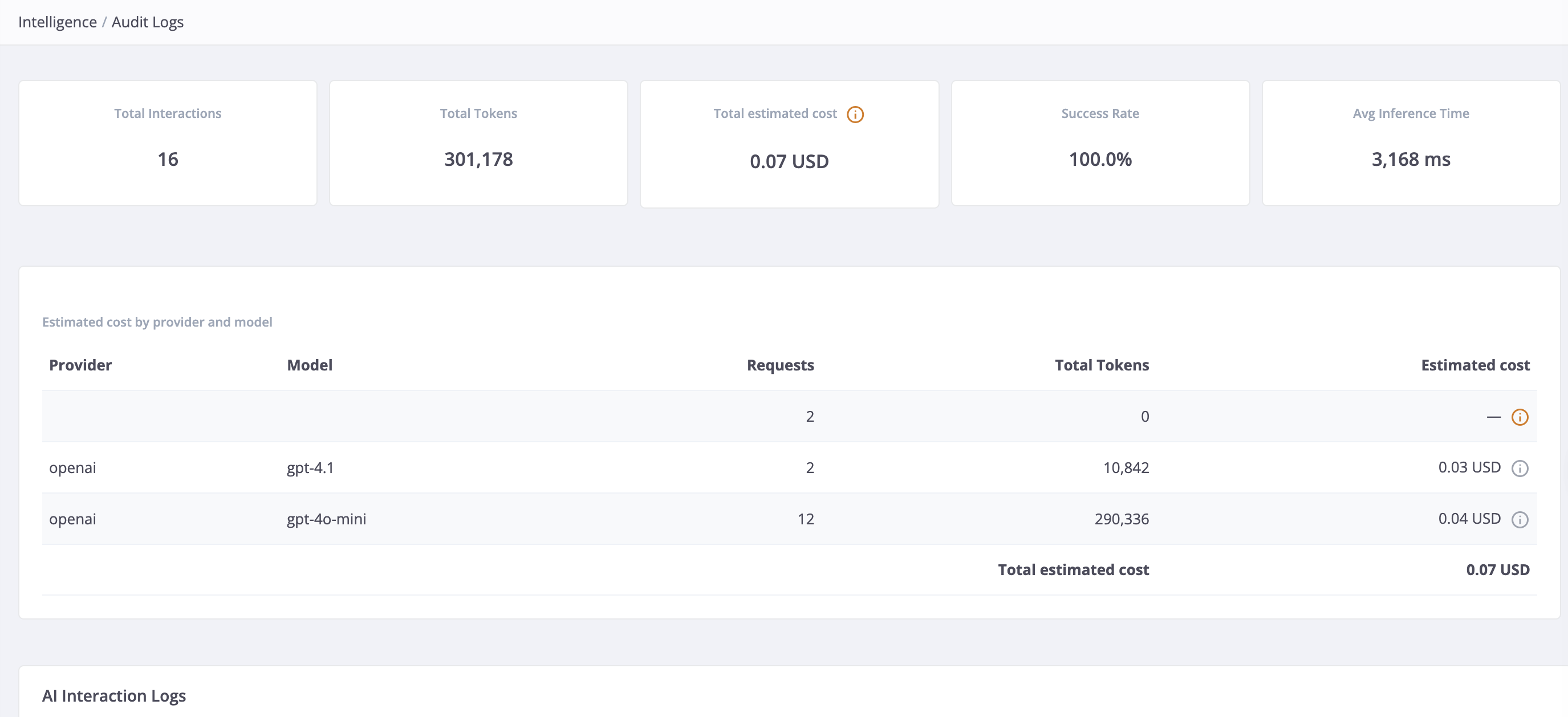
Back Office: Audit Logs page
After enabling audit logging, you can view and analyze AI interaction logs in the Back Office at Intelligence > Audit Logs.
The Audit Logs page provides:
- Summary statistics cards: Total requests, total tokens consumed, success rate, average inference time, and total estimated cost (USD) for the filtered dataset.
- Filterable data table: Filter logs by configuration name, status (success/failed), conversation reference, and date range. Each row shows an estimated cost (USD) when token prices are configured.
- Cost breakdown: A per-provider and per-model breakdown of estimated costs, respecting active filters.
- Unpriced interaction notice: When provider/model combinations have no configured price, the page lists them with request counts so you know exactly which prices to add.
- Detail drawer: Click a row’s prompt to view complete prompt and response text, token breakdown, metadata, and error details.
Navigation setup
The AiFoundation module registers its navigation under the Intelligence menu. To include the Audit Logs entry in your project navigation, add the following to config/Zed/navigation.xml:
<ai-foundation>
    <label>Intelligence</label>
    <title>Intelligence</title>
    <icon>network_intel_node</icon>
    <pages>
        <ai-interaction-log>
            <label>Audit Logs</label>
            <title>Audit Logs</title>
            <bundle>ai-foundation</bundle>
            <controller>ai-interaction-log</controller>
            <action>index</action>
        </ai-interaction-log>
    </pages>
</ai-foundation>
After updating the navigation XML, rebuild the navigation cache:
console navigation:cache:remove
Overview
The AiFoundation audit logging system automatically captures detailed information about each AI interaction:
- Configuration and Provider Information: The AI configuration name, provider, and model used
- Prompt and Response Data: The user prompt and AI response messages
- Token Usage: Input and output token counts for cost tracking
- Performance Metrics: Inference time in milliseconds
- Estimated Cost: Per-interaction cost in USD, calculated from configured token prices at display time
- Metadata: Tool invocations, errors, and structured schema information
- Conversation Tracking: Links to conversation references for multi-turn conversations
- Status: Success or failure status of each interaction
- Timestamps: Creation timestamps for each logged interaction
All AI interactions are persisted to the spy_ai_interaction_log database table and can be queried, analyzed, and audited.
Architecture
The audit logging system uses post-prompt plugins to capture AI interaction data and integrates with the Spryker logging infrastructure. For detailed architecture information, see AiFoundation module Overview.
Enable audit logging
1. Register the audit logger plugins
<?php

namespace Pyz\Zed\AiFoundation;

use Spryker\Zed\AiFoundation\AiFoundationDependencyProvider as SprykerAiFoundationDependencyProvider;
use Spryker\Zed\AiFoundation\Communication\Plugin\AuditLogPostPromptPlugin;
use Spryker\Zed\AiFoundation\Communication\Plugin\AuditLogPostToolCallPlugin;
use Spryker\Zed\AiFoundation\Communication\Plugin\Log\AiInteractionHandlerPlugin;

class AiFoundationDependencyProvider extends SprykerAiFoundationDependencyProvider
{
    /**
     * @return array<\Spryker\Zed\AiFoundation\Dependency\Plugin\PostPromptPluginInterface>
     */
    protected function getPostPromptPlugins(): array
    {
        return [
            new AuditLogPostPromptPlugin(),
        ];
    }

    /**
     * @return array<\Spryker\Zed\AiFoundation\Dependency\Plugin\PostToolCallPluginInterface>
     */
    protected function getPostToolCallPlugins(): array
    {
        return [
            new AuditLogPostToolCallPlugin(),
        ];
    }

    /**
     * @return array<\Spryker\Shared\Log\Dependency\Plugin\LogHandlerPluginInterface>
     */
    protected function getAiInteractionLogHandlerPlugins(): array
    {
        return [
            new AiInteractionHandlerPlugin(),
        ];
    }
}
2. Configure the audit logger in your config
In your configuration file (for example, config/Shared/config_default.php), add the AiInteractionAuditLoggerConfigPlugin to the audit logger plugins:
<?php

use Spryker\Shared\Log\LogConstants;
use Spryker\Zed\AiFoundation\Communication\Plugin\Log\AiInteractionAuditLoggerConfigPlugin;

$config[LogConstants::AUDIT_LOGGER_CONFIG_PLUGINS_ZED] = [
    // existing plugins...
    AiInteractionAuditLoggerConfigPlugin::class,
];

$config[LogConstants::AUDIT_LOGGER_CONFIG_PLUGINS_MERCHANT_PORTAL] = [
    // existing plugins...
    AiInteractionAuditLoggerConfigPlugin::class,
];
3. Generate transfers
Generate the transfer objects for audit logging:
console transfer:generate
4. Run database migrations
Run the database migrations to create the spy_ai_interaction_log table:
console propel:install
Configure AI Vendor model token pricing
To display estimated costs in the Audit Logs, configure token prices per provider and model.
AI Vendor model token pricing uses the AI Vendor configuration feature (ai_vendor.configuration.yml). Token prices are expressed in USD per 1,000,000 tokens and are configured separately for input and output tokens for each model.
Sync the AI Vendor configuration
Before pricing settings appear in the Back Office, run:
console configuration:sync
Configure prices per provider
In the Back Office, go to Configuration > Manage and select the AI Vendor tab for the provider (OpenAI, Anthropic, or AWS Bedrock). Enter the input and output token prices for each model as a JSON object:
{"gpt-4.1": {"input": 2.50, "output": 10.00}, "gpt-4o-mini": {"input": 0.15, "output": 0.60}}
You can optionally include a "currency" code per model entry, which is appended to the displayed cost:
{"gpt-4.1": {"input": 2.50, "output": 10.00, "currency": "USD"}}
The module ships with default prices for common models. Verify these against current provider pricing before using them in production:
| Provider | Default models included |
|---|---|
| OpenAI | gpt-4.1, gpt-4.1-mini, gpt-4o, gpt-4o-mini, gpt-5-nano, gpt-6-luna |
| Anthropic | claude-opus-4, claude-sonnet-4-5, claude-haiku-4-5, claude-haiku-5-5 |
| AWS Bedrock | eu.anthropic.claude-sonnet-4-5-20250929-v1:0, eu.anthropic.claude-haiku-4-5-20251001-v1:0, eu.anthropic.claude-haiku-5-5 |
Models not listed in the configuration are shown as N/A in the Audit Logs and are excluded from cost totals.
Override the provider-to-tab mapping
By default, the module maps logged provider names to pricing tabs as follows:
| Logged provider name | Pricing tab |
|---|---|
openai |
openai |
anthropic |
anthropic |
bedrock |
aws |
To add pricing support for additional providers, override getProviderPricingTabMap() in AiFoundationConfig:
<?php

namespace Pyz\Zed\AiFoundation;

use Spryker\Zed\AiFoundation\AiFoundationConfig as SprykerAiFoundationConfig;

class AiFoundationConfig extends SprykerAiFoundationConfig
{
    /**
     * @return array<string, string>
     */
    public function getProviderPricingTabMap(): array
    {
        return array_merge(parent::getProviderPricingTabMap(), [
            'my-custom-provider' => 'my-custom-tab',
        ]);
    }
}
Cost estimation notes
All cost figures displayed in the Audit Logs are estimates based on the token prices you configure. They may overestimate actual spend for non-Anthropic providers because cached input tokens, which are billed at a lower rate, are not reported separately by the AI library. Costs reflect the currently configured prices applied at display time — changing a price retroactively updates all historical rows.
- Prices are applied at display time: no per-row price snapshot is stored. Changing a price revalues all historical interactions.
- Per-row costs are rounded to 4 decimal places; aggregated totals are rounded to 2 decimal places.
- A provider/model combination with a malformed stored price value is treated as unpriced (shown as N/A), not as zero cost.
Understanding AI interaction log data
AiInteractionLog transfer properties
Each logged AI interaction contains the following information:
| Property | Type | Description |
|---|---|---|
idAiInteractionLog |
int | Unique identifier for the log record |
configurationName |
string | AI configuration name |
provider |
string | AI provider name |
model |
string | AI model name |
prompt |
string | User prompt sent to the AI |
response |
string | AI response message |
inputTokens |
int | Input token count |
outputTokens |
int | Output token count |
estimatedCost |
float | Estimated USD cost; null when the provider/model has no configured price |
conversationReference |
string | Conversation reference for multi-turn conversations |
inferenceTimeMs |
int | Inference time in milliseconds |
isSuccessful |
bool | Interaction success status |
metadata |
string | JSON-encoded metadata |
createdAt |
string | Timestamp (ISO 8601 format) |
Best practices
- Regular cleanup: Implement a periodic cleanup process to archive or delete old audit logs if required by your retention policies
- Cost tracking: Configure token prices for all active provider/model combinations to get full cost visibility. The Audit Logs page lists any unpriced combinations with request counts to help you identify gaps.
- Performance monitoring: Track inference times to identify slow interactions
- Error analysis: Review failed interactions to improve prompts and error handling
- Metadata inspection: Store and analyze metadata to understand tool invocations and structured responses
Thank you!
For submitting the form