
Release notes 202604.0
Edit on GitHubSpryker Cloud Commerce OS is an end-to-end solution for digital commerce. This document contains a business-level description of new features and improvements.
For information about installing Spryker, see Getting started guide.
B2B Business-Ready Commerce Experiences
Back Office Configuration Framework is now Generally Available
Spryker has made the Back Office Configuration Framework generally available, delivering key enterprise‑readiness improvements. The release enhances governance, discoverability, and usability for managing business‑relevant configuration directly in the Back Office. Configuration changes are now easier to understand, control, and audit.
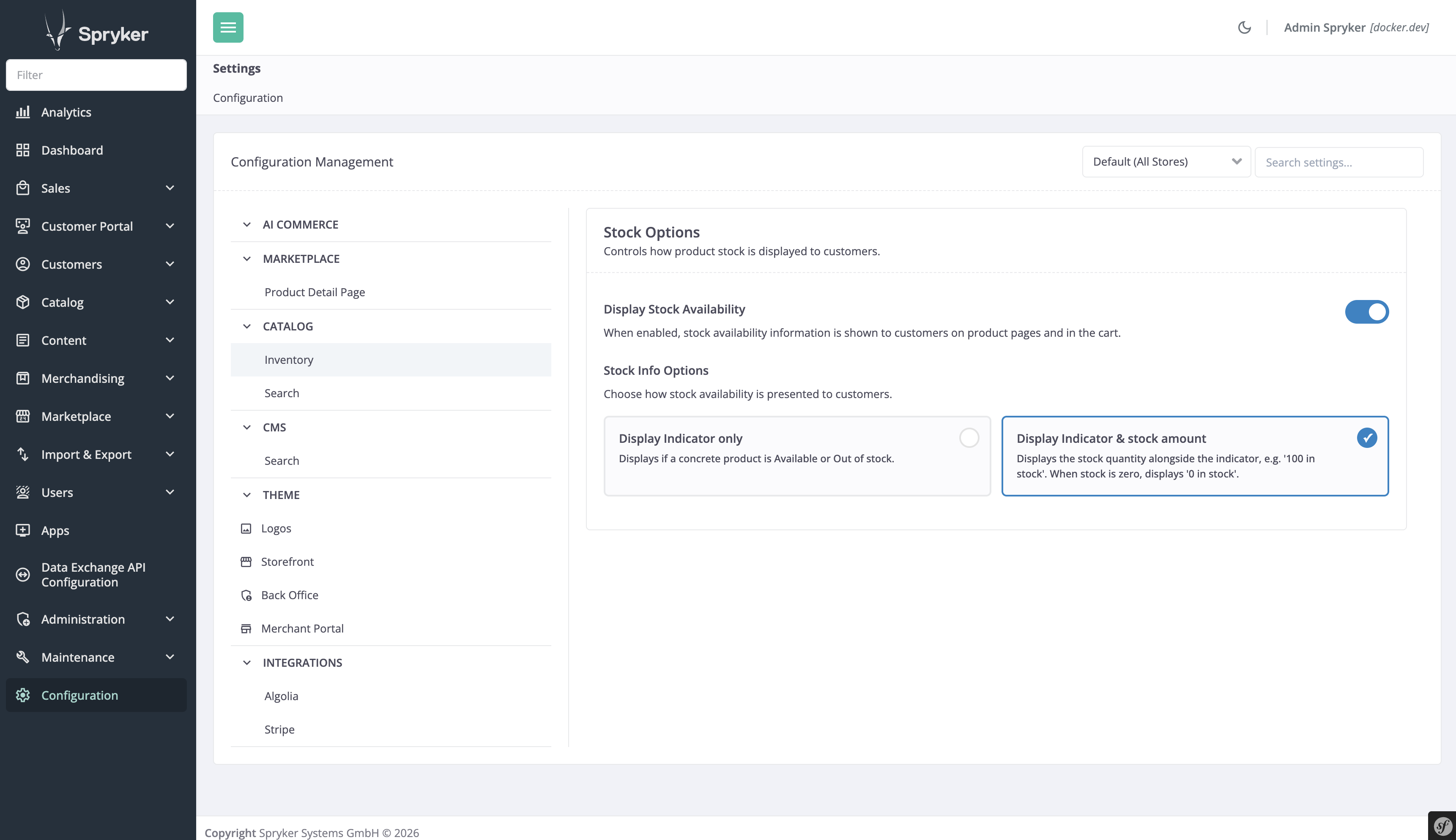
Key capabilities:
- Audit logging for configuration changes
- Improved search and discoverability of configuration options
- UX enhancements for a more reliable configuration experience
- CLI-based import support for faster setup and operational workflows
- Clear visibility into conflicts between code-based and Back Office configuration
Business benefits:
- Reduces time-to-change by enabling operations teams to adjust configuration without developer involvement, backed by a full audit trail.
- Minimizes the risk of costly production disruptions through better validation and conflict visibility before changes go live.
- Supports broader enterprise adoption with stronger governance and operability.
Documentation:
- Back Office Configuration Framework
- Developer Guide Configuration Management
- Install the Back Office Configuration Framework feature
Basic Shop Theming
Business users can now manage core branding settings directly in the Back Office without code changes or deployments. This provides a standardized way to apply basic theming across Storefront, the Back Office, and Merchant Portal.
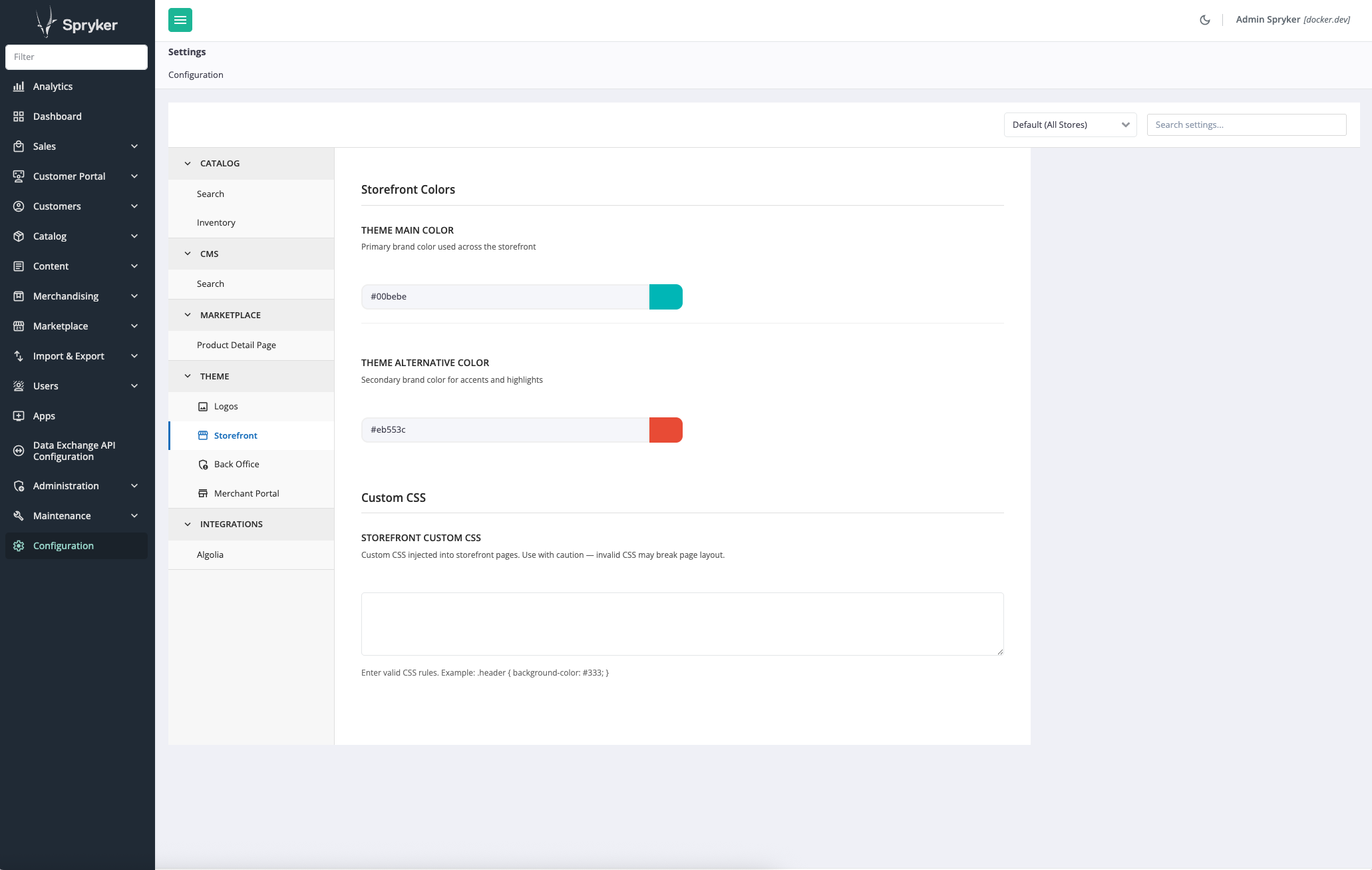
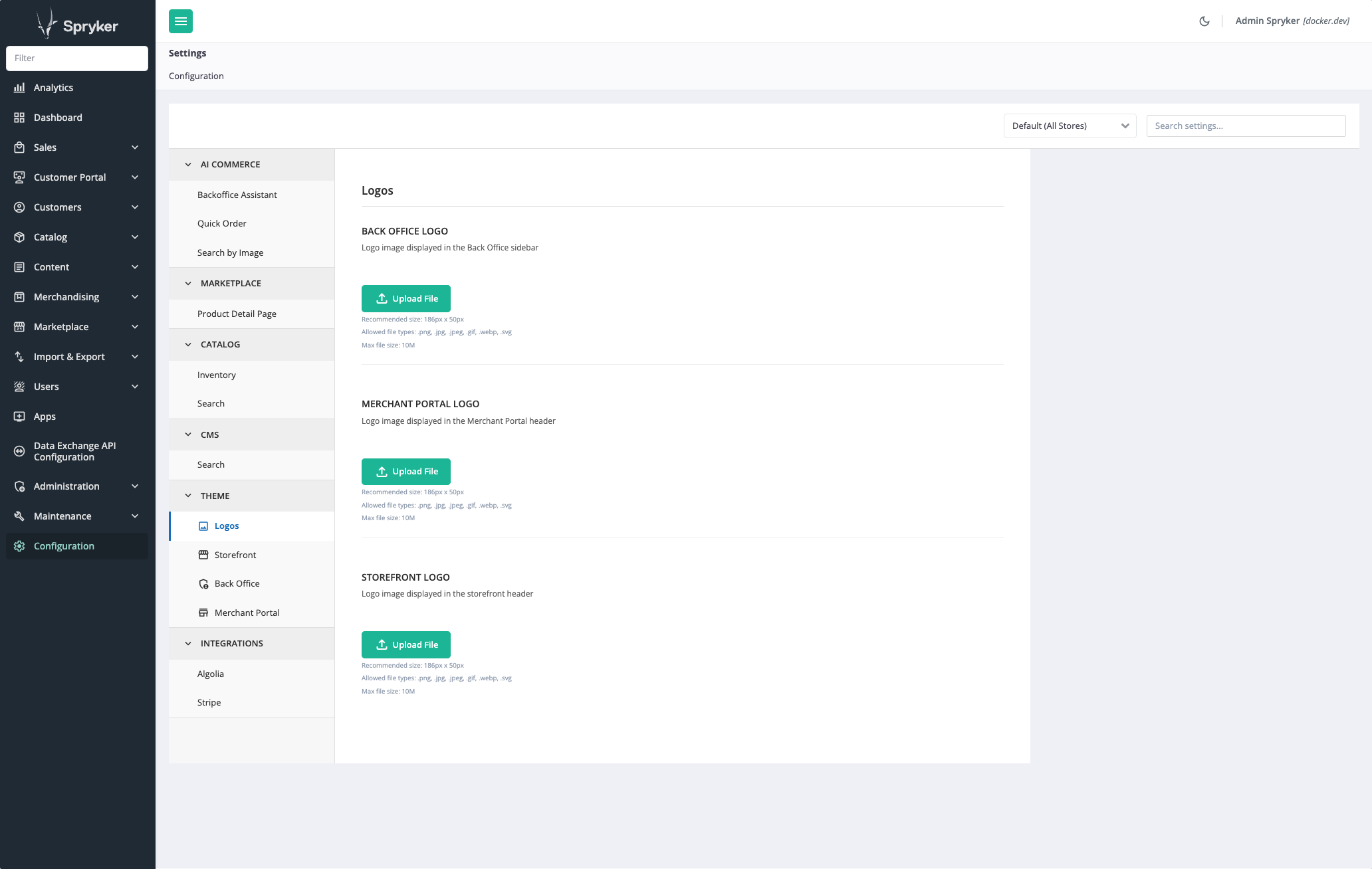
Key capabilities:
- Supports theme management with global and store-specific scope.
- Lets users upload and manage logos for Storefront, the Back Office, and Merchant Portal.
- Provides configuration for core brand colors, button styles and text colors.
- Uses a standardized Back Office configuration experience for theme administration.
Business benefits:
- Speeds up demo preparation, POCs, and early customer activation through instant, self-service branding configuration.
- Shop operators can now apply and adjust their brand CI across all Spryker touchpoints at any time directly in the Back Office, without developer involvement or redeployment.
Documentation:
Budget & Cost Centers
We introduced an Early Access version of budgets and cost centers to support policy-driven purchasing in B2B procurement. The release covers core budget enforcement and its integration with approval workflows.
Key capabilities:
- Lets companies create and manage cost centers and assign buyers to them.
- Supports budget creation with configurable enforcement rules such as block, warn, or require approval.
- Adds cost center selection and budget validation during checkout.
- Integrates budget-triggered approvals with Spryker’s existing Approval Process.
- Tracks budget consumption and restoration as orders progress.
Business benefits:
- Improves financial control and purchasing compliance.
- Reduces overspending risk with enforceable budget rules.
- Aligns procurement workflows with departmental or project-based spending structures.
- Provides an early demoable foundation for customer and partner conversations.
Documentation:
Back Office Product Import & Export
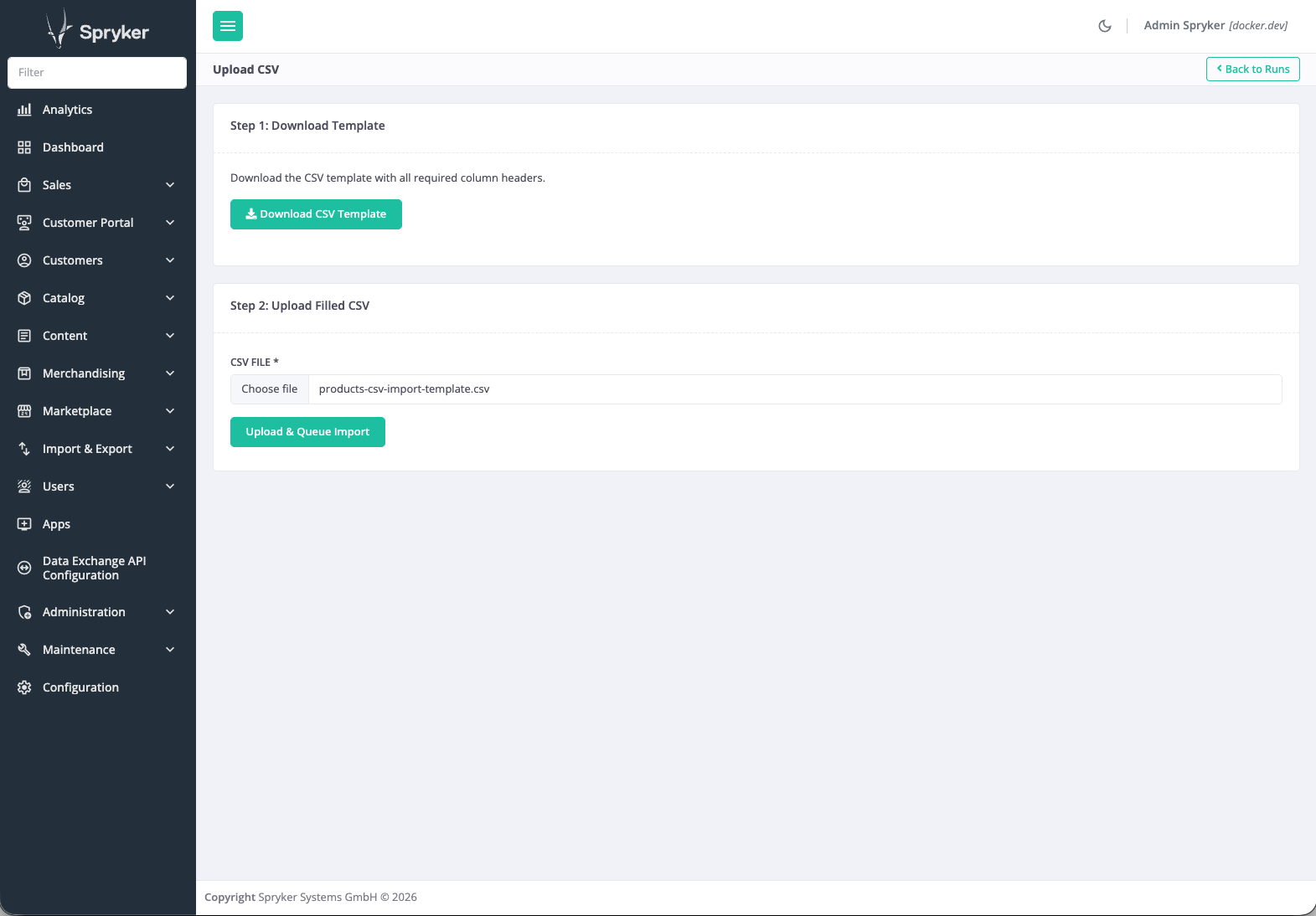
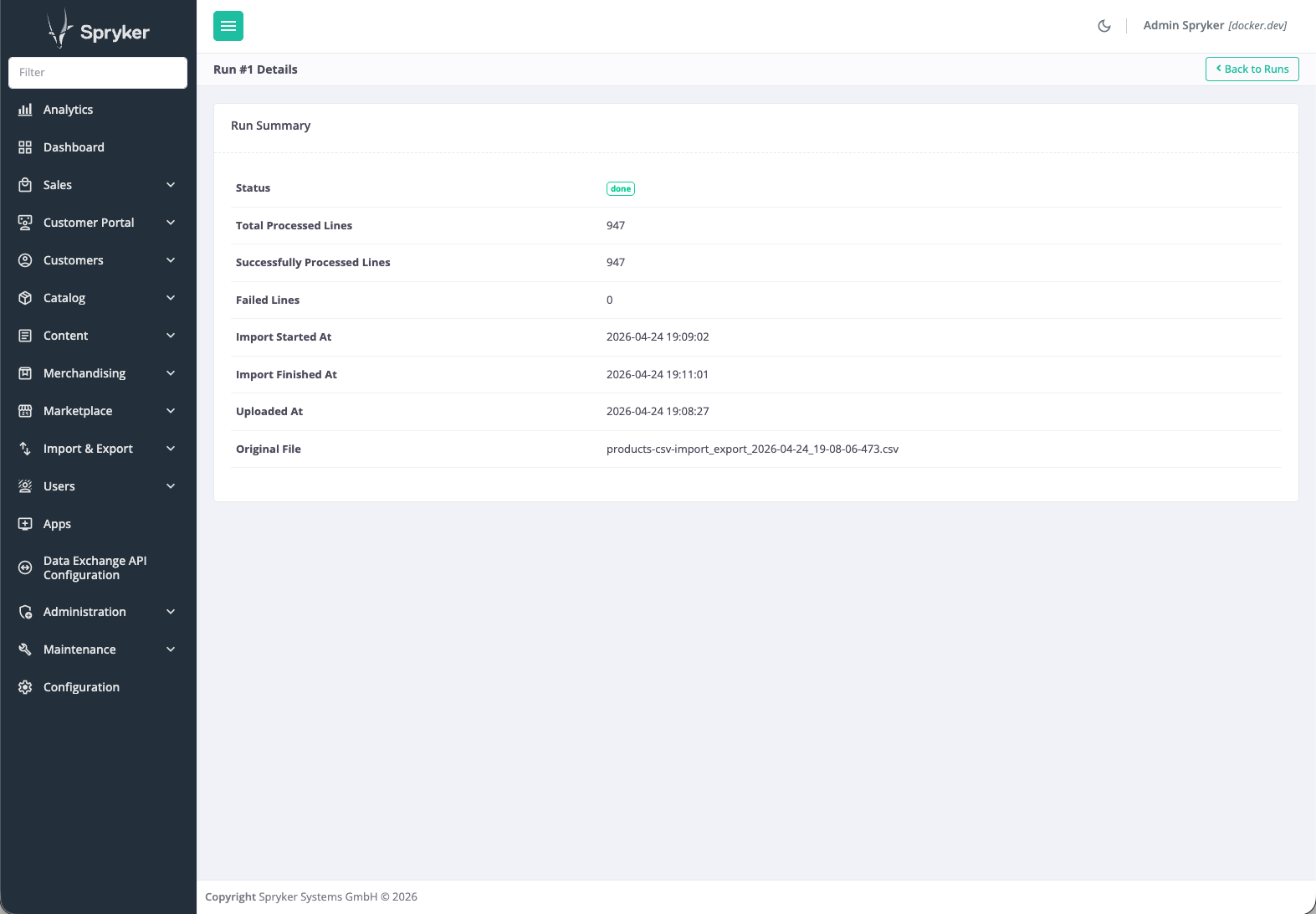
Spryker now offers product import and export via the Back Office, reducing reliance on developer‑driven CLI tooling. Business users can prepare and update catalogs faster during onboarding, launches, and routine maintenance. This improves operational speed and gives teams more control over their product data processes.
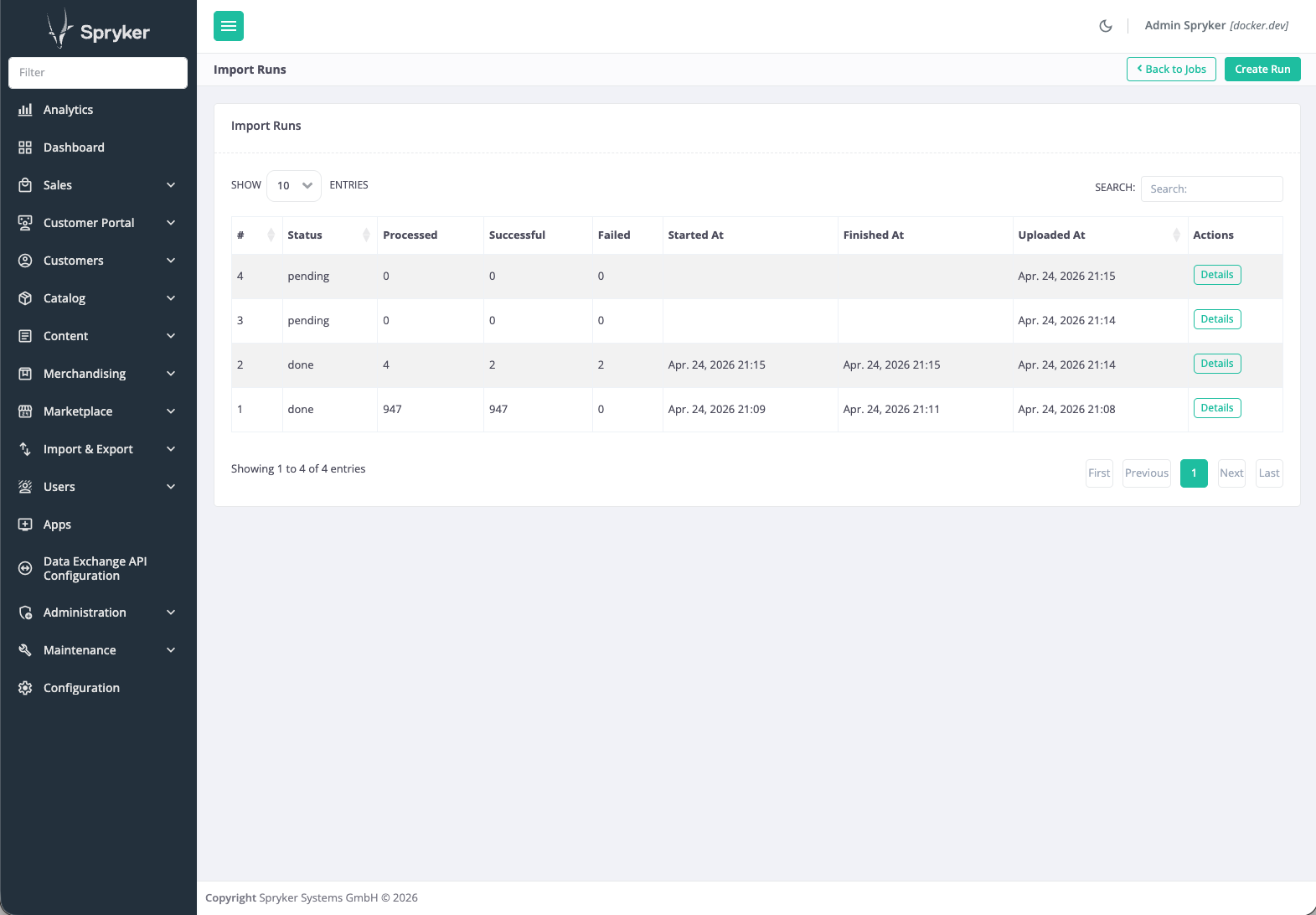
Key capabilities:
- Import and export product data directly from the Back Office
- Single‑file product import, replacing multiple CLI‑required files
- CSV‑based jobs with reusable job/run concepts and clear validation feedback
Business benefits:
- Significantly simplifies adding products to the catalog, replacing multi‑file CLI imports with a single, business‑friendly file
- Accelerates catalog preparation for new launches and environment migrations
- Empowers business users with self‑service error resolution, minimizing developer involvement
Documentation:
Product attribute display types
You can now control where product attributes are visible without project-specific customization. This helps keep internal operational data hidden while displaying only relevant information to buyers.
Key capabilities:
- Adds visibility types for product attributes.
- Supports internal-only attributes as well as attributes shown on PDP, PLP, and cart-related experiences.
- Provides native configuration for attribute visibility management.
Business benefits:
- Shop operators can now control which attributes are displayed where across the storefront, making it easier to surface the right product information at the right place to support buyer decision-making and product discovery.
- Internal attributes can be managed separately to support operational or process-related needs without ever being exposed to buyers.
Documentation:
Spryker Storefront Design System Foundation
Building storefronts without a common foundation meant repeated work, slower delivery, and experiences that looked and felt different every time. This release introduces a unified design system with shared foundations and reusable components, so teams work from common building blocks. The result is faster implementation, easier adoption, and the ability to scale storefront delivery without scaling complexity.
Key capabilities:
- Defines the design system foundation with shared tokens and naming conventions.
- Introduces token-driven implementation patterns for new storefront components.
- Adds composite component patterns built from core UI elements.
- Covers common structures such as cards, buttons, input fields, headers, search and more.
Business benefits:
- Improves consistency across storefront experiences.
- Reduces duplicate design and frontend implementation effort.
- Accelerates feature delivery with reusable UI patterns.
- Creates a stronger foundation for future storefront evolution.
Documentation:
Back Office Product Import & Export
Spryker now offers product import and export via the Back Office, reducing reliance on developer‑driven CLI tooling. Business users can prepare and update catalogs faster during onboarding, launches, and routine maintenance. This improves operational speed and gives teams more control over their product data processes.
Key capabilities:
- Import and export product data directly from the Back Office
- Single‑file product import, replacing multiple CLI‑required files
- CSV‑based jobs with reusable job/run concepts and clear validation feedback
Business benefits:
- Significantly simplifies adding products to the catalog, replacing multi‑file CLI imports with a single, business‑friendly file
- Accelerates catalog preparation for new launches and environment migrations
- Empowers business users with self‑service error resolution, minimizing developer involvement
Documentation:
Budget & Cost Centers
We introduced an Early Access version of budgets and cost centers to support policy-driven purchasing in B2B procurement. The release covers core budget enforcement and its integration with approval workflows.
Key capabilities:
- Lets companies create and manage cost centers and assign buyers to them.
- Supports budget creation with configurable enforcement rules such as block, warn, or require approval.
- Adds cost center selection and budget validation during checkout.
- Integrates budget-triggered approvals with Spryker’s existing Approval Process.
- Tracks budget consumption and restoration as orders progress.
Business benefits:
- Improves financial control and purchasing compliance.
- Reduces overspending risk with enforceable budget rules.
- Aligns procurement workflows with departmental or project-based spending structures.
- Provides an early demoable foundation for customer and partner conversations.
Documentation:
Back Office support for merchant product ownership
Marketplace operators can now manage merchant ownership of products directly in the Back Office, without relying on the Merchant Portal. This makes it easier to maintain accurate product data in centrally managed or hybrid marketplace models. The result is smoother operations and clearer accountability across the catalog.
Key capabilities:
- Assign or update merchant ownership for any product directly in Back Office workflows.
- See merchant ownership instantly within product management views.
- Maintain merchant‑related product data as part of your standard PIM processes.
Business benefits:
- Strengthens support for centrally managed catalogs and hybrid marketplace models, giving operators more flexibility in how they run their marketplace.
- Improves transparency and control, making ownership clear, consistent, and auditable.
- Reduces reliance on workarounds and custom tooling, lowering operational overhead.
- Supports more flexible marketplace operations, enabling teams to scale product management with confidence.
Documentation:
Back Office Frontend Modernisation
We delivered the first phase of the Back Office theme modernisation to improve clarity, consistency, and responsiveness. This update creates a more usable and scalable visual foundation without changing the overall information architecture.
Key capabilities:
- Improves visual hierarchy and component consistency across the Back Office.
- Reduces UX debt introduced by legacy Inspinia defaults.
- Enhances spacing, density, emphasis, and table presentation.
- Provides a more stable foundation for future Back Office UX improvements.
Business benefits:
- Improves daily usability for Back Office users.
- Makes the Back Office more credible and demo-ready.
- Reduces the need for one-off CSS customizations.
- Establishes a better base for future product evolution.
Streamlined Login and Session Recovery Experience
Logging in should feel like picking up where you left off, not starting over. With this release, users across the Back Office, Storefront, and Marketplace are presented with a meaningful dashboard featuring quick actions for common tasks, including viewing orders, adding products, and checking returns. After a session timeout, users are redirected back to the page they were on so they do not lose track of what they were doing.
Key capabilities:
- Redirects Back Office users to the dashboard instead of a blank technical page after login.
- Adds action-oriented quick actions to the Back Office dashboard for common tasks such as viewing orders, adding products, opening the catalog, and checking returns.
- Restores the last visited page after session timeout across the Back Office, Storefront, and Marketplace.
- Reopens create and edit pages after re-login, while unsaved data is not preserved.
Business benefits:
- Reduces onboarding friction for new users.
- Helps operational users continue workflows faster after session expiration.
- Improves usability and perceived product maturity across core daily journeys.
- Makes demos and first-touch product experiences more intuitive.
Connected, and AI-Enabled Platform
Spryker Now Ships with AI Foundation and Smart Product Enrichment
Spryker now includes the AI Foundation and Smart PIM out of the box, allowing merchants to adopt AI‑assisted catalog enrichment with minimal setup. Product content can be improved, translated, and enriched directly in the Back Office using AI, reducing manual work and improving content quality. Customers only need to connect their preferred AI provider to start benefiting from AI‑powered product enhancements, with governance automatically handled through AI Foundation.
Key capabilities
- Enhances and translates product names and descriptions using AI
- Generates alt‑text for product images and suggests suitable product categories
- Delivered by default in Spryker, requiring only AI provider configuration
Business benefits
- Reduces manual effort in creating and refining product content across the catalog
- Makes AI adoption easier by providing a pre‑configured integration layer with built‑in governance and provider flexibility
- Speeds up catalog enrichment and localization for merchants operating across multiple markets
Documentation
Smart Back Office Assistant
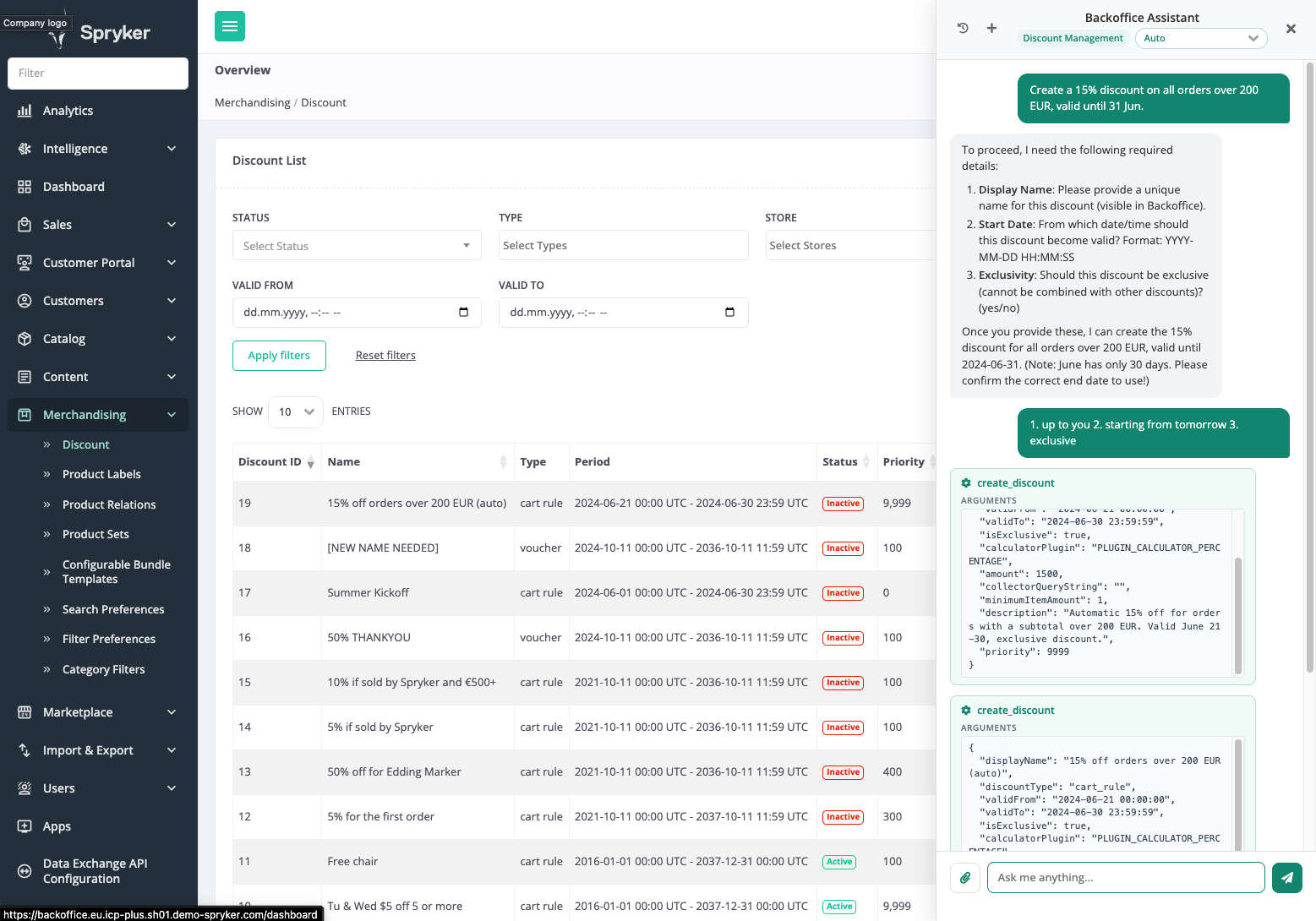
Spryker introduces the Smart Back Office Assistant, enabling operators to perform Back Office tasks through natural language instead of relying solely on manual navigation. Operators can get guidance on where to find features, ask operational and order‑related questions, and create discounts directly through chat. This makes Back Office work faster, more intuitive, and easier for all user types.
Key capabilities
- Provides navigation and operational guidance to help users quickly find functions and understand Back Office workflows
- Answers order‑related questions, including order status and operational details
- Assists to complete forms, for example, by enabling discount creation directly through chat.
Business benefits
- Reduces time spent searching for pages and completing repetitive tasks
- Improves usability for operators who are less familiar with Back Office structure or workflows
- Helps prevent errors by guiding operators through correctly structured inputs and actions
Documentation
AI Foundation Visibility & Governance Enhancements
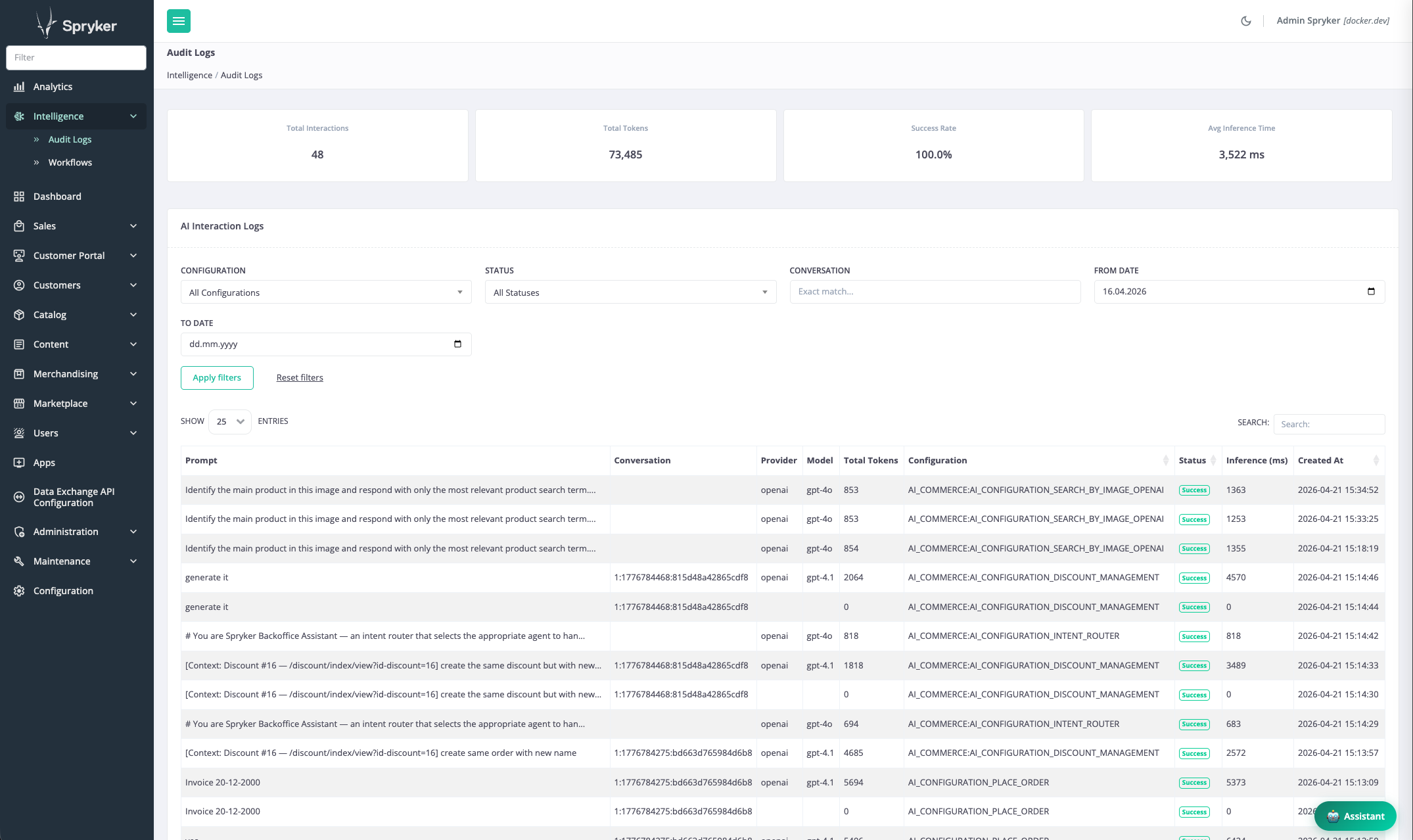
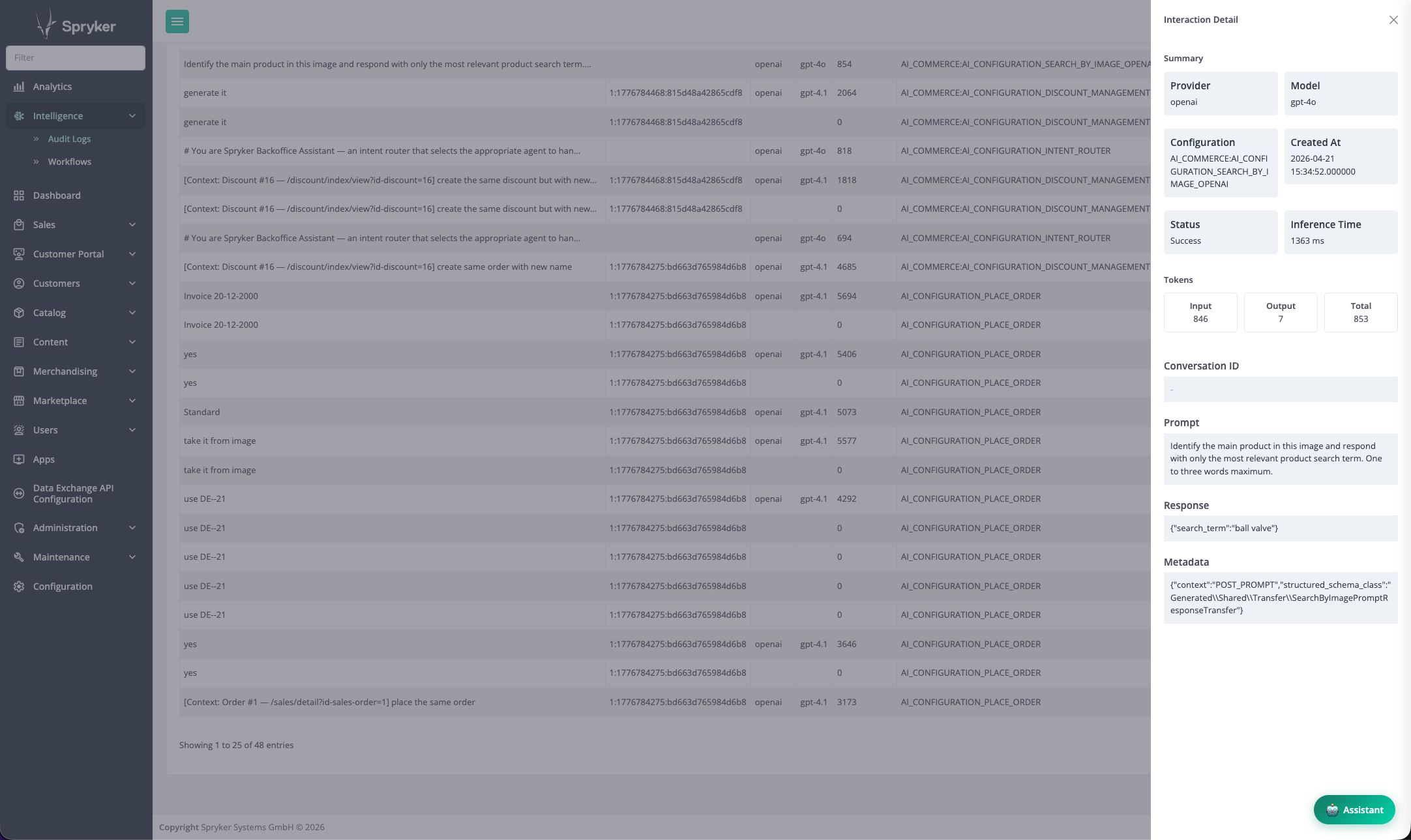
Spryker introduces comprehensive visibility into AI activity through new Back Office views for both AI interactions and AI workflow execution. Teams can now inspect prompts, responses, metadata, and workflow states in a single place, improving transparency and control over AI‑driven processes. These enhancements strengthen governance, streamline troubleshooting, and make AI operations easier to understand and monitor.
Key capabilities:
- Back Office audit logs for reviewing prompts, responses, metadata, and model details
- Workflow execution views with list, detail, state history, and visualized transitions
- Filtering, sorting, and inline inspection tools for efficient debugging and analysis
Business benefits:
- Improves governance and traceability across all AI‑powered processes
- Simplifies troubleshooting by making AI interactions and workflow states fully transparent
- Gives operators greater control over AI‑driven actions with clear visibility into execution paths
Documentation:
Smart Visual Product Search & Ordering
Spryker now enables buyers to identify products and start orders simply by uploading or capturing an image. Whether it’s a technical part, a field-site photo, or a handwritten note, the system can recognize products and quantities and help buyers move directly from identification to ordering. The entire capability now runs on the Spryker AI Foundation, offering provider flexibility, improved reliability, and easier long‑term adoption.
Key capabilities
- Helps buyers identify relevant or visually similar products by uploading or capturing an image
- Prefills the quick order form with products and quantities extracted from photos, screenshots, or handwritten notes
- Uses Spryker AI Foundation for multi‑provider support (OpenAI, Azure, Bedrock) and centralized AI governance
Business benefits
- Speeds up product identification and ordering, especially for technical and spare‑parts workflows
- Reduces manual entry and ordering errors by interpreting product information directly from images
- Supports mobile and field‑based buying scenarios where buyers capture photos instead of searching by name or SKU
Documentation
AI Dev Tooling for Coding Agents
Spryker now provides ready-to-use new AI Dev tooling to help development teams work more effectively with coding agents in Spryker projects. The update provides ready-to-use agent instruction files and reusable Spryker-specific skill examples.
Key capabilities:
- Generates a project‑ready agent configuration file (AGENTS.md)
- Generates a set of rules for AI agent based on Spryker coding conventions and architectural guidelines
- Provides reusable skill examples covering testing, data import, schema conventions, validation, and frontend development
- Includes a setup command that generates agent configuration file, rules and skills for supported coding agents
Business benefits:
- Speeds up onboarding for developers who are new to Spryker by giving AI coding agents the right context from day one
- Improves code quality and consistency through pre‑written, Spryker‑aligned development rules
- Helps teams deliver features faster by reducing back‑and‑forth with AI tools and minimizing incorrect code generation
Documentation:
API Platform is now Generally Available
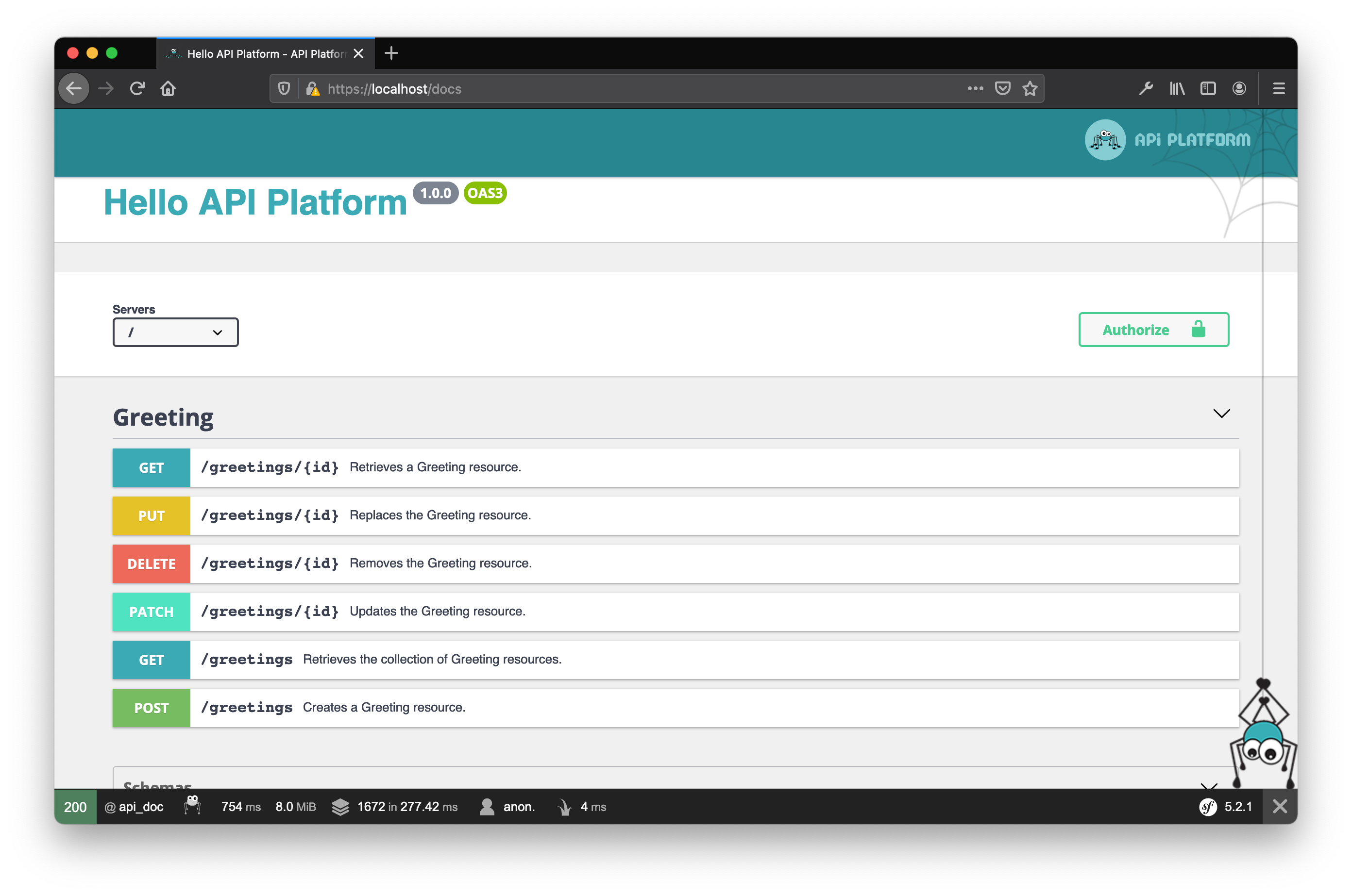
Spryker made API Platform generally available as the foundation for modern API development and migration. Existing APIs have been migrated to API Platform internally while keeping external contracts backward-compatible. This enables faster API delivery, easier extensibility, and more standardized API development.
Key capabilities:
- Declarative API development using YAML schemas
- API generation with validation, pagination, serialization, and operation-specific rules
- Interactive and always up-to-date OpenAPI documentation
- Backward-compatible migration of existing APIs to API Platform infrastructure
- Cleaner separation of read and write logic through providers and processors
Business benefits:
- Reduces development effort for new and existing APIs
- Improves consistency and maintainability of API implementations
- Accelerates delivery of integrations and future API capabilities
Documentation:
Algolia configuration in the Back Office
Spryker updated the Algolia integration settings in the Back Office to replace the legacy ACP-based configuration experience. The new page uses the Back Office Configuration Framework and provides a more consistent and user-friendly way to manage Algolia credentials. This helps reduce setup effort and simplifies validation during implementation.
Key capabilities:
- New configuration section in Back Office > Configuration > Integrations > Algolia
- Manage Algolia credentials, including:
- Application ID
- Search-only API key
- Admin API key
- Validate credentials directly via API calls
- Align Algolia setup with the current Spryker-native integration approach
Business benefits:
- Simplifies Algolia setup and maintenance in the Back Office
- Reduces implementation time and configuration errors
- Replaces legacy ACP-era fields with a clearer configuration experience
Documentation:
Mollie PSP Integration
Spryker introduces a new native integration with Mollie, a leading European payment service provider, enabling seamless B2B and B2C payment experiences across key European markets. The integration allows merchants to quickly enable a wide range of local and international payment methods with minimal development effort. It is delivered in collaboration with Spryker Solution Partner KPS.
Key capabilities:
- Native integration with Mollie
- Support for a wide range of local European and international payment methods
- Plug-and-play setup with minimal custom development
Business benefits:
- Faster time-to-market for European commerce use cases
- Improved conversion through localized payment experiences
- Reduced implementation complexity and maintenance overhead
Documentation:
OAuth SSO readiness for Spryker applications
Spryker introduced a standardized and reusable approach for OAuth 2.0 and OpenID Connect single sign-on across key applications. The release establishes a consistent integration pattern for identity providers such as Keycloak, Azure AD, and Okta for the Back Office, Storefront, and Merchant Portal. This makes identity integrations more predictable and reduces the need for project-specific implementations.
Key capabilities:
- Standardized SSO approach for:
- the Back Office
- Storefront
- Merchant Portal
- Support for OAuth Authorization Code flow with PKCE
- Provider-agnostic integration based on configurable OAuth providers
- Persistent identity linking between external providers and Spryker users
- Reference implementation, templates, configuration patterns, and rollout guidance
- Backward compatibility with existing form-based login
Business benefits:
- Reduces time and cost for enterprise identity integrations
- Improves implementation predictability across projects
- Creates a reusable foundation for federated authentication across Spryker entry points
Documentation:
Native PunchOut Gateway for cXML and OCI
Spryker introduced native PunchOut Gateway capabilities for cXML and OCI to reduce bespoke integration work in procurement-driven B2B commerce. The release adds reusable building blocks for common PunchOut flows, including session start, shopping, cart updates, and cart return. This strengthens support for enterprise procurement environments, especially SAP-centric setups.
Key capabilities:
- Native compatibility for cXML and OCI PunchOut scenarios
- Support for basic PunchOut requisition and cart flows
- Standard OCI parameter handling
- OCI cart return support with line items
- Reusable message handling and implementation guidance
Business benefits:
- Reduces custom development effort for PunchOut implementations
- Speeds up procurement-channel enablement and time-to-revenue
- Improves repeatability and maintainability across B2B integration projects
Documentation:
New Stripe Integration
Spryker introduced a new Stripe integration that replaces the legacy ACP-based app with a more extensible Spryker-native implementation. The release also adds a dedicated configuration page in the Back Office for managing Stripe settings. This gives customers and partners more control over Stripe-based payment flows and reduces dependency on legacy integration boundaries.
Key capabilities:
- New installable Stripe Eco module without ACP runtime dependency
- Support for checkout payment method selection
- Support for payment initialization, authorization, capture, refund, and cancel flows
- New configuration section in Back Office > Configuration > Integrations > Stripe
- Validation of Stripe keys and webhook configuration
- Storage of Stripe settings in configuration storage
Business benefits:
- Improves flexibility for extending and customizing Stripe payment flows
- Reduces implementation risk and legacy dependency overhead
- Lowers long-term maintenance effort and supports faster payment innovation
Documentation:
New Vertex Integration
Spryker introduced a new Vertex integration to replace the legacy ACP-based approach for tax calculation scenarios. The new integration is designed to provide more flexibility and reduce legacy constraints when adapting tax-related processes. This supports more maintainable and extensible tax integrations over time.
Key capabilities:
- New Spryker-native Vertex integration
- Reduced reliance on legacy ACP-based architecture
- Improved extensibility for tax calculation and related scenarios
Business benefits:
- Supports more adaptable tax integrations for changing business needs
- Reduces integration friction and project-specific patching
- Lowers total cost of ownership through improved maintainability
Documentation:
Data import performance and stability enhancements
We improved the data import experience and robustness for large data volumes. Data imports now provide better execution visibility through a progress bar, and memory usage has been optimized to better support very large imports, including merchant price imports with up to 1 million records.
Key capabilities:
- Added a progress bar for data import console commands to show execution progress.
- Reduced memory consumption in data import flows to prevent out-of-memory issues during large imports.
- Improved reliability for high-volume imports across data import entities.
Business benefits:
- Helps operators better monitor long-running imports.
- Reduces failures caused by memory exhaustion during large imports.
- Improves operational efficiency for bulk data onboarding.
Documentation:
Performance and security improvements
We made your Spryker Commerce OS faster, more secure, and more stable.
Key capabilities:
- Non-buffered log streaming presents the logs immediately.
- Lower latency and response times in storefront with optimized widgets.
- Lower latency and response times in the Back Office and Merchant Portal.
- Higher stability and throughput of Publish & Synchronize workers. The update introduces dynamic waiting behavior, better control over parallel job execution, and compatibility improvements for Symfony Messenger resource-aware workers.
Documentation:
- Non-buffered log streaming
- Yves widget performance best practices
- Split Publish & Synchronize queues for performance
- Merchant Portal and Back Office performance with ACL rules
- Order details page performance guidance
Efficient and Flexible Cloud Foundation
Spryker Monitoring Integration: logs forwarding
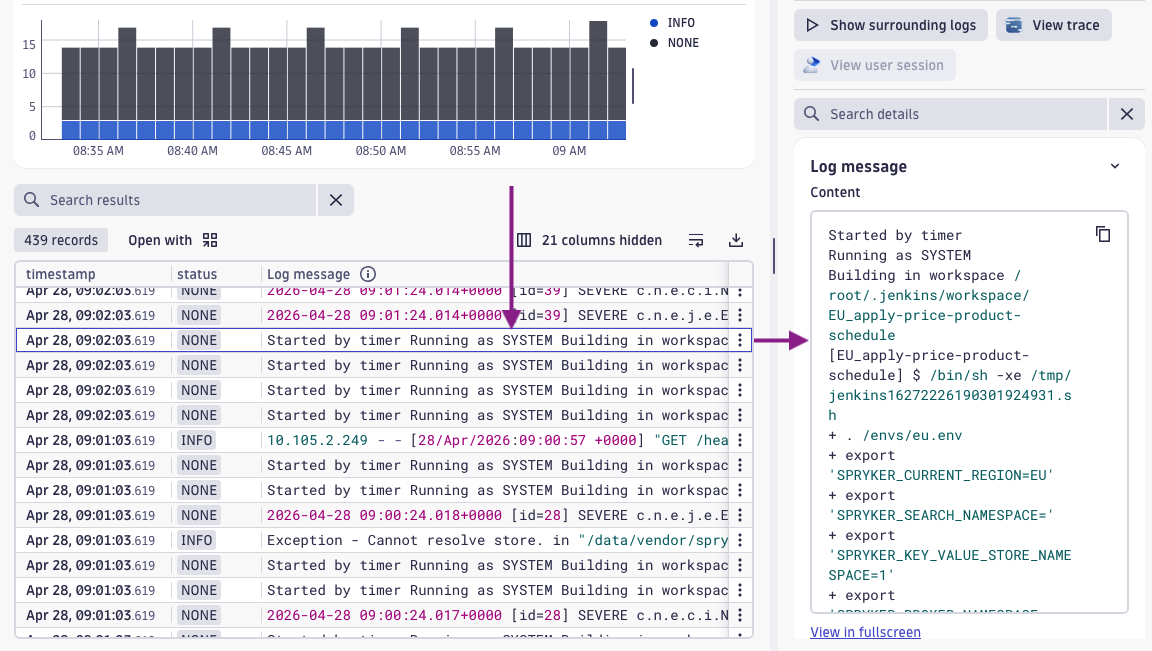
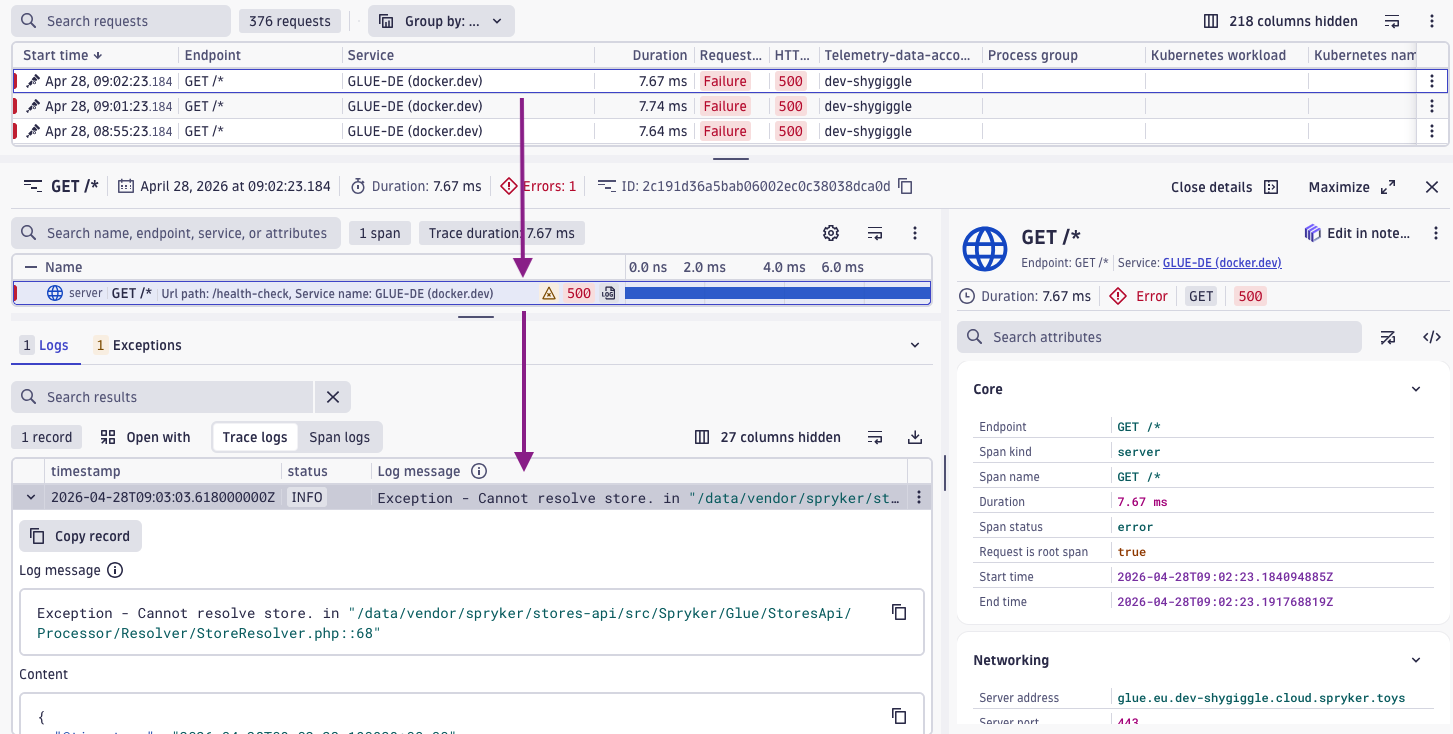
Spryker expanded cloud observability by enabling log forwarding through SMI to third-party monitoring platforms of your choice. This allows teams to correlate logs with traces, create alerts based on log data, and use their preferred monitoring tooling beyond AWS CloudWatch.
Key capabilities:
- Inspect logs from Spryker Platform in your monitoring tool
- Correlate logs with traces using trace and span identifiers
- Configure log verbosity to control emitted log volume
Business benefits:
- Improved troubleshooting through unified logs and traces
- Better alerting capabilities based on application and infrastructure log events
Documentation:
Single Sign-On (SSO) for Cloud services
Spryker introduced centralized access management for cloud services, including SSO support for customer identity providers such as Okta and OneLogin. This update reduces manual access handling, improves security, and simplifies onboarding and offboarding for users. It also includes rollout, production-readiness, and IAM cleanup measures to standardize and harden access controls.
Key capabilities:
- Connect your own identity provider for SSO access to cloud services
- Centralize user access management for services such as Jenkins, RabbitMQ, and others
- Reduce manual access management effort through self-service-oriented processes
Business benefits:
- Faster and more secure user onboarding and offboarding
- Reduced operational effort for access requests and changes
- TLS-encrypted communication to Jenkins and RabbitMQ over internal environment network
Documentation:
Bastion security hardening
Spryker improved Bastion host security and maintainability by upgrading the operating system, isolating workloads from the host, and enforcing SSO and MFA for human access. This change modernizes the setup while keeping customer impact minimal and preserving SFTP access for integrations.
Key capabilities:
- Upgrade Bastion hosts to a current LTS operating system
- Enforce SSO and MFA for human access, deprecate direct SSH access for human users
Business benefits:
- Improved security posture for administrative access
Maintenance and service updates
Spryker delivered maintenance updates across cloud services and application tooling to keep the platform secure, supported, and maintainable.
Key capabilities:
- RabbitMQ 4.2 is now supported in Docker SDK for local development environments.
- Node.js 24 introduces V8 v13.6 and npm 11, which results in noticeably faster
frontend:yves:buildandfrontend:zed:buildruns.
Business benefits:
- Reduced security and operational risk from outdated components
Documentation:
Thank you!
For submitting the form