
Release notes 202610.0
Edit on GitHubFor information about installing Spryker, see Getting started guide.
B2B Business-Ready Commerce Experiences
Recurring Orders Improvements
Recurring Orders now support more flexible scheduling and fewer unnecessary interruptions. Buyers can define multi-day delivery patterns in a single recurring order and set price tolerances so small expected price changes do not automatically stop the schedule for review.
Key capabilities:
- Create one recurring order with multi-day schedules, such as deliveries every Tuesday and Thursday
- Define independent price tolerances for order totals and individual products
- Use a clearer, more consistent experience across checkout, order review, and the Customer Cabinet
Business benefits:
- Reduces manual effort by lowering the number of schedules buyers need to manage
- Prevents avoidable order interruptions caused by minor price changes
- Increases trust in automated replenishment for repeat B2B purchases
Documentation:
Workflows — Visual authoring, validation, and a consolidated view
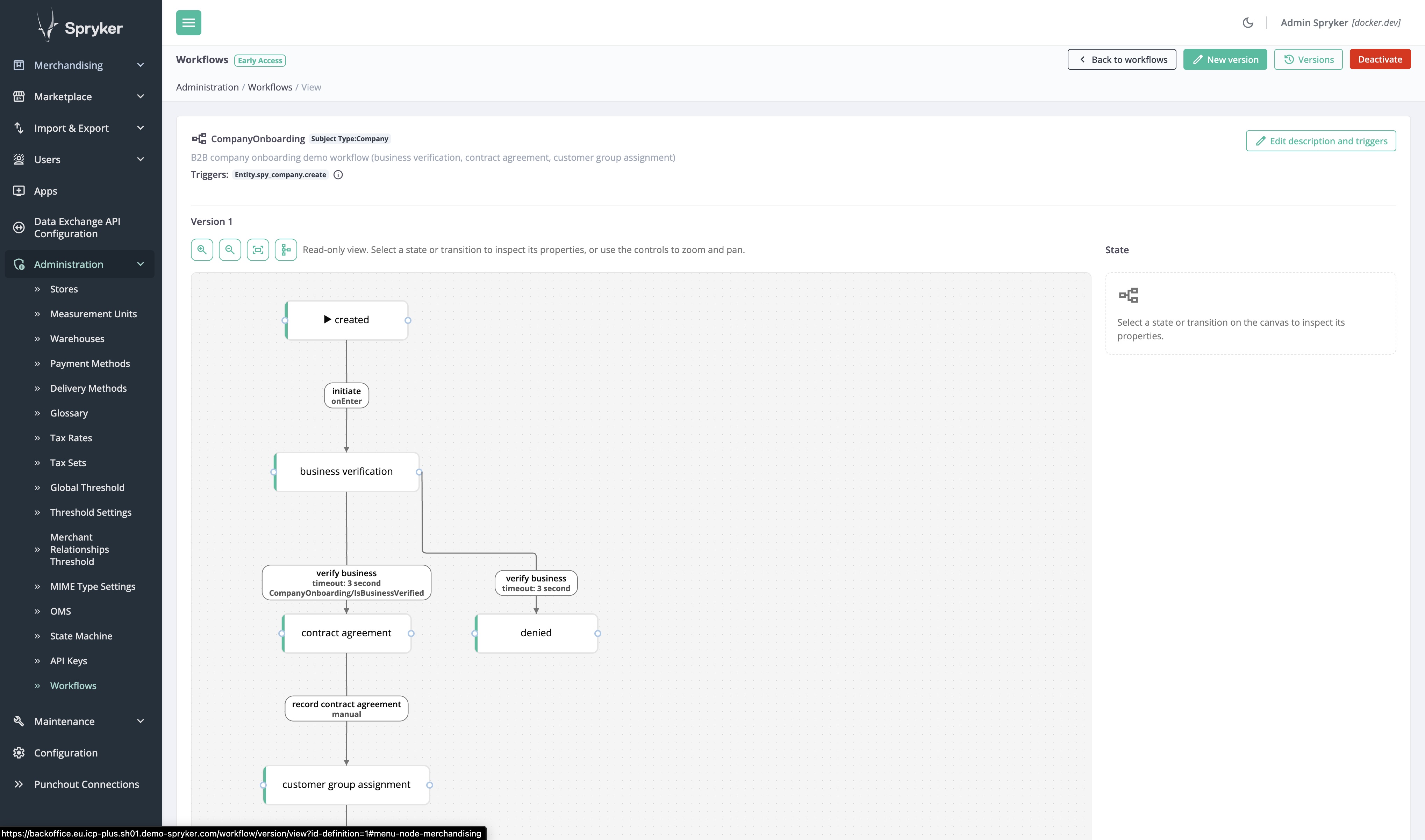
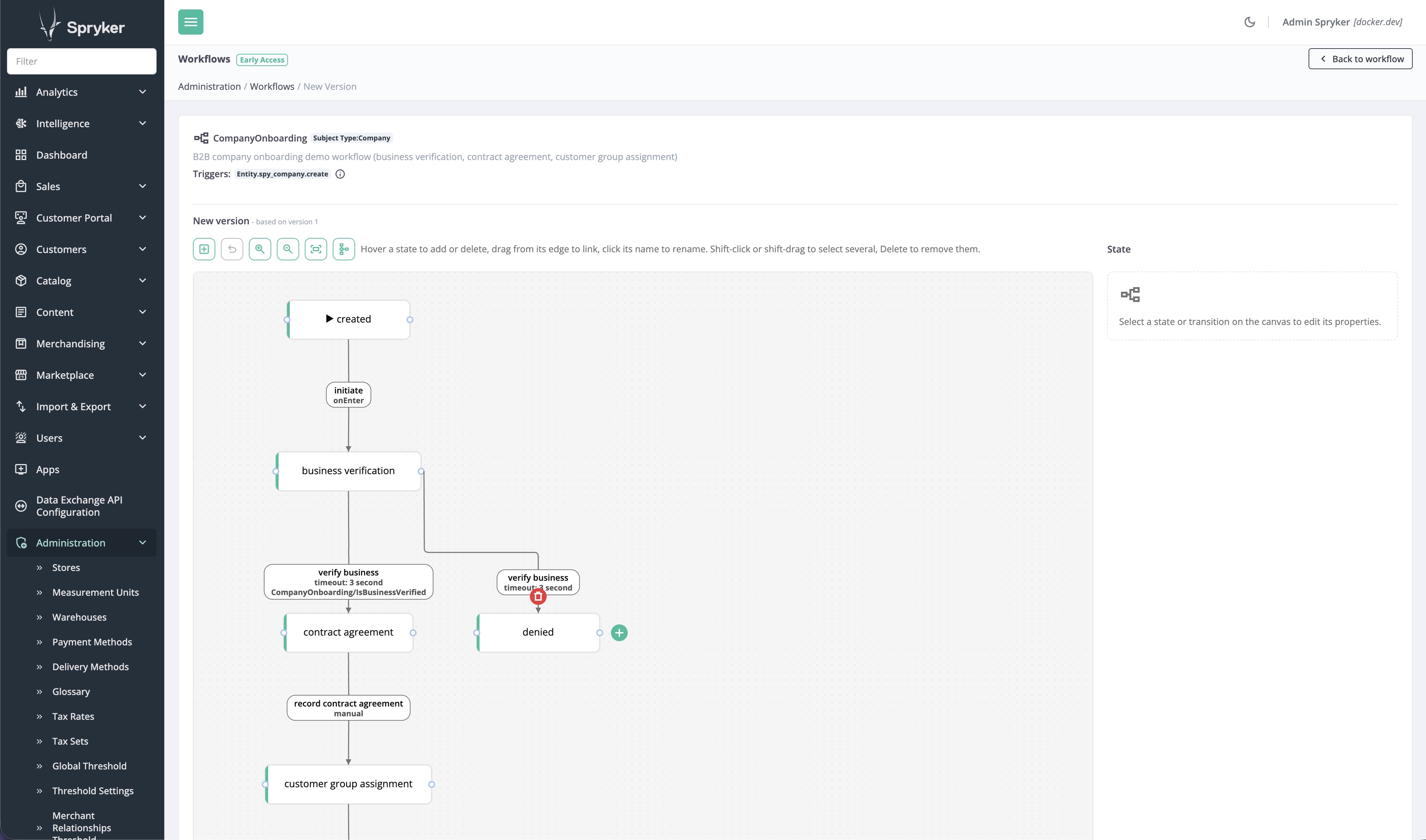
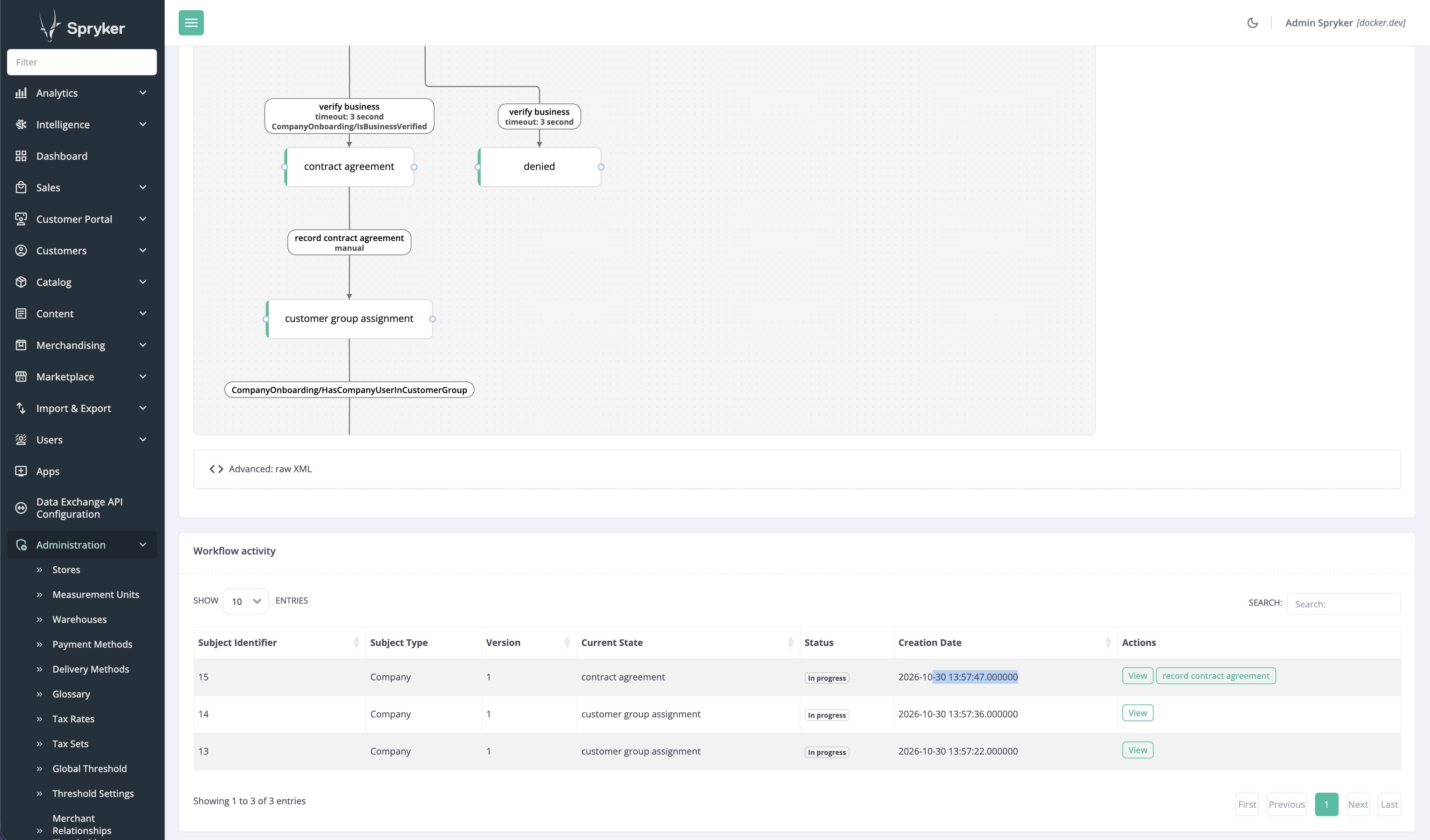
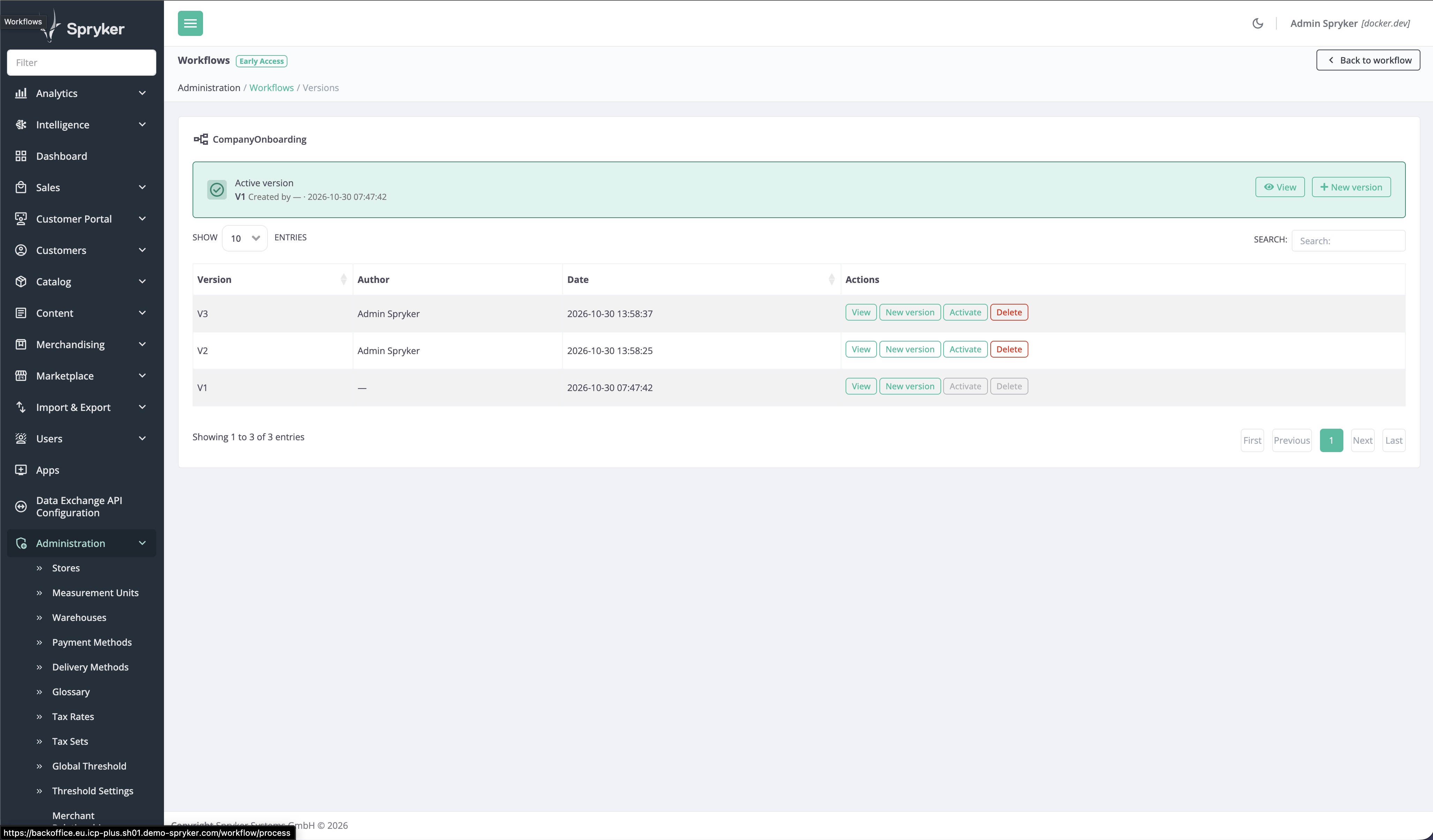
Back Office users can now create, review, and activate workflows visually, instead of writing XML by hand, and see everything about a workflow on a single page. This release also lets you model more business processes with workflows, including marketplace processes such as merchant onboarding
Key capabilities:
- Visual authoring: build and edit workflows on a diagram instead of in XML, with clearer labels and more intuitive controls.
- Validation: workflows are checked for configuration errors, and a workflow with errors can’t be activated.
- Consolidated view: a workflow’s description, triggers, diagram, and related activity on one page.
- More building blocks: new subject types and triggers so you can build workflows for marketplace processes such as merchant onboarding and merchant product onboarding.
Business benefits:
- Faster changes: operations teams can update routine workflows themselves, without waiting for a development cycle. -Lower risk: validation stops misconfigured workflows from going live, reducing errors in business-critical processes.
- Flexible automation: marketplace operators can model processes such as merchant onboarding and merchant product onboarding to match their own requirements, with less custom code.
Documentation:
Service Points BO UI
The Back Office now includes a dedicated Service Points interface for viewing service points in one place. Business users can access key service point information directly in the Back Office without relying on database or API access.
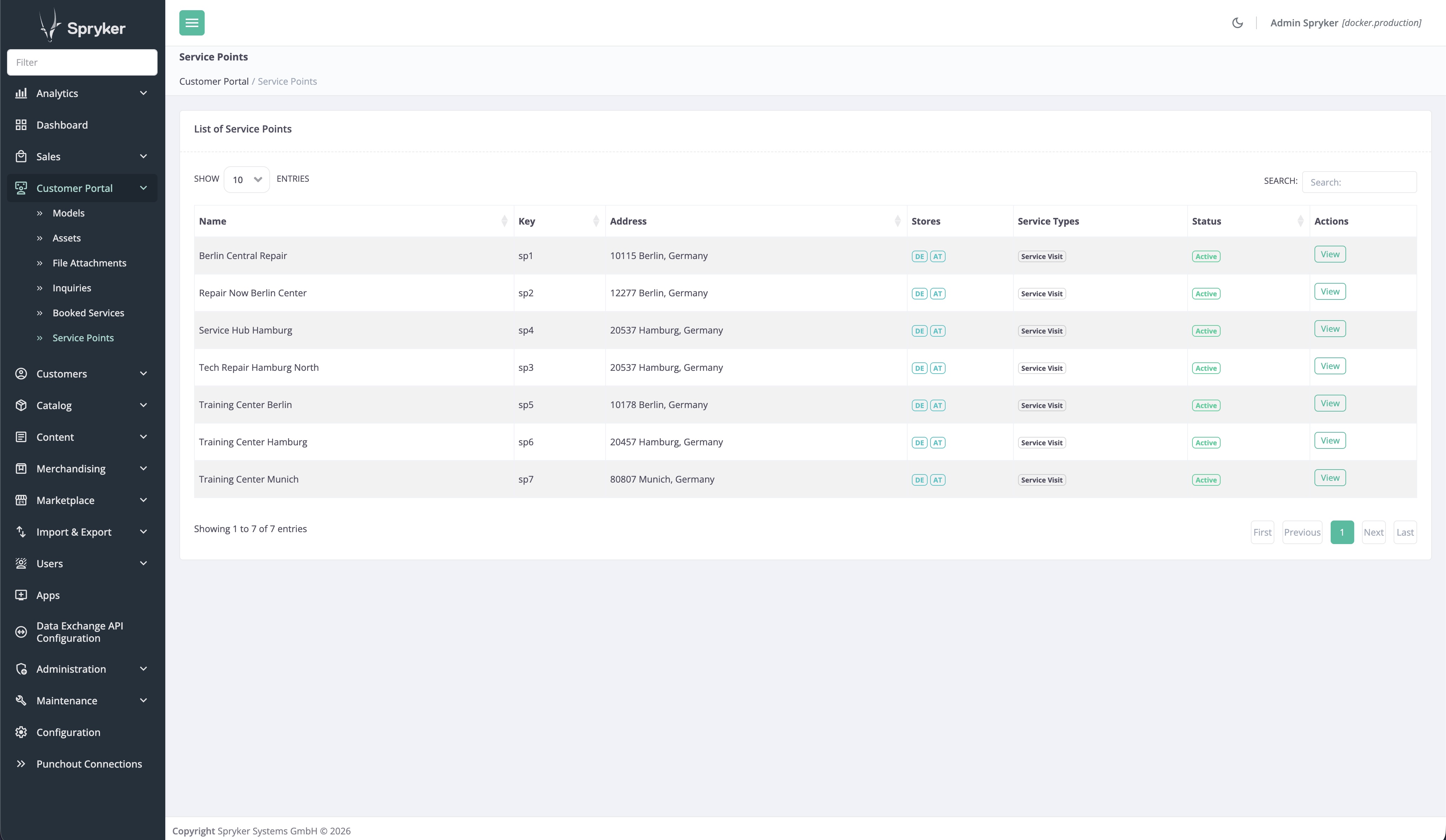
Key capabilities:
- View a list of service points with key details such as name, status, assigned stores, and location
- See inactive service points clearly marked in the list
- Access service point-related details in a Back Office screen protected by standard permissions
Business benefits:
- Improves operational visibility for service-based commerce setups
- Reduces reliance on technical teams for day-to-day information access
- Creates a foundation for broader service point management in future releases
Documentation:
Display of Invoices & Credit Notes
Buyers can now access invoice and credit note documents directly from their order-related interfaces instead of relying only on ERP access or email attachments. Spryker displays the finished documents provided by the ERP, helping extend self-service beyond order placement.
Key capabilities:
- View and download order-related documents such as invoices
- Keep ERP as the system of record for document creation and compliance
- Make documents available in customer-facing and seller-facing interfaces
Business benefits:
- Reduces document requests sent to service desks and sales representatives
- Helps buyers find the right documents without a second system or manual matching
- Strengthens self-service experiences for post-order processes
Documentation:
- Feature overview - Order Invoice
- Feature overview - Marketplace Order Invoice
- Installation guide - Order Invoice
- Installation guide - Marketplace Order Invoice
- Dev guide
- User guide - Order Invoice
- User guide - Marketplace Order Invoice
B2B Customer Groups - Membership
Customer groups can now be built using companies and business units, not only individual users. This makes segmentation better aligned with real B2B account structures and easier to maintain across commercial use cases. We will continue to build B2B Customer Groups, reach out if you are interested.
Key capabilities:
- Add companies, business units, and individual customers to the same customer group
- Use Back Office, import, and API support to manage group membership
- View effective membership details, including whether access is direct or inherited through a company
Business benefits:
- Makes B2B segmentation easier to manage at scale
- Reduces the need for project-specific customization around account grouping
- Creates a stronger foundation for targeting pricing, assortments, discounts, and content
Documentation:
Unified Order Intake via the Back Office API
External systems such as ERP, OMS, POS, marketplaces, and AI tools can now create orders in Spryker through the Back Office API and move them through the order lifecycle. An order placed through the API runs through the same checkout rules, price calculation, order process, and confirmation mail as a storefront order, so no storefront buyer has to be simulated.
Key capabilities:
- Create an order for an existing customer with line items, product options, shipment, billing address, and payment method.
- Apply the right prices automatically: contract prices of the buyer’s business unit first, otherwise the standard catalog price. A custom unit price can be set deliberately per line.
- Place orders on behalf of a business unit, with the buyer’s order permissions checked.
- Store the caller’s own reference on the order, such as a purchase order number or EDI document ID, visible in the Back Office.
- Retrieve, filter, and sort orders with their line items.
- Trigger order process events on selected line items, for example to confirm shipment from an external system, and add or read order comments.
Business benefits:
- Captures orders from every sales channel in one place, without custom order logic per channel.
- Removes manual re-entry of phone, email, and EDI orders.
- Keeps orders traceable to their source document through the external reference.
Not included in this release: native EDI transport and partner-specific mappings, and bulk or asynchronous order import.
Documentation:
- Backend API: Create an order
- Backend API: Retrieve orders
- Backend API: Fire an order event
- Backend API: Create an order comment
- Install the Orders Backend API feature
Back Office API for commerce and B2B entities
The Back Office API now lets ERP, CRM, PIM, and other source systems maintain commerce data and B2B accounts in Spryker directly, with the same business rules and validation the Back Office applies. This release covers the catalog, discounts, translations, customers, B2B company accounts, and merchants. Further domains such as prices, stock, CMS, returns, shipment, payment, and tax follow in later releases.
Key capabilities:
- Catalog: manage products, including prices, stock, images, categories, stores, and tax, through one product endpoint. Create, update, and delete categories, and assign products to a category in bulk.
- Discounts and translations: create, update, activate, and deactivate discounts with the same configuration as the Back Office, and generate, list, and export voucher codes. Create glossary keys and update their translations per locale.
- Customers: search, create, update, and anonymize customers; deleting a customer anonymizes the record instead of removing it, in line with GDPR. Manage addresses, including default billing and shipping addresses, notes, customer groups, and customer access.
- B2B company accounts: manage companies, business units with their hierarchy and addresses, company users, and company roles with their assignments, and look up the permissions a role can hold. A new buyer organization can be set up end to end without the Back Office UI. Customer and company account endpoints are available to Back Office users only.
- Merchants: manage merchants and merchant profiles as the marketplace operator.
- One set of conventions: authentication, pagination, filtering, sorting, and errors work the same across all endpoints. Records are addressed by public references and UUIDs, related records can be requested in one call, and all endpoints are described in the generated OpenAPI specification.
Business benefits:
- Keep the catalog, campaigns, translations, and customer accounts in sync with source systems instead of re-entering them in the Back Office.
- Onboard B2B buyer organizations from the system where the account is created.
- Replace project-built endpoints with a supported API that applies Back Office validation, password policy, and privacy rules, and survives upgrades.
- Shorten each new integration, because every domain follows the same conventions.
Documentation:
- Backend API conventions
- Products Backend API
- Backend API: Retrieve categories
- Backend API: Manage discounts
- Backend API: Retrieve glossary keys
- Backend API: Manage customers
- Backend API: Manage companies
- Backend API: Manage merchants
Backend API authentication for merchant and Back Office users
Back Office users and merchant users can now sign in to the Backend API with their own credentials. Each user gets a token that carries their role, so an endpoint can serve the marketplace operator and merchants at the same time. Merchant users see and change only their own merchant’s data, with the same access rules that protect the Merchant Portal.
Key capabilities:
- Request and refresh access tokens as a Back Office user or a merchant user.
- Protect API sign-in with multi-factor authentication for both user types.
- Tokens carry the user’s role, so each endpoint can allow Back Office users, merchant users, or both.
- Merchant users’ requests are limited to their own merchant’s data automatically, without extra filtering in each endpoint.
Business benefits:
- Lets merchants connect their own systems to the marketplace with their existing user accounts.
- Removes the need for shared technical accounts with full access.
- Reuses the Merchant Portal’s access rules for merchants, so data separation between merchants works the same in the UI and the API.
Documentation:
- Authenticate as a Back Office user
- Authenticate as a merchant user
- Manage Multi-Factor Authentication
- Integrate the authentication
- Integrate Persistent ACL for merchant API endpoints
Back Office frontend tooling shipped with the product
The Back Office build tooling now ships inside the Gui module instead of as a separate npm package. Developers build, lint, and test the Back Office the same way as the Storefront and the Merchant Portal. Projects switch with the upgrade guide; Node.js 24.15 or later is required.
Key capabilities:
- Tooling and its dependencies update with the Gui module.
- One set of build, lint, and test commands across all three applications.
- Live reload, linting, and TypeScript support for Back Office code.
- Project code is picked up without a custom build script.
- Linter and TypeScript configuration is generated automatically.
Business benefits:
- Simpler upgrades, with no separate tooling version to track.
- Faster onboarding with one way of working across applications.
- Quicker delivery of Back Office customizations and UI improvements.
Documentation:
Connected, and AI-Enabled Platform
Automated Architecture-as-Code generation in AI Dev SDK
Spryker introduced an early access capability in the AI Dev SDK that helps teams generate Architecture-as-Code documentation in a faster and more consistent way. It guides users through a structured questionnaire, reuses existing project documents where possible, and generates a standard-compliant architecture/ folder for review and handover.
Key capabilities:
- Generates standard arc42-based architecture documentation, including 12 sections, diagrams, functional and non-functional requirements, integrations, and technical risks
- Uses a progressive questionnaire with conditional follow-up questions, while pre-filling answers from existing project documents to reduce manual effort
- Produces review-ready outputs in version-controlled Markdown, HTML preview, and PDF export
Business benefits:
- Reduces dependency on individual architecture experts by making documentation creation more guided and repeatable
- Improves delivery quality by creating a more reliable architecture baseline for implementation and review
- Enables downstream AI-supported development and guardrails with a stronger architectural source of truth
Documentation:
AI Commerce — Cost-efficient default models
New AI Commerce installations now use more cost-efficient AI models by default, lowering operating costs from day one. Existing projects keep their current configuration and can switch to the new models in the Back Office.
Key capabilities:
- New default models: more cost-efficient models are now the defaults for OpenAI, AWS Bedrock, and Anthropic.
- Cost visibility: token prices for the new models are included, so estimated costs appear in the AI Audit Logs.
- Consistent configuration: Quick Order and Search by Image on the storefront now use the AI configuration selected in the Back Office.
Business benefits:
- Lowers out-of-the-box AI operating costs for new projects.
- Shows estimated AI usage costs, so you can track spending per feature.
- Ensures all AI Commerce features consistently use the model you configure in the Back Office.
Documentation:
AI Dev SDK enhancements for Copilot, demos, upgrades, and frontend workflows
The AI Dev SDK has been extended to support more developer workflows and tools. It now includes GitHub Copilot support, guided demo preparation, broader upgrade assistance, and stronger frontend-focused rules and skills.
Key capabilities:
- Adds plugin support for GitHub Copilot alongside Claude Code.
- Introduces a demo preparation wizard that guides teams from briefing to build validation and presenter report.
- Expands upgrade support with tooling updates, performance and security checks, release steps, and reporting.
- Adds frontend-focused rules and skills for Yves, the Back Office, and the Merchant Portal.
Business benefits:
- Lowers onboarding effort for teams using different AI coding assistants.
- Each upgrade brings the latest security and performance fixes, and gives the business a clear report of the changes and the release steps.
- Improves frontend code quality with project-specific rules and skills for Yves Storefront, the Back Office, and the Merchant Portal.
Documentation:
Efficient and Flexible Cloud Foundation
Symfony 7.4 LTS Compatibility
Spryker now supports Symfony 7.4 LTS. This gives customers an early path toward the next long-term support release while keeping Symfony 6.4 support in place. The update helps customers plan migrations ahead of time and remain aligned with supported framework versions.
Key capabilities:
- Adds support for Symfony 7.4 and preserves Symfony 6.4 compatibility during the transition period
Business benefits:
- Helps reduce security and maintenance risks by simplifying long-term upgrade planning
Documentation:
OpenSearch 3.x Support in Spryker PaaS
Spryker is advancing support for OpenSearch 3.x to provide a clear path beyond OpenSearch 1.x. This work prepares the platform to provision, maintain, and monitor newer OpenSearch versions while supporting application compatibility and customer migration planning.
Key capabilities:
- Enables platform compatibility for indexing, reading, and writing with OpenSearch 3.x
- Prepares Spryker PaaS to provision and maintain OpenSearch 3.x services
- Establishes the basis for migration guidance from older OpenSearch versions
Business benefits:
- Support for Vector Search for AI applications
- Reduces security and maintenance risks associated with aging search versions
Documentation:
Docker and runtime updates
Update to Docker images and remediation of CVE-2026-109618 and CVE-2026-109619.
Key capabilities:
- Mitigated CVE-2026-109618 and CVE-2026-109619.
- Updated Docker PHP dependencies, addressed Debian Bullseye end-of-life impact, and aligned Blackfire port usage.
- Added XSL extension support for PHP 8.3, 8.4, and 8.5 images with activation through deployment configuration.
- Introduced configurability for Symfony Messenger and Scheduler to support both new and legacy infrastructure setups.
Business benefits:
- Reduced operational risk through security and compatibility updates across runtime images and dependencies.
Documentation:
- Release notes for spryker-php 20261021
- Release notes for spryker-php 20260915
- Release notes for spryker-php 20260908
Managed Service Updates
Spryker updated core managed services and operational components to keep cloud environments secure and current. This includes Jenkins image updates, zero-downtime RabbitMQ upgrade capabilities and MariaDB.
Key capabilities:
- Updates Jenkins to newer, more secure versions
- Enables zero-downtime RabbitMQ upgrades through blue-green rollout
- Compatibility with MariaDB 11.8
Business benefits:
- Reduces operational disruption during maintenance activities
- Ensures platform services stay current and supportable
Documentation:
Application Performance and Reliability Improvements
Multiple improvements to performance and reliability of ACL, Merchant-Relationship Price Storage and Cache, Web Profiler, dependencies and Dynamic Multi Store to strengthen platform reliability, reduce operational friction, and address known technical limitations.
Key capabilities:
- ACL. Remediation of known issues.
- Merchant-Relationship. Reduction of memory footprint and increase of processing speed by storing merchant-relationship prices once per merchant relationship instead of fanning them out per business unit.
- Forms. Sanitize data only once to decrease latency.
- Fixes to profiler.
- Dynamic Multi Store. Fix all known issues.
- Reduced redundant Zed calls during login checks to improve authentication performance.
Documentation & Releases:
- Bulk delete makes use of Persistence ACL impossible
- Performance issue with MerchantRelationshipListener
- Keeping dependencies updated for performance
- SanitizeXssListener sanitises submitted form data twice
- WebProfiler Doesnt work if xdebug enabled
- Fixed profiler page on YVES
- Adjusted performance for login and Zed tables
Thank you!
For submitting the form