
Storefront API
The Spryker Storefront API is a JSON REST API that is designed for customer-facing applications and buyer journey touchpoints. It is built to be used as a contract between the Spryker Commerce OS backend and any possible customer touchpoint or integration with third-party systems. As an application, Storefront API knows how to read and interpret API resources and leverage feature modules that expose existing Spryker functionality for customer experiences.
The Storefront API represents a contract that developers can stick to when they are extending the Spryker Commerce OS with new customer touchpoints or integrations. All REST API requests are handled according to the JSON REST API specification. These specifications define how clients should request data, fetch it, modify it, and how the server should respond to it. Hence, the expected behavior stays the same across all endpoints.
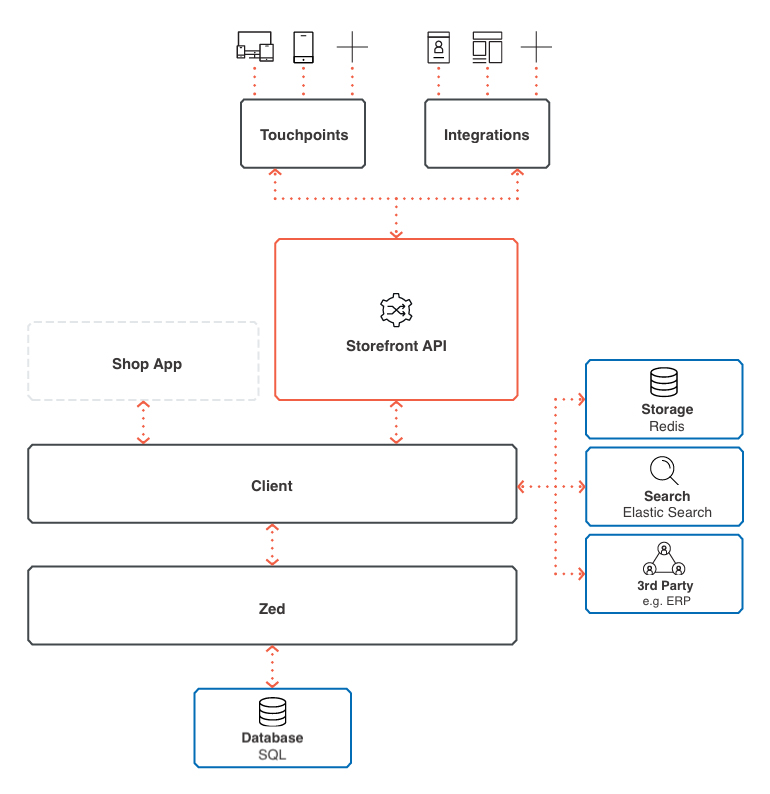
Two implementations
Storefront API endpoints are served by two interchangeable infrastructures:
- API Platform: the recommended infrastructure for developing new Storefront API endpoints.
- Glue: the legacy infrastructure. For details, see Glue infrastructure and the guides in the Develop with Glue section, starting with Implement a REST API resource.
The external JSON:API contract is identical for both infrastructures, so client applications interact with Storefront API endpoints the same way regardless of which infrastructure serves them.
Key features
- Customer-focused: Designed for buyer journey and customer-facing applications
- REST API based: Built on REST API principles with JSON:API conventions
- Storage/Search Integration: Connects to Storage and Search for optimized customer experience
- Extensible: Comes with predefined APIs that can be extended or customized
- Multi-touchpoint: Enables building custom experiences across different touchpoints
Storefront API capabilities
Storefront API empowers developers with a rich set of features:
- Custom API Application Creation: Build distinct API applications tailored to specific domains or integration needs
- Resource Definition: Define resources, such as products, orders, carts, that your API will expose
- Relationship Management: Establish relationships between resources to provide comprehensive data efficiently–for example parent-child or linked resources
- Efficient Data Handling: Utilize built-in support for pagination, sorting, filtering, sparse fields (requesting only specific data fields), and configurable inclusion of related data to optimize API calls
- Robust Security: Secure your API endpoints using OAuth 2.0 and define granular access controls
Use cases
Storefront API is ideal for:
- Web shops and e-commerce storefronts
- Mobile applications (native, hybrid, or web-view)
- Progressive Web Apps (PWAs)
- Headless commerce implementations, such as voice commerce devices and chatbots–for example, leverage the order history APIs to inform customers about the status of their delivery
- Custom customer touchpoints
- Third-party integrations for customer data
Business advantages of using the Storefront API
You can benefit from the APIs in these aspects:
- Reach more customers: APIs empower you to create any number of touchpoints to connect with your customers, regardless of the device.
- Customization: You can reach out to different customer segments via different touchpoints. APIs enable you to offer a tailored customer experience for your audience, wherever it may be.
- Integrations: APIs are not only used to deliver custom experiences, but you can also leverage APIs to integrate to different platforms; from offering your products on Amazon to leveraging mapping services for customers to find your offline store.
- Testing ideas: APIs are the quickest way to test your ideas and get a head start before the competition does. Consider them as building blocks for your developers to assemble your new ideas. New applications only need to follow the API contracts, but even those can be extended for your purposes.
Getting started
To start working with Storefront API:
- Authentication: Obtain customer authentication tokens. For details, see Authenticating and authorization.
- Explore endpoints: Review available customer-facing API resources—for example, in the Storefront API B2B Demo Shop Reference.
- Implement requests: Use REST API with JSON:API conventions.
- Handle responses: Process API responses according to the JSON:API format. For details, see Response structure.
Further reading
Thank you!
For submitting the form