
Integrating an external CMS with Spryker
Edit on GitHubYou already run a CMS. There is content in it, editors trained on it, workflows built around it, and a license paid for. Keeping it is a normal way to build on Spryker, and this document assumes you will.
It covers how the two systems fit together: what each one owns, which integration strategies are available, how to tell which applies to you, and which boundaries never move whichever you pick.
This is the short version. For the extended, technical version — capability assessment, delivery mechanics, code-level extension points, and a phase plan — see Scoping an External CMS Integration.
Nothing about it has to change to make this work. Its content model, delivery API, preview mechanism, and localization design are taken as given. Where your CMS and Spryker disagree, the adaptation is written on the Spryker side, in project code.
The shape of the whole integration follows from one decision: who renders your storefront. Spryker’s storefront application Yves, a frontend application you build and run, or both side by side across a split URL space.
Four things hold whichever integration pattern you choose:
- Cart, checkout, and customer account are rendered by Spryker or by your frontend application — never by the CMS.
- Commerce data stays with Spryker — product, price, availability, offer, merchant, cart, customer, order.
- Your CMS is authoritative for editorial content, across whatever scope you agree to give it.
- The rest is integration work with a known shape — content retrieval, composition, preview, publishing, caching, localization.
The three strategies
Each is a different answer to the rendering question, and each suits a different starting position.
A — Spryker renders is the default for a replatform or a greenfield build. Spryker ships a complete commerce storefront: cart, checkout, customer account, and the B2B surfaces — approval flows, quote requests, company users, contracts. The CMS integration is a well-bounded addition to that. Strategy A also widens in stages through declared content positions — named locations in Spryker’s page templates that content can be plugged into — without a routing split or a cutover event, which is what makes a large content scope deliverable incrementally.
B — Your frontend renders applies when you already own a frontend stack and a team to run it, when live in-context visual editing on commerce pages is a hard requirement, or when non-web channels are committed. Every screen Spryker would have shipped is then designed, built, tested, and maintained in the frontend framework. Spryker’s commerce capabilities remain fully reachable over its APIs — this is a cost consideration, not a feasibility one.
C — Split rendering applies when an existing CMS-served site stays live and gains commerce, or when the transition to A or B must be delivered in stages across the URL space.
If you want to go deeper, read: how to eliminate and weigh strategies against your actual CMS instance.
The boundaries that never move
| Responsibility | Owner |
|---|---|
| Editorial content, within the agreed scope | External CMS |
| Product, offer, merchant, price, and availability data | Spryker |
| Cart, customer, checkout, and order data | Spryker |
| Rendering of cart, checkout, and customer account pages | Spryker or a frontend application using the Spryker Storefront API |
Why the CMS cannot render commerce. A CMS has no customer session and no cart state, holds no server-side commerce logic or payment handling, and its output is published once and shared by every visitor. Commerce data can appear on a CMS-served page — fetched in the browser from the Spryker Storefront API — but anything stateful or requiring server-side trust belongs to a Spryker-rendered or frontend-rendered page.
If you want to go deeper, read: what stays fixed regardless of strategy — payload rules, the adapter, placement.
The strategies side by side
| A — Spryker renders | B — Your frontend renders | C — Split rendering | |
|---|---|---|---|
| Produces the HTML | Spryker’s storefront application (Yves) | A frontend application you deploy | Two or more renderers, one per URL segment |
| Resolves routes and URLs | Spryker | Your frontend application | The owner of each segment |
| Editorial content comes from | Your CMS, read live or synchronized into Spryker | Your CMS, directly or through a backend-for-frontend | Per segment |
| Commerce UI (cart, checkout, customer account, B2B flows) | Ships with Spryker | Built in the frontend framework | Retained wherever Spryker renders |
| Live in-context visual editing | No — draft preview by reload | Yes, where the CMS offers a bridge | Yes on CMS-served segments |
| Grows in stages by | Adding declared content positions — no routing change | Route or page type | Moving one segment at a time |
| Operational cost | Lowest | Medium | Highest |
Solid arrows are requests, pointing at whoever handles them. Dotted arrows are the responses.
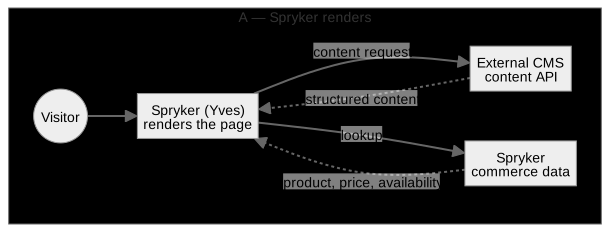
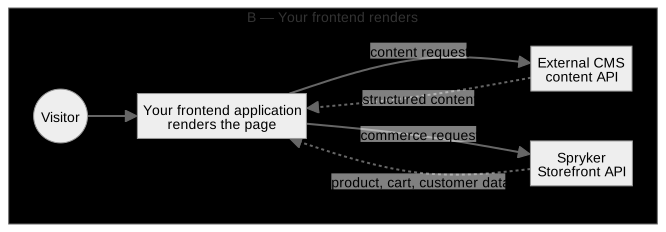
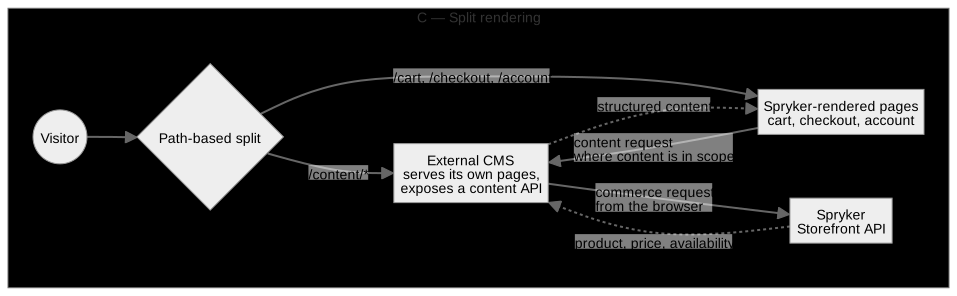
If you want to go deeper, read: cost tables, layer-by-layer responsibility, and code-level extension points per strategy.
How common CMS products relate to the strategies
The table groups widely used products by delivery posture and notes the strategies each is commonly combined with. It is compiled from publicly available vendor documentation, and capabilities differ across versions, plans, and self-hosted deployments.
A product name is therefore an orientation point rather than a determinant. What a given strategy depends on is the specific instance: its content delivery API, content model, publishing events, preview mechanism, localization design, and operational limits such as rate limits and latency.
| Product | Category | Typically delivers | Typically lands in |
|---|---|---|---|
| Storyblok | Headless, with a visual editor | Structured JSON | A or B |
| Contentful | Headless | Structured JSON, GraphQL | A or B |
| Contentstack | Headless | Structured JSON | A or B |
| Sanity | Headless | Structured, queried rather than fetched per page | A or B |
| Strapi | Headless, self-hosted | Structured JSON | A or B |
| Adobe Experience Manager, Sitecore, Optimizely CMS | Hybrid / traditional | Structured content and rendered pages | A, B, or C |
| WordPress, Drupal | Traditional, with headless modes | Rendered pages, or JSON through API modules | Usually C, keeping the existing marketing site |
Run your own instance through the capability assessment in the extended version. That, not the product name, is what settles which strategies remain open.
Spryker’s own CMS is not displaced by this
Spryker’s CMS modules provide more than an authoring surface. Declared content positions, reusable blocks with validity dates and category or product assignment, typed content items that reference commerce entities, and an asynchronous publish-and-synchronize pipeline are all placement and publishing machinery that external content flows through.
How much of it remains an authoring surface is an explicit scope decision, made per content type and allowed to grow over time. One rule holds however much your CMS owns, and in every strategy: exactly one system owns each content type, site-wide.
If you want to go deeper, read: scope levels, per-entity decisions, and the blocks question.
Narrowing the choice
To reach a decision tailored to your project, work through the following. Most of it is a matter of establishing facts rather than expressing a preference.
- What your CMS delivers. Whether it exposes a documented content delivery API, and whether that API returns structured content, rendered markup, or both. A system that only serves pages is a renderer, which places it in C.
- Its operational envelope. Rate limits, response latency from your hosting region, publishing events, draft access for preview, localization model, asset delivery. These indicate whether content can be read on the request path or is better synchronized into Spryker.
- Whether a frontend application is in play. An existing frontend stack and a team to operate it, a requirement for live in-context editing on commerce pages, or committed non-web channels each point to B — alongside the cost of building the commerce screens Spryker otherwise ships.
- Whether an existing site stays live. A CMS-served site that must keep serving traffic while gaining commerce points to C, either as the target architecture or as a staged route to A or B.
- How much content the CMS owns. Which page types, and which declared content positions inside Spryker-owned pages, and whether that scope is taken on at once or widened over time.
- Who owns each cross-cutting concern. URLs and SEO, navigation, localization, preview, caching and invalidation, failure behavior — one owner each.
If you want to go deeper, read turning these six factors into a phase plan, with exit criteria and rollback.
Once you have decided, hand this off to your architects — Scoping an External CMS Integration walks them through the capability assessment, the decision record, code-level extension points per strategy, and the review checklist to sign off against.
Thank you!
For submitting the form